


Introduction: Why UML Matters for Modern Software Development
In today’s fast-paced technology landscape, clear communication and precise system design are non-negotiable. Unified Modeling Language (UML) serves as the universal blueprint for software architects, developers, and business analysts to visualize, specify, construct, and document software systems. However, getting started with UML can feel overwhelming—especially when facing expensive enterprise tools with steep learning curves.
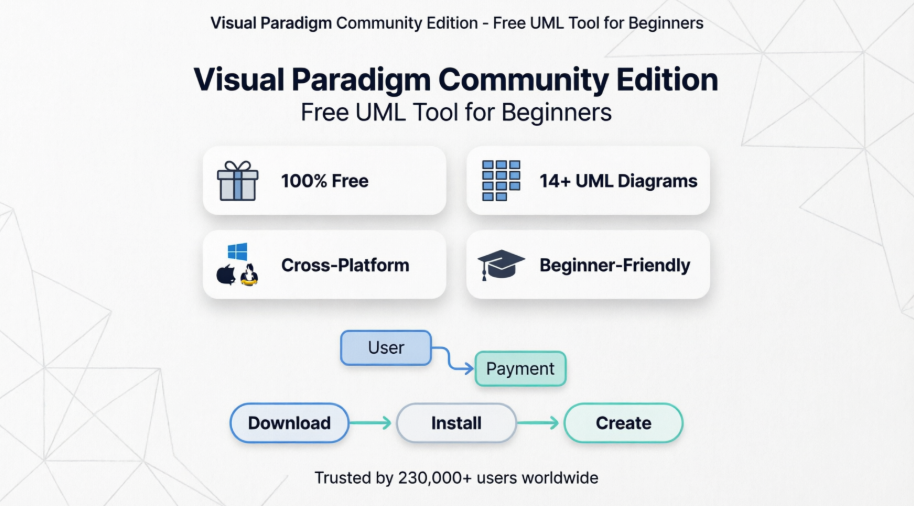
This guide introduces Visual Paradigm Community Edition, a powerful, completely free UML modeling tool designed specifically for beginners, students, and non-commercial users. Whether you’re designing your first class diagram or mapping complex system interactions, Visual Paradigm provides the professional-grade capabilities you need—without the professional-grade price tag. Let’s explore why this tool stands out and how you can kickstart your UML journey today.
What is Visual Paradigm Community Edition?
Visual Paradigm Community Edition is a free, fully-featured UML modeling software that supports all 14 UML 2.x diagram types. Built for clarity and efficiency, it empowers users to create professional system designs without redundant interface clutter. The tool runs on any Java-enabled platform—Windows, macOS, or Linux—making it accessible to virtually every developer.
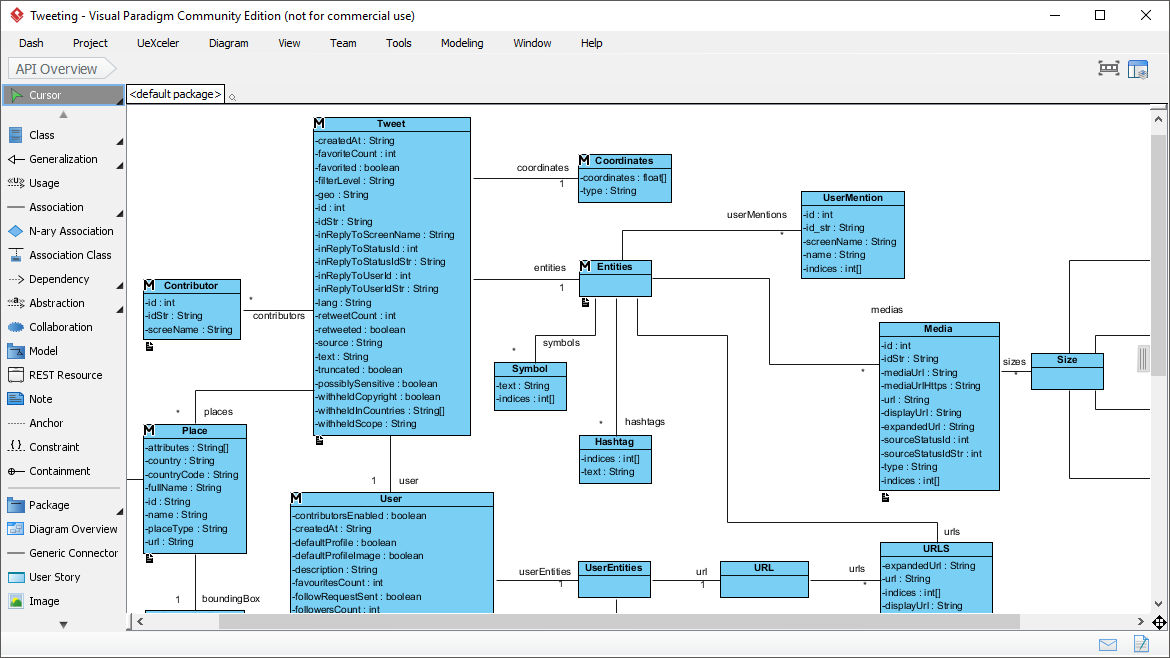
Design API with the Class Diagram tool. With no redundant widgets on the screen, you can design freely in a large diagram editor.
Why Choose Visual Paradigm for UML Beginners?
🎯 Beginner-Friendly Interface
-
Clean, intuitive workspace focused on your diagram—not distracting toolbars
-
Drag-and-drop functionality with smart connectors
-
Context-sensitive menus that guide you through modeling decisions
💰 Completely Free for Non-Commercial Use
-
No credit card required
-
No time-limited trial restrictions
-
Full access to core UML modeling features
🌐 Cross-Platform Compatibility

Modeling in ANY Java-enabled platforms – Windows, Mac OS X, Linux
📚 Comprehensive Learning Support
-
Built-in syntax checking prevents modeling errors
-
Reusable elements accelerate your workflow
-
Extensive documentation and community resources
Everything You Need, in One Place

UML Support
Draw ANY of the UML2 diagrams

Modeling Capability
Re-usable elements, syntax checking, sub-diagrams, etc

Efficiency
We care about the difference between a click and a drag.
Resource Catalog: Your Secret Weapon for Speed

Resource Catalog
Draw UML diagrams in quick
With just a few clicks of your mouse, you can create stunning diagrams in no time. The Resource Catalog is your secret weapon for maximum efficiency and top-notch quality. Visual Paradigm, the UML software of your dreams, is designed with you in mind, ensuring that every aspect of your design journey is as seamless and high-quality as possible.
Key Benefits:
-
Pre-built shape libraries for rapid diagram creation
-
Smart templates for common design patterns
-
One-click element insertion with automatic relationship suggestions
Real Modeling Tools: Beyond Simple Drawing


We build modeling software, not drawing tool
Reuse elements in different models, ensure the correctness of design with syntax checking, establish multiple levels of abstraction with sub-diagrams, add references to design artifacts, etc. Visual Paradigm is a UML tool designed for a great outcome. If you have ever used a real modeling software, you will appreciate how much it can help with your modeling work.
Advanced Capabilities:
-
✅ Syntax validation ensures UML compliance
-
✅ Element reuse across multiple diagrams
-
✅ Sub-diagram support for hierarchical modeling
-
✅ Model-to-model relationships and traceability
Element Referencing: Connect Your Entire Project
Element Referencing
Linkage established
Visual Paradigm is a full-featured UML software that allows you to establish linkages among UML model elements and with external resources like webpages and physical files.
Practical Applications:
-
Link class attributes to requirement specifications
-
Connect sequence diagram messages to source code files
-
Reference external documentation, APIs, or stakeholder feedback
-
Maintain traceability from concept to implementation
Complete UML Diagram Support
Visual Paradigm Community Edition supports all standard UML 2.x diagrams plus essential extensions:
Previous Slide◀︎ Next Slide▶︎
-
 First slide details.
 -
Current Slide
 Second slide details.
 -
 Third slide details.
 -
 Fourth slide details.
 -
 Fifth slide details.
Supported Diagram Types (Community Edition):
-
Use Case, Class, Sequence, Communication Diagrams
-
State Machine, Activity, Component, Deployment Diagrams
-
Package, Object, Composite Structure, Timing Diagrams
-
Interaction Overview Diagrams
-
Entity Relationship Diagrams (ERD)
-
SysML Diagrams: Requirement, Block Definition, Internal Block, Parametric
-
Business Concept Diagrams
Feature Comparison: Community vs. Modeler Edition
* A single-lined watermark will appear in printout and images produced by the Community Edition
Who’s Using Visual Paradigm?
Visual Paradigm is trusted by over 230,000 people in companies ranging from small business to Fortune 500 companies, universities and government units.

Industries & Use Cases:
-
🎓 Academic institutions teaching software engineering
-
🏢 Enterprise architecture teams documenting complex systems
-
👥 Agile development teams planning sprints and features
-
🌐 Open-source projects requiring clear technical documentation
-
💼 Consultants delivering professional system designs to clients
Getting Started in 3 Simple Steps
-
Download: Visit the Community Edition download page and select your operating system
-
Install: Run the installer (Java runtime required; bundled installer available)
-
Create: Launch the application and start your first diagram using the Resource Catalog
Pro Tips for Beginners:
-
Start with a Use Case Diagram to map system functionality
-
Use the “Auto-layout” feature to organize complex diagrams
-
Enable syntax checking early to learn UML rules interactively
-
Export diagrams as PNG for presentations or documentation
Conclusion: Your UML Journey Starts Here
Visual Paradigm Community Edition removes the traditional barriers to professional UML modeling: cost, complexity, and platform limitations. By offering enterprise-grade features in a beginner-friendly interface, it empowers students, hobbyists, and early-career professionals to master system design without compromise.
Whether you’re documenting a personal project, preparing for technical interviews, or contributing to open-source software, Visual Paradigm provides the foundation you need to think visually, design precisely, and communicate effectively. The single watermark on exported images is a small trade-off for access to a tool used by Fortune 500 companies worldwide.
Take action today: Download Visual Paradigm Community Edition, create your first class diagram, and experience the confidence that comes from professional-grade modeling—completely free. Your journey to mastering UML starts with a single click.
- Reference List
- Visual Paradigm UML Tool – Use Case Diagram: Learn how to model system functionality and user interactions with professional Use Case Diagrams.
- Visual Paradigm UML Tool – Class Diagram: Design robust object-oriented systems with comprehensive Class Diagram support and syntax validation.
- Visual Paradigm UML Tool – Sequence Diagram: Map dynamic interactions between objects and visualize message flows over time.
- Visual Paradigm UML Tool – Communication Diagram: Illustrate object relationships and message exchanges in a network-style layout.
- Visual Paradigm UML Tool – State Machine Diagram: Model object lifecycles and event-driven behavior with intuitive state transitions.
- Visual Paradigm UML Tool – Activity Diagram: Visualize workflows, business processes, and algorithmic logic with flowchart-style diagrams.
- Visual Paradigm UML Tool – Component Diagram: Document system architecture and modular dependencies at the component level.
- Visual Paradigm UML Tool – Deployment Diagram: Map physical infrastructure, nodes, and artifact deployment for system operations.
- Visual Paradigm UML Tool – Package Diagram: Organize large models into manageable namespaces and dependency groups.
- Visual Paradigm UML Tool – Object Diagram: Illustrate concrete instances of classes at a specific point in time for debugging and validation.
- Visual Paradigm UML Tool – Composite Structure Diagram: Decompose complex classifiers into internal parts and collaboration points.
- Visual Paradigm UML Tool – Timing Diagram: Analyze time-constrained behavior and state changes across multiple lifelines.
- Visual Paradigm UML Tool – Interaction Overview Diagram: Combine multiple interaction diagrams into high-level workflow narratives.
- Database Design with ERD Tools: Create professional Entity Relationship Diagrams for relational database modeling and schema design.
- SysML Diagram Tool – Requirement Diagram: Capture and trace system requirements using Systems Modeling Language standards.
- SysML Diagram Tool – Block Definition Diagram: Define system structure, blocks, and value types for complex engineering projects.
- SysML Diagram Tool – Internal Block Diagram: Detail internal connections, ports, and flows within SysML blocks.
- SysML Diagram Tool – Parametric Diagram: Model performance constraints and engineering calculations with parametric equations.
- Business Modeling Diagrams – Business Concept Diagram: Visualize business entities, relationships, and rules for stakeholder alignment.
- BPMN Diagram and Tools: Model business processes using industry-standard Business Process Model and Notation.
- Data Flow Diagram Tool: Map data movement, storage, and transformation across system boundaries.
- Flowchart Maker: Create intuitive process flows, decision trees, and algorithm visualizations.
- Team Collaboration Toolset: Enable real-time co-authoring, version control, and cloud-based project sharing.
- Team Collaboration – Discuss Design with Teammates: Facilitate feedback loops with inline commenting and review workflows.
- Task Management: Link modeling elements to actionable tasks and track progress within your project.
- Glossary Management Tools: Maintain consistent terminology and definitions across large modeling projects.
- Textual Analysis Tool: Extract modeling elements automatically from requirements documents and natural language specifications.
- Business Modeling – EPC Diagram: Model event-driven process chains for operational workflow optimization.
- Business Modeling – Process Overview Diagram: Create high-level executive summaries of complex business processes.
- Business Modeling – Organization Chart: Visualize reporting structures, roles, and responsibilities within enterprises.
- Network Diagram Tool: Design and document IT infrastructure, network topologies, and connectivity maps.
- Rack Diagram Tool: Plan server rack layouts, equipment placement, and data center physical architecture.
- Venn Diagram Tool: Illustrate set relationships, overlaps, and logical comparisons for analysis and presentation.
- Floor Plan Maker: Design office layouts, facility maps, and spatial arrangements with drag-and-drop precision.
- Download Visual Paradigm Community Edition: Get the free, fully-featured UML modeling software for non-commercial use on Windows, macOS, or Linux.
- Visual Paradigm Free Trial Download: Explore advanced Modeler Edition features with a risk-free trial for commercial evaluation.