


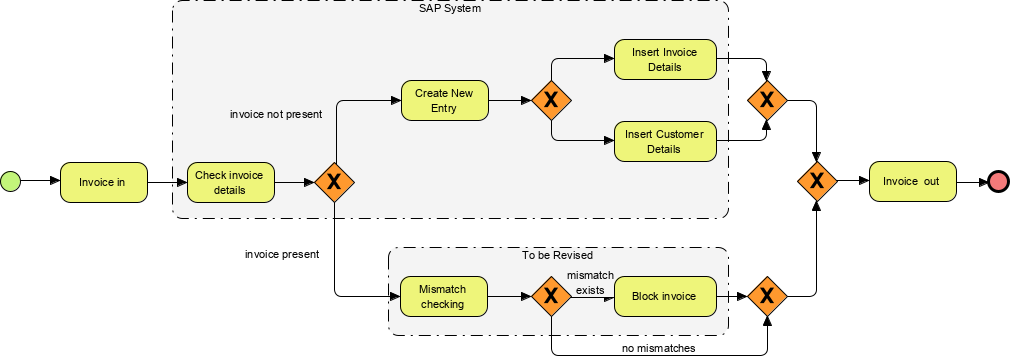
In the world of Enterprise Resource Planning (ERP), few processes are as critical—or as fraught with errors—as the Accounts Payable workflow. This tutorial dissects a complex Business Process Model and Notation (BPMN 2.0) diagram that automates invoice processing within an SAP environment. By analyzing the interaction between system logic and exception handling, we can understand how to build robust, fail-safe business processes.
Understanding the Process Architecture
The diagram presented is a classic “Pooled” process model, which separates distinct operational environments into Swimlanes. This visual separation is crucial for understanding system boundaries and data ownership.
- The SAP System (Top Lane): This represents the automated, high-volume logic. It contains the core rules for validating incoming data and the system’s standard response to new or valid entries.
- To Be Revised (Bottom Lane): This represents an exception handling path. In BPMN, this often signifies a manual intervention area, a legacy system, or a specific workflow that requires human oversight before the process can continue.
Phase 1: The Entry and Validation Gate
The process begins at the Start Event (the green circle). The first actionable step is Invoice in, representing the ingestion of a digital or physical document. Immediately following this, the process hits a decision point, represented by the Exclusive Gateway (XOR) labeled “Check invoice details”.
This gateway acts as a traffic cop. It splits the flow based on the existence of the data:
- Invoice Not Present: If the system detects a missing or invalid entry, the flow moves to the “Create New Entry” task.
- Invoice Present: If the data exists, the flow proceeds to the detailed validation logic below.
Phase 2: Exception Handling & Logic Divergence
When the invoice is successfully detected (“Invoice Present”), the process enters the To Be Revised lane. Here, the system performs Mismatch checking. This is a critical business rule:
If the invoice details (amount, vendor, tax) do not match the underlying Purchase Order (PO), the system triggers the Block invoice task. This prevents financial leakage by stopping payment until the discrepancy is resolved.
Phase 3: Parallel Execution and Convergence
Notice the unique structure of the “Invoice Not Present” path. After creating a new entry, the process encounters a series of XOR gateways. This suggests a parallel execution model where the system performs two distinct tasks: Insert Invoice Details and Insert Customer Details. In a real-world SAP integration, these might be simultaneous database writes.
The diagram concludes with a convergence point. Whether the invoice was blocked, inserted, or newly created, all valid paths eventually merge at the final XOR gateway before exiting as Invoice out (the red circle). This ensures that the process state is standardized regardless of the path taken.
Key Technical Takeaways
When modeling complex financial workflows, always prioritize the Exception Path. While it is tempting to model the “Happy Path” (where everything goes right), the true value of a BPMN diagram lies in how it handles the “Invoice Not Present” or “Mismatch Exists” scenarios. This diagram demonstrates that a mature process model must account for data gaps and validation failures explicitly, rather than assuming they will resolve themselves.