


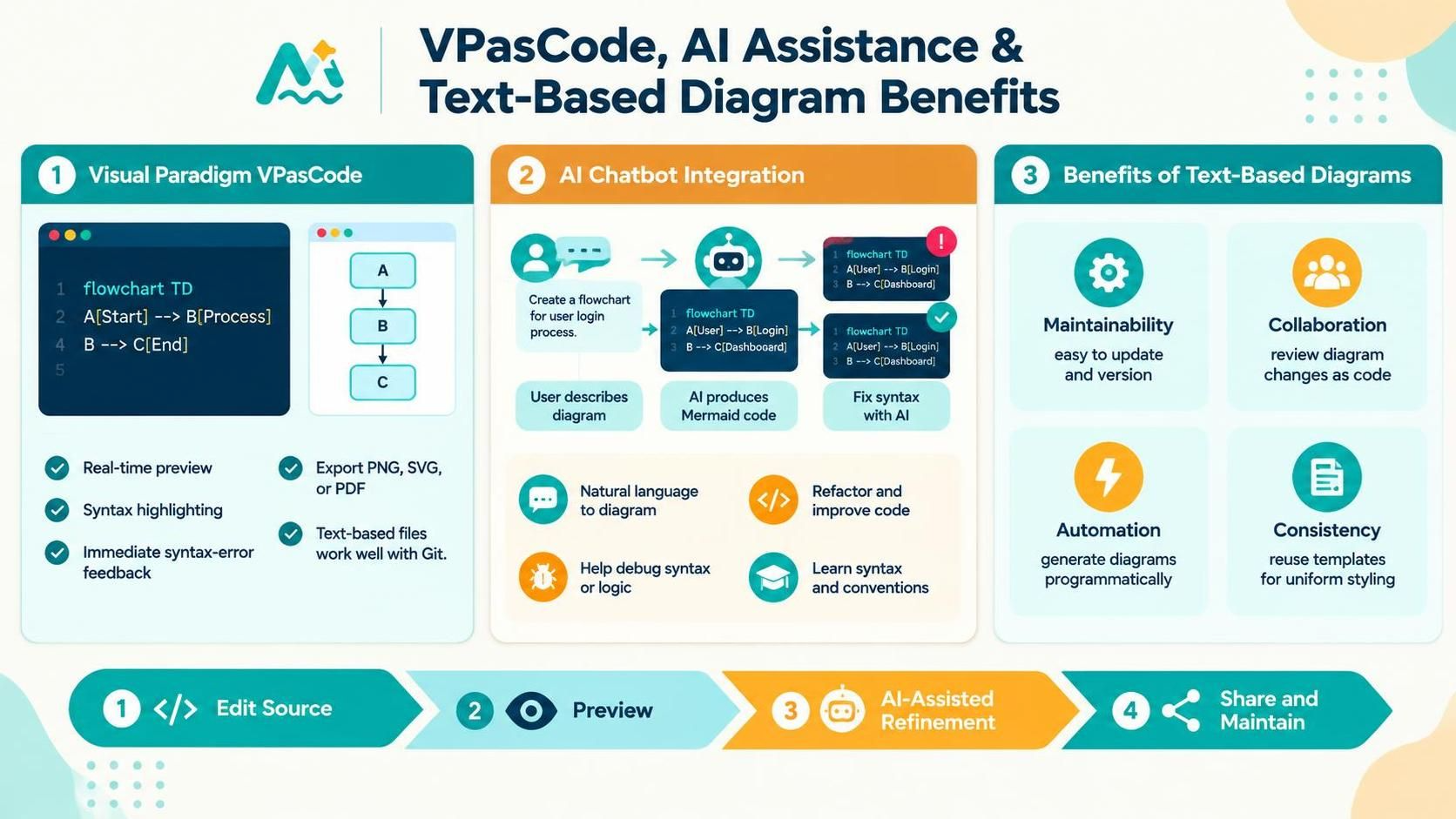
In the modern landscape of system architecture and software design, the gap between human intent and visual representation is narrowing. This tutorial explores the transformative workflow introduced by Visual Paradigm’s VPasCode environment. By combining text-based modeling languages with Artificial Intelligence, we move away from the tedious “drag-and-drop” paradigm toward a precise, code-centric approach. This method offers unparalleled control, versioning capabilities, and rapid prototyping for complex system diagrams.
The Core Architecture: VPasCode and Mermaid
At the heart of this ecosystem lies the concept of Text-Based Diagramming. Unlike traditional graphical editors where every arrow and box is a distinct object, text-based modeling treats the diagram as a script. This is particularly true for Mermaid, a JavaScript-based diagramming and charting tool that renders charts from text definitions.
Visual Paradigm’s VPasCode serves as the execution engine for this philosophy. It is not merely a text editor; it is a specialized modeling environment designed to interpret code and render it instantly. The architecture relies on a tight feedback loop:
- The Source: A plain text file where the diagram logic is defined using specific syntax (e.g., Mermaid).
- The Parser: The VPasCode engine that reads the text in real-time.
- The Renderer: The visual component that displays the diagram on the canvas as the user types.
This architecture eliminates the need for manual alignment. When you define a connection in the text, the system calculates the layout automatically. This ensures that the diagram is always structurally sound, regardless of how complex the network becomes.
Step-by-Step: The “Edit-Preview-Refine” Workflow
The infographic outlines a distinct four-step workflow that replaces the traditional design process. Let us break down how a user interacts with this system to create a high-fidelity flowchart.
1. Edit Source (The Input Phase)
The process begins with writing the definition. In VPasCode, you start by declaring the type of chart. For a standard flowchart, the syntax begins with flowchart TD (Top-Down).
As you type, you define nodes and their relationships. The system is context-aware, offering immediate syntax highlighting. If you make a typo, the system flags it instantly. For example, defining a simple linear process looks like this:
flowchart TD
    A[Start] --> B[Process]
    B --> C[End]
Here, --> represents a directed line. The brackets [] denote the shape of the node (in this case, a rectangle) and the text inside it.
2. Preview (The Visualization Phase)
Once the syntax is valid, the Real-time Preview feature renders the visual output. You do not need to click a “Generate” button. As soon as you close the tag or complete the line, the diagram appears on the canvas. This allows you to see the structural hierarchy immediately, ensuring that the Top-Down (TD) or Left-Right (LR) orientation matches your mental model.
3. AI-Assisted Refinement (The Optimization Phase)
This is where the integration of AI Chatbots becomes a game-changer. If you have a complex requirement—such as “Create a user login process with a database check”—you do not need to memorize the syntax. Instead, you describe the intent to the AI.
The AI acts as a bridge, translating natural language into the precise Mermaid syntax required by VPasCode. It can also act as a debugger. If the diagram fails to render, the AI can analyze the code for missing arrows or unclosed brackets and suggest the exact fix.
A[User] --> B[Login]
B --> C[Dashboard]
4. Share and Maintain (The Lifecycle Phase)
The final step involves the export and maintenance of the diagram. Because the diagram is stored as text, it is “Version Control Friendly.” You can save the file as a .mmd file and commit it to Git alongside your source code. This allows for seamless collaboration where team members can review changes to the diagram logic just as they would review changes to a software function.
Why Text-Based Diagrams Matter
The shift to text-based modeling addresses several pain points in traditional engineering.
- Maintainability: Updating a node’s label in a graphical tool often requires clicking, dragging, and re-aligning. In text mode, you simply edit the string. The layout engine handles the rest.
- Consistency: By using text templates or AI-generated snippets, you ensure that every “Login” node looks exactly like every other “Login” node across different diagrams.
- Automation: Because the diagram is code, it can be generated programmatically. You can write scripts to automatically produce documentation for your software system.
Conclusion
The combination of Visual Paradigm’s VPasCode and AI assistance represents the future of system design. It empowers architects and developers to focus on the logic and flow of their systems rather than the mechanics of drawing lines and boxes. By leveraging the power of text, we achieve diagrams that are not just visual representations, but robust, maintainable, and executable specifications.