


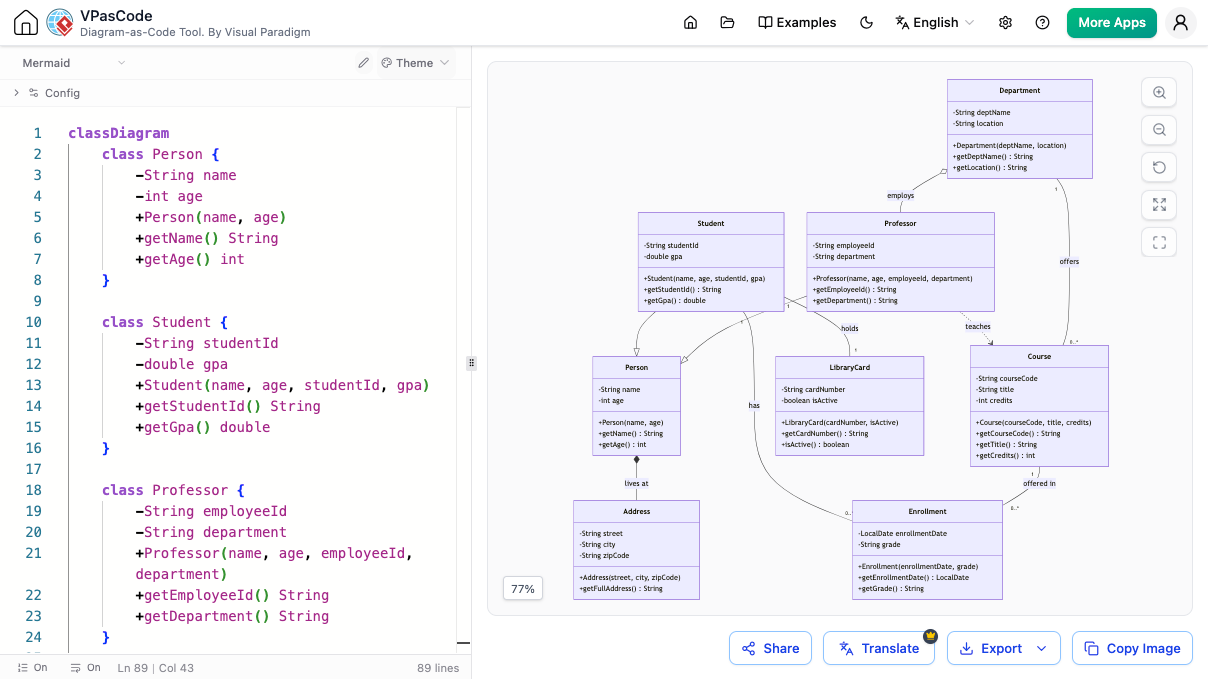
Designing a robust information system for an educational institution requires more than just listing students and courses; it demands a clear understanding of how different entities interact, inherit traits, and maintain relationships. In this tutorial, we will explore the architecture of a University System using Visual Paradigm’s VPasCode tool. We will analyze how to construct a sophisticated Class Diagram using Mermaid syntax, bridging the gap between simple text definitions and complex visual architecture.
The Power of Diagram-as-Code
Traditionally, creating UML (Unified Modeling Language) diagrams involved drag-and-drop interfaces that could become cluttered and difficult to version control. By using VPasCode, developers can define the structure of their system using code. This approach offers several advantages:
- Version Control Friendly: Since the diagram is defined in text, it can be tracked in Git just like source code.
- Reusability: You can easily copy-paste complex class structures across different diagrams.
- Speed: Writing code is often faster than manually clicking boxes and drawing lines for large systems.
Decoding the University Architecture
The system we are analyzing revolves around four primary domains: People (Students and Professors), Administration (Departments), Academic Records (Courses and Enrollments), and Logistics (Library and Address).
1. The Foundation: Inheritance Hierarchy
One of the most critical concepts in object-oriented modeling is inheritance. Instead of duplicating attributes for every single person in the system, we define a base Person class.
In the diagram, you will notice that both Student and Professor are specialized versions of Person. They inherit common attributes like name and age, but they also possess unique traits. For instance, a Student has a studentId and gpa, while a Professor holds an employeeId and is affiliated with a department.
2. Core Relationships: Composition and Association
The diagram illustrates how these entities connect. A Professor does not just exist in isolation; they teaches a Course and are employed by a Department. This is modeled as a relationship where the Department holds the authority to offer courses.
Furthermore, the Enrollment entity is a classic example of an associative entity. It connects the Student and the Course. Why do we need a separate box for Enrollment? Because the relationship itself has data. An enrollment has a grade and an enrollmentDate, which are properties of the relationship, not just the student or the course.
3. Logistics: Address and Library Cards
The architecture extends to administrative needs. The Address class is linked to the Person class via a “lives at” relationship. This allows for a flexible address structure (street, city, zip) that can be reused. Similarly, the LibraryCard is linked to a person, indicating a “holds” relationship, ensuring that library access is tied to the individual’s identity.
Implementing with VPasCode
To replicate this architecture, you would utilize the Mermaid syntax within the VPasCode editor. The editor parses the text on the left and renders the visual diagram on the right in real-time.
Here is how the structure is defined in the code:
classDiagram
    class Person {
        -String name
        -int age
        +Person(name, age)
        +getName() String
        +getAge() int
    }

    class Student {
        -String studentId
        -double gpa
        +Student(name, age, studentId, gpa)
        +getStudentId() String
        +getGpa() double
    }

    class Professor {
        -String employeeId
        -String department
        +Professor(name, age, employeeId, department)
        +getEmployeeId() String
        +getDepartment() String
    }

    Person <|-- Student
    Person <|-- Professor
In this snippet, we see the standard class definition format. The classDiagram directive initializes the graph. The <|-- symbol is the specific Mermaid syntax for generalization (inheritance), indicating that Student is a type of Person.
Conclusion
By leveraging the VPasCode tool, we have successfully modeled a complex University System. This system captures the essence of academic administration through clear inheritance, logical associations, and detailed entity attributes. Whether you are a student learning software design or a professional architecting a database schema, mastering these Mermaid patterns is essential for creating scalable, maintainable system documentation.