


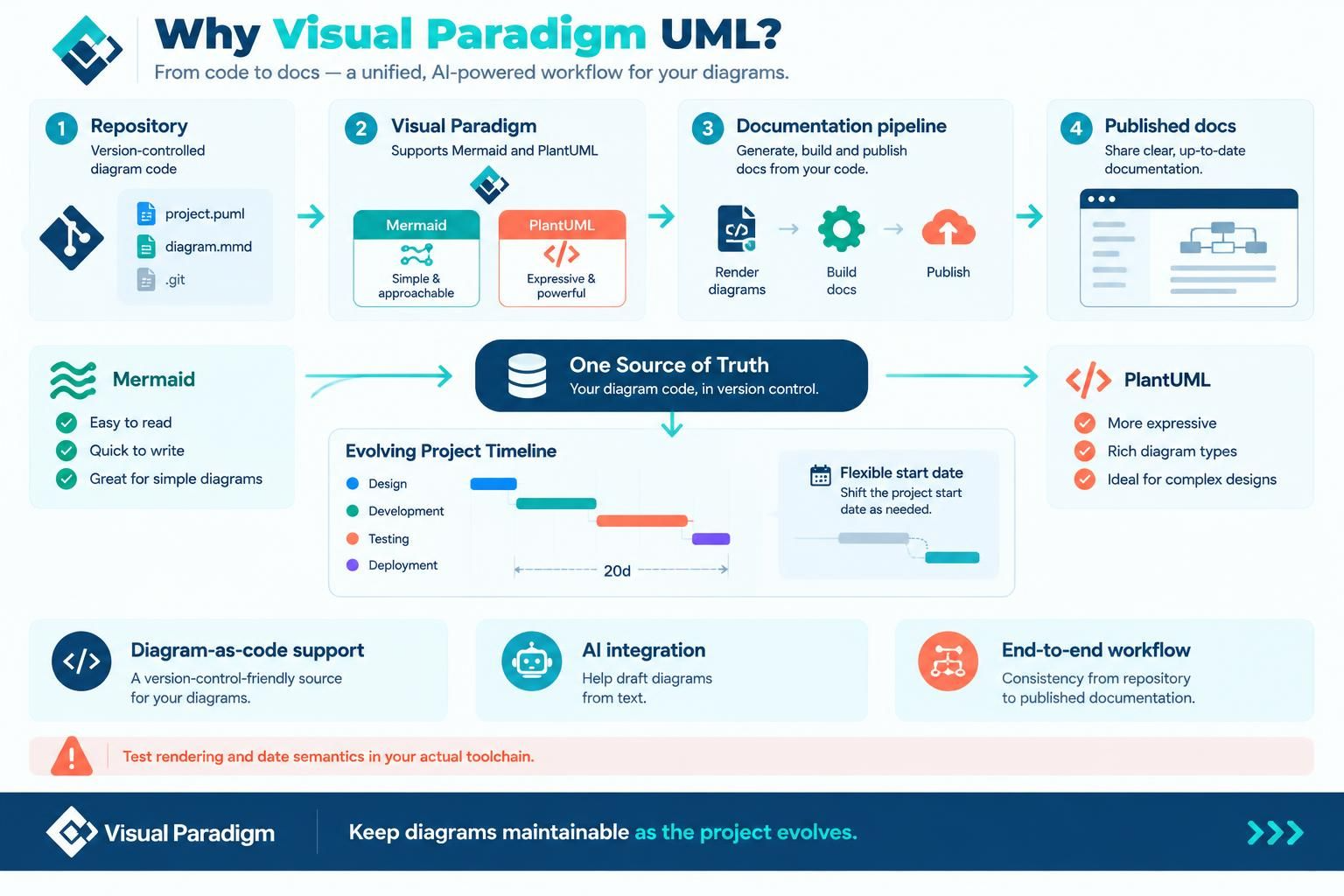
In modern software development and project management, the gap between documentation and actual code has historically been a source of friction. Static images of project timelines often become outdated the moment a deadline shifts. This tutorial explores how Visual Paradigm UML bridges that gap using a “Diagram-as-Code” workflow, combining the power of text-based modeling with the efficiency of AI integration.
The Evolution of Project Visualization
Gantt charts are essential for visualizing project schedules, dependencies, and milestones. Traditionally created in GUI-based tools, they are notoriously difficult to maintain in version control systems. If a developer changes a start date, they often have to manually drag a bar on a canvas, risking “bit-rot” where the diagram no longer matches the repository.
Visual Paradigm UML introduces a paradigm shift by treating diagrams as code. This approach ensures that your Gantt charts are stored in the same repository as your source code (e.g., .puml or .mmd files), allowing for:
- Version Control: Track changes to your project timeline alongside code changes.
- Automation: Automatically render diagrams in CI/CD pipelines.
- Collaboration: Merge requests for diagram updates, just like code.
The Unified Workflow: From Repository to Published Docs
The Visual Paradigm workflow creates a seamless pipeline from raw text to polished documentation. This process can be broken down into four critical stages:
1. Repository (The Source)
The process begins in your version control system (like Git). Instead of binary image files, you store your project definition as text files. You might use Mermaid for quick, readable sketches or PlantUML for complex, expressive definitions.
- Mermaid: Great for simple, “quick to write” diagrams.
- PlantUML: Ideal for complex designs requiring rich expressiveness.
2. Visual Paradigm (The Engine)
Visual Paradigm acts as the central processing unit for these diagrams. It ingests the code from your repository and supports both syntaxes. This is where the “One Source of Truth” concept lives. By using the VPasCode tool within Visual Paradigm, you can interact with your code directly, ensuring that the visual representation is mathematically accurate to the text definition.
3. Documentation Pipeline
Once the code is validated, the documentation pipeline takes over. This stage involves rendering the text into visual formats, building the documentation site, and publishing the results. This ensures that stakeholders always see the most up-to-date version of the project timeline.
4. Published Docs
The final output is a set of clear, up-to-date documentation accessible to the team. Because the source is code, these docs remain accurate as the project evolves.
Deep Dive: PlantUML Gantt Chart Syntax
To truly leverage this system, one must understand the underlying syntax. PlantUML allows for the definition of complex project schedules using text. Below is an example of how to define a project timeline using the gantt keyword.
Consider a scenario where you have a project with Design, Development, Testing, and Deployment phases. You can define the duration and dependencies using relative time intervals, which makes the schedule incredibly flexible.
@startgantt
[Project Start] @2023-10-01

task Design
task Development after Design 15d
task Testing after Development 10d
task Deployment after Testing 5d

note right of Testing : This phase is critical for quality.
@endgantt
In this example, notice the use of after Design 15d. This tells the system to start the “Development” task 15 days after the “Design” task begins, rather than on a specific calendar date. This is the core of maintainable project modeling.
AI Integration: Drafting from Text
Visual Paradigm further enhances this workflow with AI capabilities. If you are unsure of the syntax or want to draft a complex diagram quickly, you can use the AI Chatbot to generate the code for you from a simple text prompt. This reduces the barrier to entry for non-designers and accelerates the planning phase.
Why Visual Paradigm UML Stands Out
While there are many tools for diagramming, Visual Paradigm UML distinguishes itself through its comprehensive ecosystem. It is not just a drawing tool; it is a modeling platform that respects the software development lifecycle.
- Comprehensive Diagram-as-Code Support: It doesn’t just support diagrams; it supports the code that generates them, ensuring version control compatibility.
- End-to-End Workflow: From the repository (code) to the documentation pipeline and finally to published docs, Visual Paradigm ensures consistency.
- The “Standout” Benefit: The ability to maintain a single source of truth. Whether you choose Mermaid for its simplicity or PlantUML for its power, Visual Paradigm ensures that your diagrams remain accurate as your project evolves.
By understanding the nuances of Mermaid and PlantUML and utilizing the right tools like the Visual Paradigm Gantt Chart Tool and AI Chatbot, you can create robust, maintainable, and AI-friendly project timelines that scale with your team’s needs.