


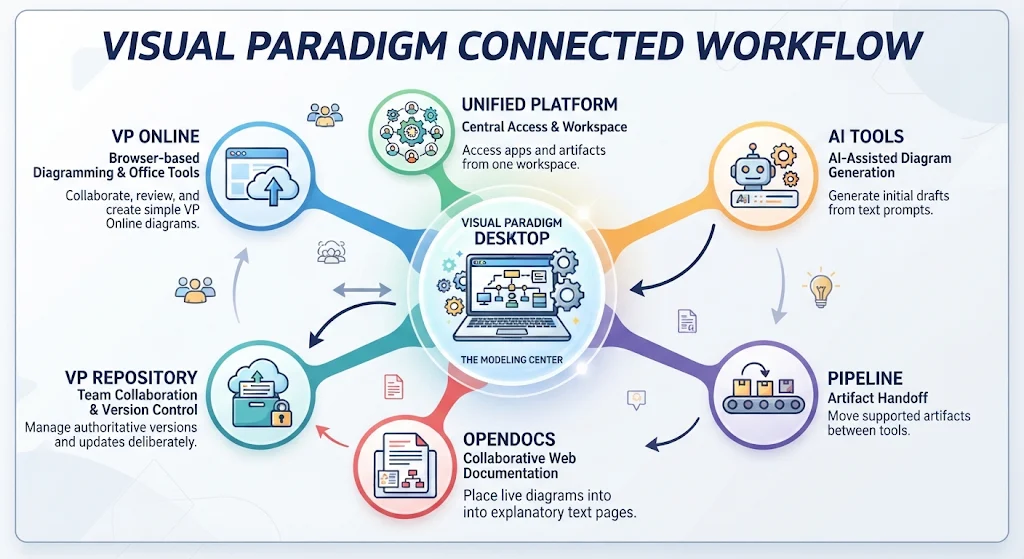
In modern enterprise software development, the gap between initial concepts and documented decisions can be vast. Visual Paradigm solves this by transforming from a simple modeling tool into a comprehensive modeling center. This tutorial explores the architecture of the Visual Paradigm Connected Workflow, detailing how the Desktop Edition integrates with the broader ecosystem to support a complete lifecycle from AI-assisted drafting to artifact handoff.
The Architecture of a Connected Ecosystem
The core philosophy of this workflow is centralization without restriction. Visual Paradigm Desktop acts as the gravitational center, or “The Modeling Center,” for detailed, heavy-lifting architecture work. However, it does not operate in a silo. Instead, it is surrounded by specialized tools that handle specific stages of the development process.
This architecture allows teams to select the right tool for the specific task at hand:
- Desktop: The powerhouse for complex modeling.
- VP Online: The lightweight, browser-based collaborator.
- AI Tools: The accelerator for rapid prototyping.
- Pipeline: The bridge for automated handoffs.
- OpenDocs: The storyteller for documentation.
1. The Modeling Center: Visual Paradigm Desktop
At the heart of the system lies the Desktop Edition. This is the environment where the “heavy lifting” occurs. It supports detailed modeling, allowing architects to build intricate UML, BPMN, and SysML diagrams with high precision. Unlike browser-based tools which may have limitations on complexity or file size, the Desktop version provides the full suite of features required for enterprise-grade system architecture.
It is designed to be the “authoritative” source of truth for the diagrammatic structure. While other tools in the ecosystem can view or interact with these diagrams, the Desktop environment is where the rigorous design logic is established.
2. Rapid Prototyping with AI Tools
Before a diagram is built manually, the workflow often begins with a concept. Visual Paradigm integrates AI Tools to assist in this phase. These tools leverage Large Language Models (LLMs) to generate initial drafts of diagrams based on text prompts.
This capability drastically reduces the “blank page” syndrome. Instead of manually placing every actor and process, the AI can produce a first draft of the system structure. This draft can then be imported into the Desktop environment for refinement and detailed specification.
3. Browser-Based Collaboration: VP Online
p>While Desktop is for the architect, VP Online is for the team. It offers browser-based diagramming and office tools that allow stakeholders to view, review, and collaborate without needing to install the heavy Desktop client.
This tool is essential for the “Office” phase of modeling. It supports lightweight collaboration, allowing team members to create simple diagrams or annotate existing ones directly in the browser. It acts as a bridge between the technical modeling center and the non-technical stakeholders who need to review the design.
4. Artifact Handoff via Pipeline
Once a model is complete, it must often be moved to other systems—such as code repositories, testing environments, or project management tools. The Pipeline component is designed specifically for this “Artifact Handoff.”
Pipeline provides a structured way to move supported artifacts between tools. It automates the export and synchronization of specific model elements, ensuring that the design is not lost when it leaves the modeling environment. This is crucial for maintaining consistency across the software development lifecycle.
5. Living Documentation with OpenDocs
A diagram is powerful, but without context, it can be ambiguous. OpenDocs solves the “context gap” by placing live diagrams alongside explanatory text. It transforms static diagrams into a collaborative web documentation format.
Instead of a separate Word document or Wiki page, OpenDocs embeds the diagrams directly into the narrative. This ensures that the documentation always reflects the current state of the model, making it easier for new team members to understand the system’s intent.
6. The Glue: The Unified Platform
Finally, all these distinct components are tied together by the Unified Platform. This acts as the central workspace where users can access apps and artifacts from a single point of entry.
It eliminates the need to log into multiple disparate systems. Whether you are accessing a VP Online session, checking the VP Repository for version control, or launching the Desktop client, the Unified Platform manages the context and access, creating a seamless experience.
Managing the Workflow: The Concept of “Authoritative Versions”
It is critical to understand that this connected workflow does not mean every tool automatically synchronizes every change in real-time. The ecosystem is designed for deliberate updates.
Because different tools serve different purposes (e.g., rapid AI drafting vs. detailed Desktop modeling), teams must designate the authoritative version of each artifact. For example, the Desktop version might be the master, while OpenDocs is a read-only view for documentation. Changes should be managed deliberately to prevent conflicts and ensure that the “truth” of the system architecture remains consistent.