


Visual Paradigm’s Animation Maker, known as AniFuzion, makes it easy to create professional 3D animations without any design skills. This tool lets you build dynamic scenes like office meetings, product demos, or training videos right in your browser. You can drag and drop characters, apply pre-built actions, and add AI-powered voiceovers to bring your ideas to life. The result? High-quality, engaging animations that communicate complex ideas clearly.
Key Takeaways
-
Use AniFuzion to create professional 3D animations for business, education, or marketing.
-
Drag and drop 3D characters and props to build scenes quickly.
-
Apply pre-built actions like walking or gesturing to save time.
-
Generate AI voiceovers with automatic lipsync for realistic dialogue.
-
Export as MP4 or share as an interactive flipbook.
What is AniFuzion?
Animation Maker, or AniFuzion, is a browser-based tool that lets you create 2D and 3D animations without installing software. It’s designed for anyone who wants to make engaging videos, presentations, or interactive content. You don’t need animation experience. The interface is simple—just drag elements onto the canvas and set them in motion. You can use pre-built characters, actions, and effects to create polished animations fast.
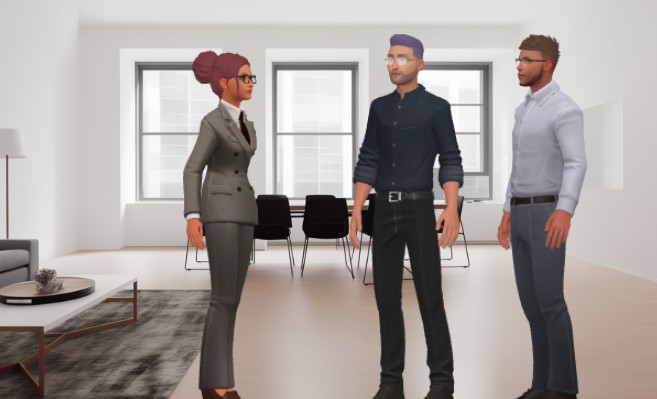
For example, the image shows a 3D animation of three professionals in a modern office setting. One woman in a suit stands facing two men, suggesting a meeting or discussion. The scene is realistic, with natural lighting, furniture, and detailed character models. This kind of scene can be built easily in AniFuzion using its extensive 3D character library and scene templates.
How to Build a Professional Scene
Creating a scene like the one in the image is straightforward. Start by selecting a template or creating a blank project. Then, drag a 3D character from the library onto the canvas. You can customize their appearance using the properties panel—change hair, clothes, or accessories. Add props like desks, chairs, or coffee tables to build the environment.
Next, apply a motion to the character. AniFuzion offers over 2,000 pre-built actions, including standing, walking, or gesturing. Choose one that fits the scene—like a woman pointing or a man nodding. You can adjust the duration and timing on the timeline to control the flow.
For dialogue, use the AI Text-to-Speech feature. Enter your script, pick a voice with the right accent and emotion, and generate the audio. The tool automatically syncs the character’s mouth movements to the words, making the animation feel natural.
Enhance the scene with background props, lighting effects, and camera angles. You can also add text or shapes with animation presets like fade-in or bounce to highlight key points. Once you’re satisfied, preview the animation and export it as an MP4 or a shareable flipbook.
Who Uses AniFuzion?
Anyone who needs to communicate visually can benefit. Educators use it to create interactive lessons. Marketers make product demos and social media clips. HR teams build onboarding videos. Content creators produce explainer animations. Even hobbyists experiment with 3D characters and effects.
It’s ideal for users who want to save time and avoid hiring animators or voice actors. With AniFuzion, you can create high-quality animations in minutes. The tool handles complex tasks like motion retargeting and automatic lipsync, so you don’t need to worry about technical details.
Core Features
Here are the main features that make AniFuzion powerful:
-
Drag-and-Drop Interface: Build scenes by moving characters and props onto the canvas.
-
3D Character Library: Choose from thousands of customizable characters in various styles.
-
Pre-Built Actions: Apply motions like walking, waving, or dancing without keyframing.
-
AI Text-to-Speech: Generate voiceovers with different accents and emotions.
-
Automatic Lipsync: Match mouth movements to audio automatically.
-
Shape Effects: Add animations to text and shapes with one click.
-
Ready-to-Use Templates: Start with pre-designed scenes to save time.
-
Export Options: Share as MP4 or interactive flipbook.
Workflow Tips
Here’s how to use AniFuzion efficiently:
-
Start with a template or blank project.
-
Add characters and customize them.
-
Apply actions to create movement.
-
Enter your script and generate AI voiceover.
-
Enhance with props, backgrounds, and effects.
-
Preview and export.
Why AniFuzion?
It’s fast, affordable, and easy to use. You can create professional animations without design skills. The tool is accessible from any device with a browser. You can collaborate with others and share your work instantly.
For business or education, animated content improves understanding and retention. It makes complex topics simpler and more engaging. With AniFuzion, you can turn static ideas into dynamic stories.
Ready to create your own professional animation? Try AniFuzion today and start building your first scene. You’ll be amazed at how quickly you can go from idea to animation.
Related Link
-
2D Animation Maker – Create Animated Videos Online: An easy-to-use online tool for creating 2D animations without coding, perfect for educators, marketers, and content creators.
-
How to Create PowerPoint Like Animation Slides on the… – AniFuzion: Creating animated PowerPoint presentations has never been easier, thanks to tools like Visual Paradigm Online’s AniFuzion. This online 2D animation maker allows you to bring your…
-
Bring Your Ideas to Life with Visual Paradigm Anifuzion 3D Video Maker: Anifuzion is a web-based 3D animation tool that enables users to create immersive 3D videos and animations without requiring advanced technical skills.
-
AniFuzion: The Online Ultimate Animation Maker – Content Posts: Visual Paradigm Online’s AniFuzion stands out as a leading animation video tool due to its comprehensive feature set, which caters to a wide range of users, from beginners to experienced animators.
-
Introducing Visual Paradigm’s AniFuzion: The Ultimate Animated Video Maker – Cybermedian: December 19, 2024 – Part of the Visual Paradigm Online Platform, AniFuzion offers a unique blend of 2D and 3D animation techniques , making it an all-in-one solution for creating dynamic and engaging content1.
-
AniFuzion: Online Animation Maker: Visual Paradigm Online. Start creating stunning 2D and 3D animations. Explore customizable character families and intuitive tools to bring … Character Families · Storytelling Video Maker · Restaurant Owners · Tutorials
-
Comprehensive Guide to Creating Animated Content for Flipbooks with Visual Paradigm Online’s Flipbook Maker: This guide details the process of generating animated flipbook content using the flipbook maker feature in Visual Paradigm Online.
-
3D Video Maker – Visual Paradigm: Create eye-catching 3D videos that stand out for visual storytelling, presentations, or creative projects, Without needing of advanced software, you can customize scenes with 3D characters, 3D props, motions in a dynamic and engaging way.
-
Online 3D video maker – Visual Paradigm: Create stunning 3D videos effortlessly with Visual Paradigm ‘s intuitive and powerful animation tools.
-
2D Animation Maker – Create Expressive 2D Character – Visual Paradigm: Bring stories to life with vibrant 2D animations using VP Online. This tool offers easy-to-use features for animating 2D characters, scenes, and effects, …