


Software architecture requires precision. When standard modeling languages fall short, extensions become necessary. The Unified Modeling Language (UML) is a versatile standard, yet it is not a one-size-fits-all solution. To adapt UML to specific domains, engineers utilize a mechanism known as a UML Profile Diagram. This guide explores the mechanics, purpose, and application of profiles without relying on proprietary tools. We will examine how these structures allow teams to customize notation while maintaining the integrity of the core metamodel.
What is a UML Profile? 🧩
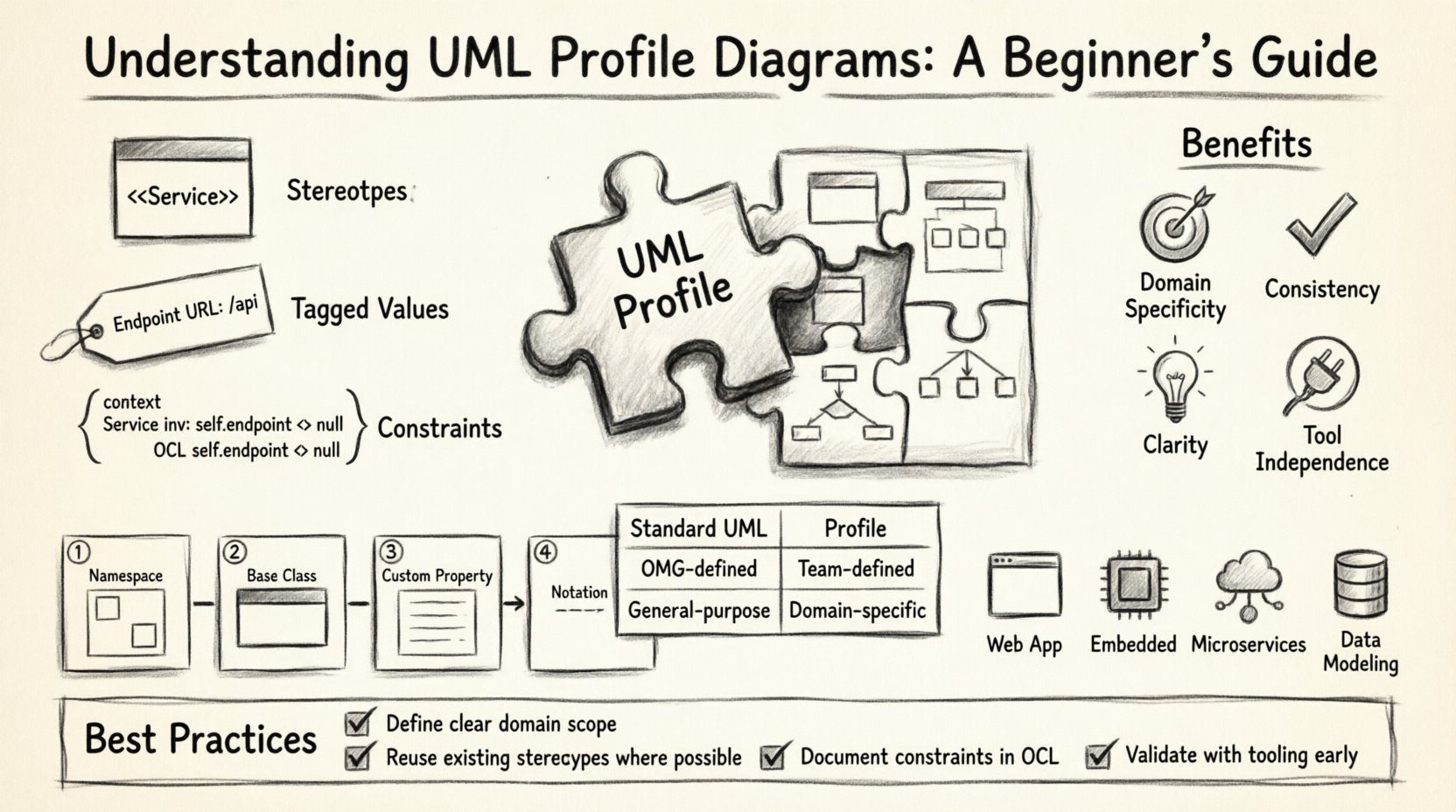
A UML Profile is a way to extend the UML language itself. It is not a diagram in the traditional sense, like a Sequence or Class diagram. Instead, it is a specialized package that defines new concepts based on existing UML building blocks. Think of it as a dictionary for a specific industry or technology stack.
When you create a profile, you are defining:
- Stereotypes: New kinds of elements, like marking a class as "Service" or "Controller".
- Tagged Values: Custom properties attached to elements, such as "database connection timeout".
- Constraints: Rules that limit how elements can be used, ensuring data integrity.
These extensions allow architects to speak the language of their specific project without confusing stakeholders who do not know the base UML standard. It bridges the gap between abstract modeling and concrete implementation.
Why Extend UML? 🛠️
Standard UML covers a vast range of scenarios, but it cannot cover every specific requirement of a niche domain. For instance, standard UML does not inherently understand the concept of a "Microservice" or a "Blockchain Smart Contract". Using a profile solves this gap.
Benefits of Using Profiles
- Domain Specificity: Tailor the model to match the vocabulary of your business domain.
- Consistency: Enforce naming conventions and structural rules across the entire project.
- Clarity: Remove ambiguity by explicitly defining what specific tags mean.
- Tool Independence: Profiles are defined by the standard, not by a specific software vendor.
Without profiles, teams might resort to informal comments or ad-hoc notations that lead to miscommunication. A profile formalizes these extensions, making them part of the model’s schema.
Core Components of a Profile 🏗️
Building a profile involves understanding how UML elements are extended. The process relies on the Metamodel, which is the abstract structure of UML itself. You do not change the metamodel directly; you extend it.
1. Stereotypes
A stereotype is the primary mechanism for extension. It is a label that groups elements into a specific category. In notation, stereotypes are enclosed in guillemets, like <<Name>>.
- Example: <<Entity>> applied to a Class.
- Function: It changes the appearance and behavior of the element in diagrams.
- Scope: Stereotypes can be applied to Classes, Interfaces, Components, or even Relationships.
2. Tagged Values
Tagged values act like custom attributes. Standard UML elements have properties like "Visibility" or "Multiplicity". Tagged values allow you to add your own properties.
- Example: A "Service" class might have a tagged value for "Endpoint URL".
- Usage: Useful for passing metadata to code generators or documentation tools.
- Structure: Typically stored as key-value pairs.
3. Constraints
Constraints define the rules that must be followed. They are often expressed using the Object Constraint Language (OCL) or simple text descriptions.
- Example: Ensuring a "Database" element is always connected to a "Server" element.
- Validation: Helps in checking model consistency before implementation begins.
Profiles vs. Standard UML: A Comparison 📊
Understanding the distinction between standard elements and profile extensions is critical for effective modeling. The table below outlines the key differences.
| Feature | Standard UML | UML Profile |
|---|---|---|
| Origin | Defined by the Object Management Group (OMG). | Defined by the modeling team or organization. |
| Scope | General purpose, applicable to any domain. | Specific to a technology or business domain. |
| Notation | Standard shapes and lines (e.g., Class box). | Custom shapes or labels (e.g., <<Microservice>>). |
| Extensibility | Fixed set of elements. | Dynamic, can be extended with new stereotypes. |
| Dependency | Independent foundation. | Dependent on the base UML metamodel. |
How to Create a Profile Conceptually 📝
While many tools offer graphical interfaces for creating profiles, the logic remains the same regardless of the environment. The process involves defining the extension package and linking it to the base model.
Step 1: Define the Namespace
Every profile needs a unique identity. This is usually done through a package structure. You create a new package dedicated to the profile definitions. This prevents conflicts with other profiles or standard UML elements.
Step 2: Select Base Classes
Identify which standard UML elements you want to extend. You cannot create a stereotype out of thin air; it must extend an existing class in the UML metamodel.
- To extend a Class, you extend the "Classifier" class.
- To extend a Relationship, you extend the "Relationship" class.
Step 3: Add Custom Properties
Once the base is selected, you add the specific properties needed for your domain. These become the tagged values. For example, if you are modeling a web application, you might add a property called "HTTP Method" to a class representing an API endpoint.
Step 4: Define Notation
Visual representation matters. You define how the stereotype appears on the diagram. Does it appear as a text label above the element name? Does it change the border color? This ensures that the model is readable by humans.
Common Use Cases for Profiles 🌐
Profiles are not theoretical exercises; they solve real engineering problems. Here are scenarios where profile diagrams add significant value.
1. Web Application Architecture
Standard UML classes are generic. A profile can define "View", "Controller", and "Model" stereotypes. This immediately communicates the architectural pattern (MVC) to anyone reviewing the diagram. Tagged values can store details like "Route Path" or "Authentication Requirement".
2. Embedded Systems
In hardware-constrained environments, memory and processing power are critical. A profile can define stereotypes for "Real-Time" tasks or "Interrupt Handlers". Constraints can ensure that no critical task exceeds a defined time limit.
3. Microservices
Modern distributed systems rely on many small services. A profile can standardize how services are represented. It can enforce rules about how services communicate, such as requiring an API Gateway stereotype for all external interfaces.
4. Data Modeling
Database schemas can be modeled using profiles to distinguish between "Transactional" tables and "Analytical" tables. This helps in optimizing queries and storage strategies without changing the underlying database technology.
Best Practices for Modeling with Profiles ✅
To maintain quality and usability, follow these guidelines when designing and using profiles.
- Keep it Simple: Do not create a profile for every small detail. Only extend where standard UML is insufficient.
- Document Definitions: Every stereotype and tagged value must have a clear description. This acts as the documentation for the profile itself.
- Version Control: Profiles change over time. Treat them as code. Version your profile definitions to manage updates.
- Avoid Overloading: Do not apply too many stereotypes to a single element. This creates confusion and makes the diagram hard to read.
- Align with Standards: Ensure your profile does not contradict the core UML rules. If it does, the model may become invalid.
Common Pitfalls to Avoid ❌
Even experienced architects make mistakes when extending UML. Being aware of these issues can save time and reduce errors.
- Creating Redundancy: If a standard UML element already exists for your purpose, do not create a new stereotype. Reuse existing concepts.
- Ignoring Tool Support: While profiles are standard, some tools do not fully support complex profile constraints. Test your profile in your modeling environment.
- Complex Inheritance: Avoid creating deep hierarchies of stereotypes. This makes the model difficult to navigate and understand.
- Missing Constraints: A profile without constraints is just a naming convention. Add rules to enforce best practices.
- Scope Creep: Do not try to make the profile solve every problem. Focus on the specific domain it is designed for.
Relationship with Other Diagram Types 🔗
Profile diagrams do not exist in isolation. They influence how other diagrams are read and interpreted.
- Class Diagrams: Stereotypes appear as labels on class boxes. They change the semantic meaning of the class.
- Component Diagrams: Profiles define how components interact. A "Service" stereotype might imply a specific interface protocol.
- Deployment Diagrams: Profiles can define node types, such as "Cloud Node" or "Edge Device", affecting how resources are allocated.
- State Machine Diagrams: Profiles can define specific states, like "Idle" or "Maintenance", which might have unique behaviors.
Advanced Concepts: Metamodel Extension 🧠
For those diving deeper, it is important to understand the metamodel. UML is built upon a metamodel, which describes the language itself. A profile extends this metamodel.
When you create a stereotype, you are technically creating a new class that inherits from a UML metaclass. This inheritance means your new element retains all the properties of the parent class, plus your custom additions. This is why you can still use standard UML operations on a profiled element, such as creating relationships.
This structure ensures backward compatibility. A diagram using profiles can still be read by tools that do not recognize the profile, although they will ignore the custom labels. This is crucial for interoperability between different teams and tools.
Conclusion and Next Steps 🚀
UML Profile Diagrams offer a powerful way to customize modeling standards to fit specific project needs. By understanding stereotypes, tagged values, and constraints, you can create models that are both precise and expressive. They allow teams to maintain a high level of abstraction while capturing domain-specific details.
To get started:
- Identify the gaps in your current modeling standards.
- Define a small set of stereotypes to address those gaps.
- Document the meaning of each extension clearly.
- Iterate on the profile as the project evolves.
Effective modeling is about communication. Profiles ensure that the language of your diagrams matches the language of your business and technology. With careful design and adherence to best practices, profiles become a vital asset in the software development lifecycle.