


System modeling is the backbone of robust software architecture. While standard Unified Modeling Language (UML) diagrams provide a foundational vocabulary, real-world projects often demand specific extensions. This is where the UML profile diagram comes into play. A profile allows you to tailor the standard notation to fit specific domains, technologies, or organizational standards without altering the core language. This guide walks you through the essentials of creating and utilizing these diagrams effectively.
🧩 Understanding the UML Profile Concept
Standard UML is designed to be general-purpose. It covers classes, objects, interactions, and states. However, a banking application might need concepts like Account or Transaction that behave differently than a generic class. A database query might require specific annotations that standard class diagrams don’t support. Profiles bridge this gap.
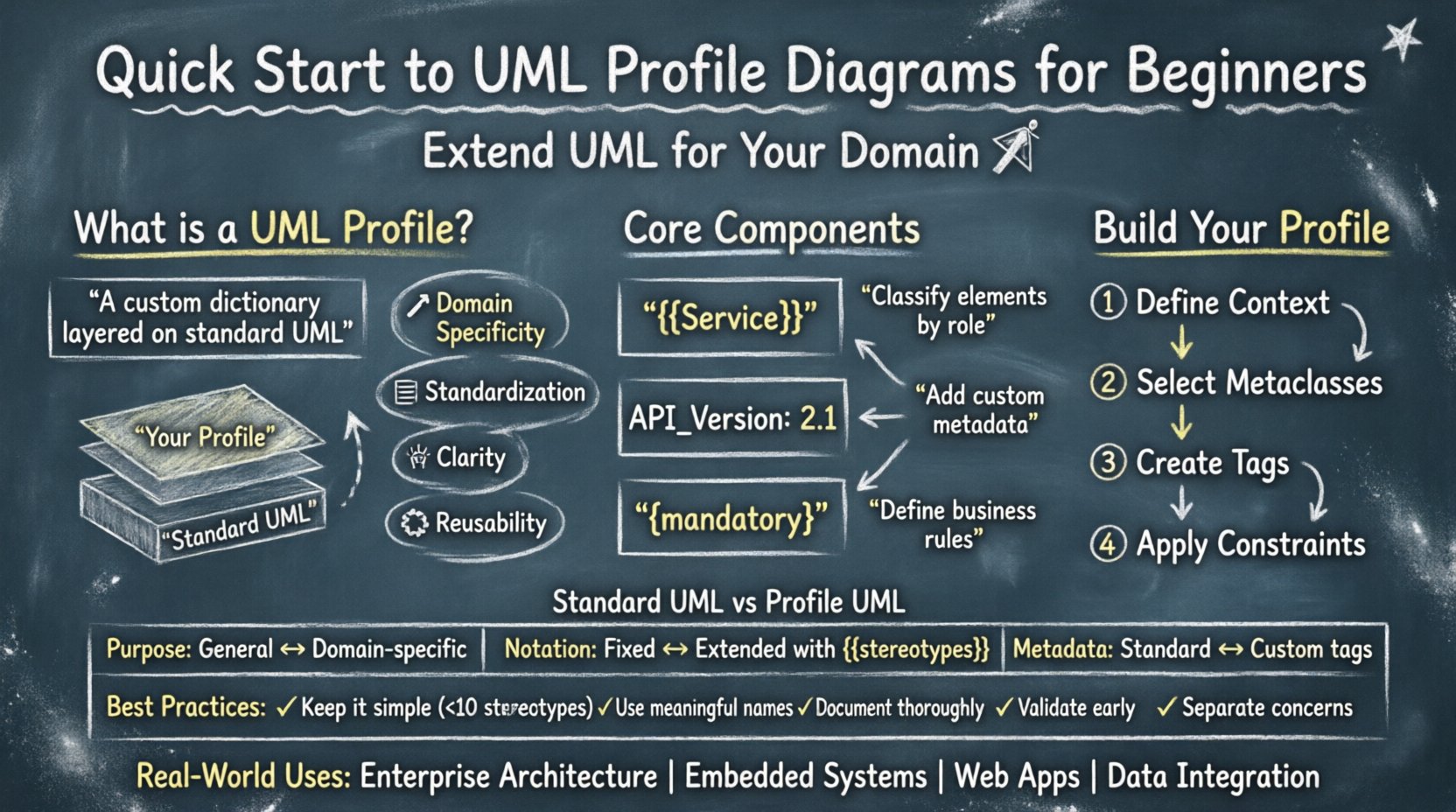
A profile is not a separate diagram type in the visual sense. Instead, it is a mechanism to extend the UML metamodel. It allows you to define new stereotypes, tag definitions, and constraints. Think of it as creating a custom dictionary for your specific project that sits on top of the standard UML vocabulary.
Why Use Profiles?
- Domain Specificity: Adapt modeling to niche industries like aviation, healthcare, or finance.
- Standardization: Ensure all team members use consistent notation for specific concepts.
- Clarity: Remove ambiguity by defining exactly what a specific shape or icon means in your context.
- Reusability: Create a set of extensions once and apply them across multiple projects.
📐 Core Components of a Profile
To build a functional profile, you need to understand its three fundamental building blocks. These elements work together to modify how UML elements are interpreted.
1. Stereotypes
A stereotype is the primary tool for extension. It allows you to classify an element in a new way. In standard UML, a rectangle represents a Class. With a profile, you can apply a stereotype like {{Service{}} to that rectangle to indicate it acts as a microservice.
- Visual Representation: Stereotypes appear as text enclosed in double brackets above the element name.
- Usage: They categorize elements based on their role rather than their structure.
- Examples:
{{Entity{}},{{View{}},{{Controller{}}.
2. Tagged Values
While stereotypes define the type of an element, tagged values define the properties. They act like custom attributes attached to UML elements. This is crucial for storing metadata that isn’t part of the standard language.
- Data Storage: Store information like version numbers, owners, or implementation details.
- Metadata: Provide context that standard fields (like name or visibility) cannot hold.
- Validation: Can be used to check constraints during model generation.
3. Constraints
Constraints are rules that limit or restrict the behavior of model elements. They are often expressed in a formal language or natural language. Constraints ensure that the model adheres to specific logic or business rules.
- Logical Rules: Define what is allowed or forbidden within the architecture.
- Notation: Usually enclosed in curly braces
{ ... }. - Examples:
{ mandatory }or{ unique }.
🛠️ Building a Profile: Step-by-Step Process
Creating a profile involves a structured approach. You do not draw a new diagram; you extend an existing package or define a new one specifically for your extension. Follow these logical steps to construct a valid profile.
Step 1: Define the Context
Identify the specific area where standard UML falls short. Is it the data layer? The user interface? The deployment architecture? Clearly defining the scope prevents the profile from becoming bloated and difficult to maintain.
Step 2: Select Metaclasses to Extend
Profiles extend specific UML metaclasses. You cannot create a stereotype for just anything; it must extend a valid metaclass like Class, Component, or Dependency.
- Class Stereotypes: Extend the Class metaclass for entity definitions.
- Component Stereotypes: Extend the Component metaclass for deployment units.
- Association Stereotypes: Extend the Association metaclass for relationship types.
Step 3: Create Tagged Values
Once the stereotype is defined, determine what information needs to be attached. If you are modeling a web service, you might need a tag for API Version or Auth Type.
- Assign a data type to each tag (String, Integer, Boolean).
- Set default values where applicable.
- Define which metaclasses can use these tags.
Step 4: Apply Constraints
Finally, write the constraints that govern the usage. If a specific stereotype is used, certain other elements must be present. For example, if a Class is marked as {{DatabaseTable{}}, it must have a Primary Key.
📊 Comparing Standard UML vs. Profile UML
Understanding the difference between standard notation and profile-enhanced notation helps clarify when to use which approach. The table below highlights key distinctions.
| Feature | Standard UML | UML Profile |
|---|---|---|
| Purpose | General-purpose modeling | Domain-specific customization |
| Notation | Fixed icons and shapes | Extended icons with stereotypes |
| Extensibility | Limited to base definitions | High (via stereotypes and tags) |
| Metadata | Standard properties only | Custom tagged values |
| Validation | General syntax rules | Custom constraints and rules |
| Portability | High (industry standard) | Dependent on profile adoption |
🎯 Best Practices for Profile Design
Designing a profile requires discipline. A poorly constructed profile can confuse stakeholders and complicate the modeling process. Adhere to these guidelines to ensure longevity and clarity.
- Keep it Simple: Avoid creating too many stereotypes. If you have more than ten, reconsider your design. Simplicity aids adoption.
- Use Meaningful Names: Stereotype names should be descriptive. Avoid abbreviations that might not be understood by new team members.
- Document Thoroughly: Every stereotype and tag should have a clear definition. Create a profile specification document alongside the model.
- Follow Naming Conventions: Use consistent naming for packages and metaclasses. A chaotic package structure makes the profile hard to navigate.
- Validate Early: Test your profile on a small project before rolling it out to the entire organization. Catch errors in the constraints early.
- Separate Concerns: Do not mix technical concerns with business logic in the same profile if possible. Separate a data profile from a UI profile.
🌍 Real-World Use Cases
Profiles are not theoretical exercises. They solve concrete problems in software development. Here are scenarios where profile diagrams provide significant value.
1. Enterprise Architecture
Large organizations often have specific standards for how systems are documented. A profile can enforce the use of specific architecture layers (e.g., Presentation, Business Logic, Data). This ensures that every diagram produced by any team follows the same architectural blueprint.
2. Embedded Systems
Embedded software often deals with hardware constraints that standard software modeling ignores. A profile can introduce stereotypes for MemoryRegion, InterruptHandler, or Driver. This helps engineers visualize how code interacts with physical components.
3. Web Development
Modern web applications rely on frameworks that impose specific structures. A profile can model MVC (Model-View-Controller) patterns explicitly. Developers can tag classes as {{Model{}}, {{View{}}, and &{{Controller{}}, making the architecture immediately visible.
4. Data Integration
When integrating multiple data sources, schemas often vary. A profile can define standard mappings between different database schemas. It allows modelers to annotate relationships as {{Transform{}} or {{Sync{}}, clarifying the data flow.
⚠️ Common Pitfalls to Avoid
Even experienced modelers make mistakes when extending UML. Be aware of these common issues to maintain a clean and effective profile.
- Over-Extension: Trying to model everything with a profile leads to confusion. Stick to extending where necessary.
- Ignoring Metaclass Limits: You cannot apply a stereotype to an element it does not extend. Ensure your profile targets the correct base class.
- Missing Constraints: Defining a stereotype without constraints leaves it open to misuse. Always define what the stereotype implies.
- Inconsistent Tagging: If one team member uses
APIVersionand another usesVersion, the model becomes fragmented. Standardize tag names. - Lack of Training: A profile is useless if the team doesn’t understand it. Provide workshops or documentation sessions.
🔍 Analyzing Profile Diagrams
When you look at a diagram that uses profiles, you are looking at a hybrid of standard and custom notation. The visual structure remains the same (rectangles, lines, diamonds), but the semantic meaning has changed.
Here is what to look for when reviewing a profile-enhanced diagram:
- Stereotype Placement: Check if the stereotype is placed correctly above the element name.
- Tagged Value Visibility: Ensure that custom attributes are visible in the element details, not hidden.
- Constraint Adherence: Verify that the model satisfies the logical rules defined in the profile.
- Dependency Chains: Check if profile elements depend on standard UML elements correctly.
🔄 Iterating on Your Profile
A profile is a living artifact. As your project evolves, your modeling needs will change. You should expect to update your profile over time. This requires a version control strategy for your model definitions.
- Versioning: Label your profile versions (e.g., v1.0, v1.1) to track changes.
- Deprecation: If a stereotype is no longer needed, mark it as deprecated rather than deleting it immediately.
- Feedback Loop: Gather feedback from modelers. If a tag is rarely used, remove it. If a constraint causes errors, fix it.
🚀 Integrating with Model Generation
One of the most powerful aspects of profiles is code generation. Many modeling tools can generate source code based on your model. Profiles enhance this by providing the extra metadata needed for generation.
For example, if you have a stereotype {{Entity{}} with a tag Table, the generator can use that tag to name the SQL table. Without the profile, the generator would have to guess or rely on generic naming conventions.
- Code Templates: Use profile tags to drive code templates.
- Annotation Generation: Automatically add framework annotations (like
@Autowiredor@Transactional) based on stereotypes. - Documentation: Generate API documentation that includes profile-specific details.
📝 Final Thoughts on Modeling Extensions
UML profiles are a powerful tool for bringing structure to complex systems. They allow you to speak the language of your specific domain while retaining the benefits of standard modeling. By understanding stereotypes, tagged values, and constraints, you can build models that are both technically accurate and business-relevant.
Remember that the goal is communication. If your profile makes the design clearer for your team, it has succeeded. If it adds confusion, it needs refinement. Keep the focus on clarity and consistency as you develop your modeling standards.
Start small. Define a few key stereotypes for your current project. Test them. Refine them. Then expand. This iterative approach ensures that your UML profile grows with your organization, providing value without becoming a burden.
📚 Frequently Asked Questions
Q: Can I use multiple profiles in one diagram?
A: Yes. You can import or apply multiple profiles to a single model. However, be careful of naming conflicts between stereotypes from different profiles.
Q: Do I need special software to create profiles?
A: Most modeling tools support profile creation. However, the concept is standard and applies regardless of the specific tool you choose to use.
Q: Is a profile diagram different from a standard diagram?
A: Visually, no. A profile diagram is simply a standard diagram where profile elements have been applied to the model elements.
Q: How do I share a profile with my team?
A: Export the profile definition from your modeling environment and import it into the tools used by other team members. Maintain a central repository for these definitions.
By mastering the mechanics of UML profiles, you gain the flexibility to adapt standard modeling techniques to the unique challenges of your projects. This adaptability is key to maintaining high-quality architecture documentation in dynamic environments.