


UML Profile Diagrams are a critical mechanism for extending the Unified Modeling Language to meet specific domain requirements. They allow architects to define custom syntax, semantics, and constraints without altering the core UML metamodel. However, creating and maintaining these profiles introduces significant complexity. When issues arise, they often stem from deep structural conflicts within the metamodel or misconfigurations in the model management environment.
This guide addresses the technical intricacies of diagnosing and resolving problems within UML profiles. We will examine the underlying mechanics of stereotypes, tagged values, and constraints. By understanding the root causes of validation failures, you can systematically restore model integrity. This is not about quick fixes; it is about understanding the architecture of the profile system itself.
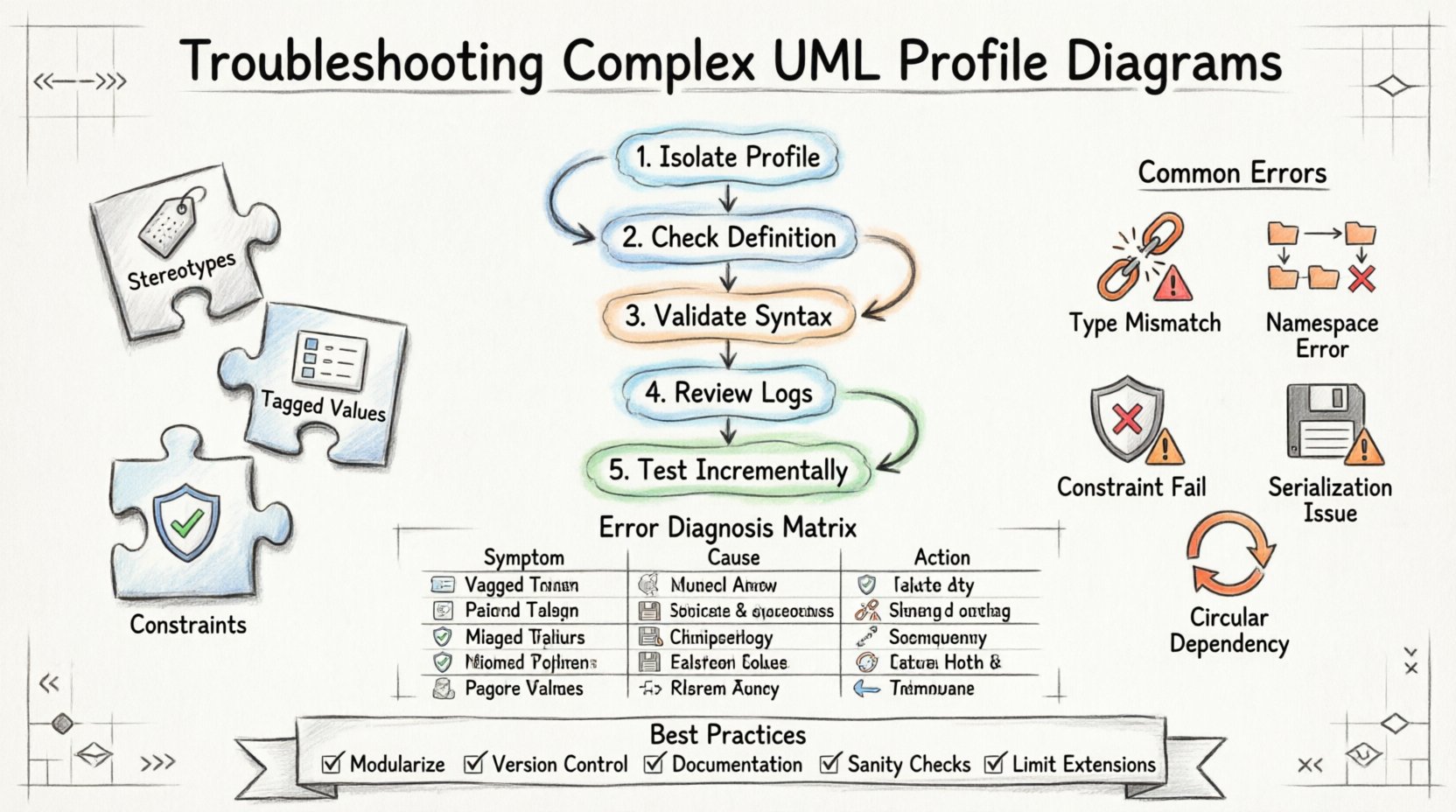
Understanding the Core Components of a Profile 🧩
Before troubleshooting, one must understand the elements that constitute a valid profile. A profile is essentially a package that extends the UML metamodel. It relies on three primary mechanisms:
- Stereotypes: These allow you to classify elements with new meanings. They extend existing classifiers, such as Class or Component.
- Tagged Values: These add attributes to stereotypes, providing metadata that standard UML does not support natively.
- Constraints: These define rules that must be satisfied for the model to be valid.
Issues typically occur when these components interact incorrectly. For instance, a stereotype might extend a class that does not support the required extension points. Or, a constraint might reference a property that was never defined in the tagged value registry.
Common Validation Failures 🔍
Validation errors are the first indicator of a problem. These errors often appear during model parsing or export operations. Below are the most frequent categories of failures encountered in complex profiles.
1. Stereotype Extension Conflicts
When a stereotype extends a classifier, it must adhere to specific rules. If the base classifier is abstract or closed, the extension may be rejected. The system often flags this as a “Type Mismatch” or “Invalid Inheritance” error.
- Issue: Attempting to extend a primitive type directly without a valid wrapper.
- Issue: Circular dependencies between stereotypes where A extends B, and B extends A.
- Issue: Using a stereotype in a context where the extended element is not permitted.
2. Namespace Resolution Errors
Profiles often span multiple packages. If the namespace hierarchy is not correctly defined, the modeler cannot resolve references. This leads to broken links and missing definitions.
- Issue: Imported packages are not correctly referenced in the profile definition.
- Issue: Qualified names are used incorrectly, causing ambiguity between similar element names.
- Issue: Version mismatches between the profile and the core metamodel.
3. Constraint Evaluation Failures
OCL (Object Constraint Language) or similar constraint languages are used to enforce rules. If the syntax is incorrect, or if the referenced properties do not exist, evaluation fails.
- Issue: Referencing a tagged value that has not been declared in the stereotype.
- Issue: Invalid expressions within the constraint logic.
- Issue: Circular references in constraint dependencies.
Namespace and Resolution Logic 🔗
One of the most persistent challenges in UML profiles is namespace resolution. Profiles are not standalone; they rely on the context of the model they inhabit. When a profile is applied to a model, the tool must resolve where each stereotype and tagged value resides.
If the namespace is not properly exported, elements become invisible to the rest of the system. This is particularly problematic in large-scale projects where profiles are shared across teams.
Diagnosing Namespace Issues
To identify namespace problems, follow these steps:
- Verify that the profile package is marked as “Public” or “Importable” within the environment.
- Check the import statements in the consuming model. Ensure the path to the profile is absolute or correctly relative.
- Inspect the qualified names of the stereotypes. They should include the package path (e.g.,
Domain::MyProfile::MyStereotype). - Look for duplicate definitions. If two profiles define the same stereotype name without qualification, resolution becomes ambiguous.
Tagged Value and Constraint Logic ⚙️
Tagged values add depth to your models, but they introduce potential points of failure. A tagged value is essentially a property attached to a stereotype. If the property type is invalid, or if the constraint logic tries to access a non-existent property, the model becomes unstable.
Typical Tagged Value Errors
- Type Mismatch: A tagged value is defined as an Integer, but a String is assigned during validation.
- Missing Definition: A constraint references a tagged value name that was never created in the stereotype definition.
- Scope Limitation: A tagged value is defined at the class level but used on an association, which is not supported by the metamodel.
Debugging Constraint Logic
Constraints are the logic gatekeepers of your profile. They ensure data integrity. When they fail, the error messages can be cryptic. It is crucial to parse the OCL or specific constraint syntax carefully.
- Ensure that all property references are fully qualified within the constraint context.
- Check for null values. If a tagged value is optional, the constraint must handle the absence of that value gracefully.
- Validate the evaluation order. If Constraint A depends on Constraint B, ensure B is evaluated first.
Metamodel Extension Pitfalls 📉
Extending the metamodel is the core function of a profile. However, this process interacts with the underlying infrastructure of the modeling platform. Issues often arise from the way the platform serializes the metamodel changes.
Serialization and Deserialization
When saving a model, the profile definitions must be persisted correctly. If the serialization format does not support the specific extensions, data loss can occur upon reload. This often manifests as missing stereotypes after reopening a file.
- Issue: Custom attributes are stripped during a save/export cycle.
- Issue: The profile is loaded in a different version of the modeling environment that interprets the schema differently.
- Issue: Binary serialization incompatibilities between different tool versions.
Versioning Conflicts
Metamodels evolve. If your profile was created against Version 5 of the core standard, but the environment loads Version 6, inconsistencies will occur. The profile might try to extend an element that was deprecated or renamed in the newer standard.
- Always document the target metamodel version for each profile.
- Review the changelog of the core standard before applying updates.
- Test profiles in a sandbox environment before deploying to production models.
Interoperability and Serialization 🔄
Profiles are often used to facilitate exchange between different systems. XMI (XML Metadata Interchange) is a common standard for this purpose. However, XMI does not natively support all profile extensions, leading to data loss during import/export operations.
XMI Export Challenges
When exporting to XMI, the system must map custom stereotypes to standard XML tags. If the mapping is not configured, the data becomes generic XML that loses the profile’s semantic meaning.
- Check the XMI mapping configuration. Ensure custom namespaces are included.
- Verify that the receiving system supports the custom extensions. If it uses a different profile, the data will be interpreted as unknown attributes.
- Validate the XMI file structure manually if automated import fails.
Systematic Debugging Workflow 📋
When a complex profile fails, a systematic approach is required. Ad-hoc changes often introduce new errors. Follow this workflow to isolate the problem.
- Isolate the Profile: Create a minimal model that contains only the profile and the element triggering the error. Remove all other dependencies.
- Check the Definition: Review the profile package structure. Ensure all stereotypes and tagged values are correctly defined within the package.
- Validate Syntax: Run a syntax check on the profile definition itself, not just the model using it.
- Review Logs: Check the system logs for stack traces. These often provide the exact line number and error code.
- Test Incrementally: Re-add dependencies one by one to identify which component causes the conflict.
Error Diagnosis Matrix 📊
The following table summarizes common error scenarios and their likely causes. Use this as a quick reference during troubleshooting.
| Error Symptom | Probable Cause | Recommended Action |
|---|---|---|
| Stereotype not found | Namespace resolution failure | Check import paths and qualified names. |
| Constraint evaluation failed | Missing property or invalid logic | Verify tagged value definitions and OCL syntax. |
| Model load error | Metamodel version mismatch | Ensure profile matches the core standard version. |
| Missing attributes on export | XMI mapping configuration | Review serialization settings and namespace mappings. |
| Circular dependency error | Recursive inheritance | Refactor inheritance hierarchy to remove cycles. |
Best Practices for Stability 🛡️
To minimize future issues, adopt these structural best practices when designing profiles.
- Modularize: Split large profiles into smaller, focused packages. This reduces coupling and makes debugging easier.
- Version Control: Treat profile definitions as code. Use version control systems to track changes and revert if necessary.
- Documentation: Maintain clear documentation for every stereotype. Explain its intended use, required tagged values, and constraints.
- Sanity Checks: Create a “Hello World” model for every profile to test basic functionality before complex implementation.
- Limit Extensions: Do not extend the metamodel more than necessary. Every extension adds complexity and potential failure points.
Advanced Metamodel Integration 🧠
For highly complex scenarios, profiles may need to interact with multiple metamodels simultaneously. This is common in cross-domain architectures where software, hardware, and business logic are modeled together.
Merging Metamodels
When merging, ensure that element names do not collide. If two domains define a “Class” stereotype with different properties, the merge operation will fail or overwrite data.
- Use unique prefixes for stereotypes in each domain (e.g.,
SW::ClassandHW::Class). - Define a root profile that handles the common integration points.
- Ensure that the merging tool supports the specific UML version being used.
Dynamic Profile Application
Sometimes profiles are applied dynamically at runtime rather than statically in the model file. This requires specific support from the modeling platform.
- Verify that the platform supports dynamic stereotype application.
- Ensure that the dynamic loader can resolve dependencies on the fly.
- Monitor memory usage, as dynamic loading can increase overhead.
Performance Considerations ⚡
Large models with complex profiles can impact performance. The validation engine must traverse the entire metamodel hierarchy to check constraints.
Optimization Strategies
- Lazy Loading: Configure the model to load profile definitions only when an element is accessed.
- Caching: Enable caching for resolved stereotypes to avoid repeated lookups.
- Batch Validation: Run validation on specific packages rather than the entire model if possible.
- Profile Simplification: Remove unused stereotypes from the active profile package.
Handling Legacy Data 🕰️
Migration from older modeling standards is a common source of profile issues. Legacy data may not conform to the new profile definitions.
- Mapping: Create a mapping profile that translates old stereotypes to new ones.
- Conversion: Use conversion tools to update the model structure before applying the new profile.
- Hybrid Mode: Support both old and new stereotypes temporarily during the transition period.
- Verification: Manually inspect converted elements to ensure no data was lost.
Collaboration and Team Standards 👥
In a team environment, profile consistency is vital. If different developers create conflicting profiles, the model becomes fragmented.
- Central Repository: Host profiles in a shared repository accessible to all team members.
- Review Process: Implement a code review process for profile changes.
- Standard Naming: Agree on a naming convention for all stereotypes and tagged values.
- Training: Ensure all team members understand the profile standards before use.
Final Thoughts on Profile Maintenance 🔧
Maintaining a UML profile is an ongoing process. The requirements of the domain change, and the profile must evolve with them. Regular audits of the profile structure help identify technical debt before it becomes critical. By following the troubleshooting steps outlined in this guide, you can maintain a robust and reliable modeling environment. Focus on clarity, modularity, and strict adherence to the metamodel rules to ensure long-term stability.
Remember that every error is a clue. When you encounter a validation failure, do not simply bypass it. Investigate the structural reason behind the error. This deeper understanding will prevent similar issues from recurring in the future. A well-maintained profile is a powerful asset that enhances the precision and utility of your system models.