


Software architecture relies on clear communication between stakeholders. Standard Unified Modeling Language (UML) diagrams provide a foundational syntax, yet they often lack the specificity required for complex, domain-driven systems. This is where UML Profile Diagrams become essential. They allow architects to extend the standard metamodel without breaking compatibility, ensuring that diagrams remain both precise and meaningful across the project lifecycle.
By customizing the notation, teams can embed domain-specific semantics directly into the visual language. This guide explores how these extensions improve architectural documentation, reduce ambiguity, and support maintainability in large-scale engineering efforts.
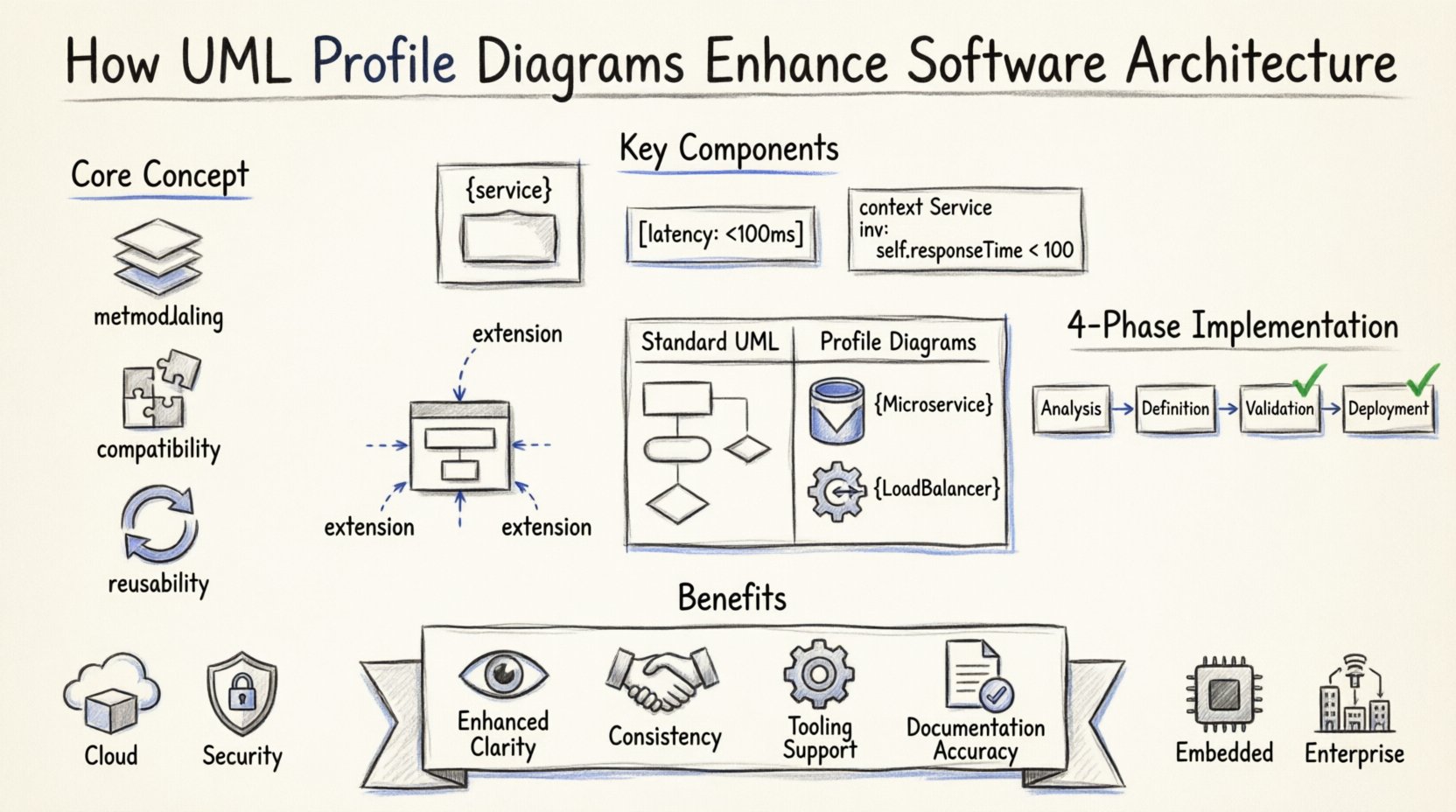
🧩 Understanding the Core Concept of Profiles
A UML Profile is a mechanism for customizing the UML metamodel. It allows users to define new types of elements, properties, and relationships that are specific to a particular domain or technology stack. Instead of forcing a generic modeling tool to interpret a specialized concept through generic shapes, profiles define a tailored vocabulary.
- Metamodeling: Profiles operate at the metamodel level. They extend the existing UML classes rather than replacing them.
- Compatibility: Because they extend the standard, profile diagrams remain valid UML. Tools that support UML profiles can render them correctly alongside standard diagrams.
- Reusability: Once a profile is defined, it can be applied across multiple projects within an organization, creating a consistent architectural language.
Without profiles, architects often resort to ad-hoc conventions. One developer might draw a database using a generic rectangle, while another uses a cylinder. Profiles enforce a standard representation for specific architectural constructs, such as microservices, security tokens, or hardware interfaces.
🔧 Key Components of a UML Profile
To build a functional profile, specific elements must be defined. These components work together to extend the semantics of the base UML notation. Understanding these building blocks is crucial for effective implementation.
1. Stereotypes
Stereotypes are the primary mechanism for customization. They are keywords that modify the meaning of existing UML elements. For example, a standard Class can be stereotyped as a Service or an Entity. This changes how the element is interpreted by the architecture team.
- Visual Representation: Stereotypes typically appear in guillemets, such as
{service}, above the element name. - Behavioral Change: A class stereotyped as a Database implies persistence rules that a standard class does not.
2. Tagged Values
Tagged values allow the addition of new attributes to model elements. They provide a way to store metadata that is not part of the standard UML definition. This is vital for capturing architectural constraints.
- Examples: A tagged value might specify the latency tolerance of a component, the required encryption standard, or the deployment target.
- Dynamic Information: These values can be used by tools to generate code or documentation automatically.
3. Constraints
Constraints are rules that restrict the usage of elements. They are often expressed in Object Constraint Language (OCL). Profiles use constraints to enforce architectural patterns.
- Validity: A constraint might dictate that a
{Service}cannot have direct dependencies on a{Database}without an intermediate layer. - Enforcement: These rules can be validated by modeling tools to ensure compliance with architectural standards.
📈 Benefits for Software Architecture
Implementing profiles brings structural advantages to the development process. The following points detail how these enhancements manifest in real-world scenarios.
- Enhanced Clarity: Specific stereotypes reduce the cognitive load on readers. A
{LoadBalancer}is immediately understood, whereas a generic component requires context. - Consistency: Teams adhere to a shared vocabulary. This reduces miscommunication during code reviews and architecture design sessions.
- Tooling Support: Modern modeling tools can interpret profile extensions to generate code stubs, validation reports, or deployment scripts.
- Documentation Accuracy: The diagrams reflect the actual implementation constraints, making them a reliable source of truth for onboarding new developers.
When an architecture changes, the profile ensures that the visual representation updates accordingly. If a new technology is adopted, the profile can be updated to include the necessary stereotypes, maintaining the integrity of the documentation.
📊 Standard UML vs. Profile Diagrams
Comparing standard UML with profile-enhanced diagrams highlights the value of customization. The table below outlines the differences in scope, flexibility, and usage.
| Feature | Standard UML | UML Profile Diagrams |
|---|---|---|
| Scope | General-purpose, broad applicability | Domain-specific, tailored to context |
| Semantics | Fixed definitions for elements | Extended definitions via stereotypes |
| Flexibility | Low, rigid structure | High, adaptable to new requirements |
| Metadata | Limited to standard properties | Custom tagged values allowed |
| Learning Curve | Standardized, widely known | Requires training on specific profiles |
| Use Case | General system design | Enterprise architecture, complex systems |
Standard UML serves as a baseline. It is effective for high-level conceptual models. However, as systems grow in complexity, the generic nature of standard diagrams becomes a bottleneck. Profiles resolve this by adding the necessary depth without abandoning the underlying standard.
🚀 Implementation Strategy
Creating a profile is a systematic process. It requires planning to ensure the extension aligns with the overall architectural goals. Rushing this process often leads to confusion and inconsistent usage.
Phase 1: Analysis
- Identify recurring concepts that lack standard UML representation.
- Interview architects and developers to understand domain terminology.
- Define the scope of the profile. Is it for the entire enterprise or a specific subsystem?
Phase 2: Definition
- Create the package structure to hold the profile definitions.
- Define the stereotypes for key concepts (e.g., API, Cache, Queue).
- Specify tagged values for metadata (e.g., latency, region, version).
- Write constraints to enforce architectural rules.
Phase 3: Validation
- Apply the profile to a pilot project.
- Review diagrams generated by the profile for clarity and accuracy.
- Gather feedback from the modeling team.
- Refine the definitions based on usage patterns.
Phase 4: Deployment
- Distribute the profile to all modeling tools within the organization.
- Conduct training sessions to ensure consistent application.
- Integrate validation checks into the continuous integration pipeline.
⚠️ Common Challenges and Mitigations
While profiles offer significant benefits, they introduce complexity that must be managed. Ignoring these challenges can result in a fragmented modeling ecosystem.
- Profile Drift: Over time, different teams may modify the profile independently.
Mitigation: Maintain a central version control system for profile definitions and enforce strict change management. - Tooling Support: Not all modeling tools support profiles equally.
Mitigation: Select tools that have robust profile management features and test compatibility before adoption. - Over-Engineering: Creating too many stereotypes can confuse users.
Mitigation: Limit the profile to essential concepts. Use standard UML for generic elements. - Documentation Decay: If the profile is not updated, the diagrams become misleading.
Mitigation: Treat the profile as living documentation. Update it alongside code refactoring.
🔄 Long-Term Maintenance and Evolution
Software architectures evolve. New patterns emerge, and old technologies are retired. A well-designed profile architecture accommodates these changes without requiring a complete rewrite.
When a new architectural pattern is adopted, the profile can be extended. For instance, if a team shifts from monolithic services to microservices, a new stereotype for {Microservice} can be added without invalidating existing diagrams. This backward compatibility is a key advantage of the profile mechanism.
Maintenance also involves auditing the profile usage. Regular reviews should check if stereotypes are being used correctly. If a stereotype is rarely used, it may need to be deprecated or renamed for clarity. This ensures the vocabulary remains relevant and useful.
Training is a continuous process. New developers joining the team need to understand the profile conventions. Documentation should include examples of correct and incorrect usage to accelerate onboarding.
🌐 Real-World Application Scenarios
Profiles are not just theoretical constructs; they solve practical problems in various domains. Below are common scenarios where profile diagrams provide tangible value.
1. Cloud-Native Systems
Cloud environments involve complex resource management. Profiles can define stereotypes for containers, serverless functions, and managed databases. Tagged values can specify regions, availability zones, and scaling policies directly in the diagram.
2. Security-Critical Systems
In sectors like finance or healthcare, security is paramount. Profiles can enforce stereotypes for encryption modules, authentication gateways, and audit logs. Constraints can ensure that sensitive data flows are properly protected according to compliance standards.
3. Embedded Systems
Hardware constraints in embedded systems require precise modeling. Profiles can represent microcontrollers, sensors, and actuators. Tagged values can capture memory limits, clock speeds, and power consumption requirements.
4. Enterprise Integration
Large organizations often use diverse systems. Profiles can standardize how interfaces are represented across different subsystems. This creates a unified view of the integration landscape, making it easier to manage data flows between legacy and modern applications.
🛠️ Best Practices for Profile Design
To maximize the effectiveness of UML Profile Diagrams, adhere to the following guidelines. These practices help maintain clarity and usability over time.
- Keep it Simple: Avoid creating too many stereotypes. Use standard UML whenever possible.
- Be Consistent: Ensure naming conventions are uniform across all profiles and diagrams.
- Document Thoroughly: Provide a reference guide for every stereotype and tagged value used.
- Automate Validation: Use scripts or tooling to check for profile compliance automatically.
- Review Regularly: Schedule periodic reviews to remove obsolete stereotypes and update definitions.
Consistency is key. If one team uses a specific icon for a database, all teams should follow suit. This uniformity reduces the time spent interpreting diagrams and increases the reliability of the architectural documentation.
📉 Measuring Success
How do you know if the profile implementation is working? Metrics and feedback loops provide the answer. Tracking specific indicators helps assess the impact on productivity and quality.
- Diagram Readability: Survey developers on how quickly they can understand new diagrams.
- Error Reduction: Monitor the frequency of architectural violations detected during code reviews.
- Documentation Accuracy: Compare the diagrams against the actual system implementation.
- Onboarding Time: Measure the time it takes for new hires to become productive with the modeling tools.
If these metrics show improvement, the profile strategy is successful. If not, adjustments are needed. The goal is a modeling ecosystem that supports, rather than hinders, the development process.
🔮 Future Trends in Modeling
The landscape of software architecture is shifting. Model-Driven Architecture (MDA) continues to gain traction, and profiles are central to this evolution. As automation becomes more prevalent, the ability to define precise rules via profiles becomes even more critical.
Future tools may integrate artificial intelligence to suggest profile extensions based on code analysis. This could automate the creation of stereotypes for common patterns, reducing the manual effort required to maintain the profile.
Interoperability will also improve. Standardized profile definitions will allow different organizations to exchange architectural models more easily. This could lead to a shared library of profiles for common industry standards, reducing the need for reinvention.
🏁 Final Thoughts
UML Profile Diagrams offer a robust way to tailor modeling languages to specific needs. They bridge the gap between generic standards and domain-specific realities. By adopting profiles, organizations can achieve higher consistency, better documentation, and improved communication among teams.
The investment in defining and maintaining a profile pays dividends in reduced ambiguity and increased system reliability. As software systems grow in complexity, the ability to extend the modeling language becomes not just an option, but a necessity.
Start small. Define the most critical stereotypes for your domain. Validate them in a pilot project. Then, expand the profile as the architecture evolves. This incremental approach ensures stability while allowing for necessary growth.