


In modern software architecture, the gap between design intent and implementation often widens due to miscommunication. Different stakeholders—developers, architects, testers, and product owners—operate with varying mental models. This fragmentation leads to technical debt, rework, and delays. One specific mechanism to bridge this divide is the UML profile diagram. Unlike standard diagrams that offer a general view of systems, profiles allow for domain-specific customization. They provide a way to extend the Unified Modeling Language to match the unique vocabulary and constraints of a specific team or project.
Understanding how to leverage these diagrams effectively is crucial for maintaining high-quality architecture. This guide explores the structural components, implementation strategies, and collaborative benefits of using profiles within a development environment. We will examine how they standardize communication without relying on external tools, ensuring clarity across the entire lifecycle.
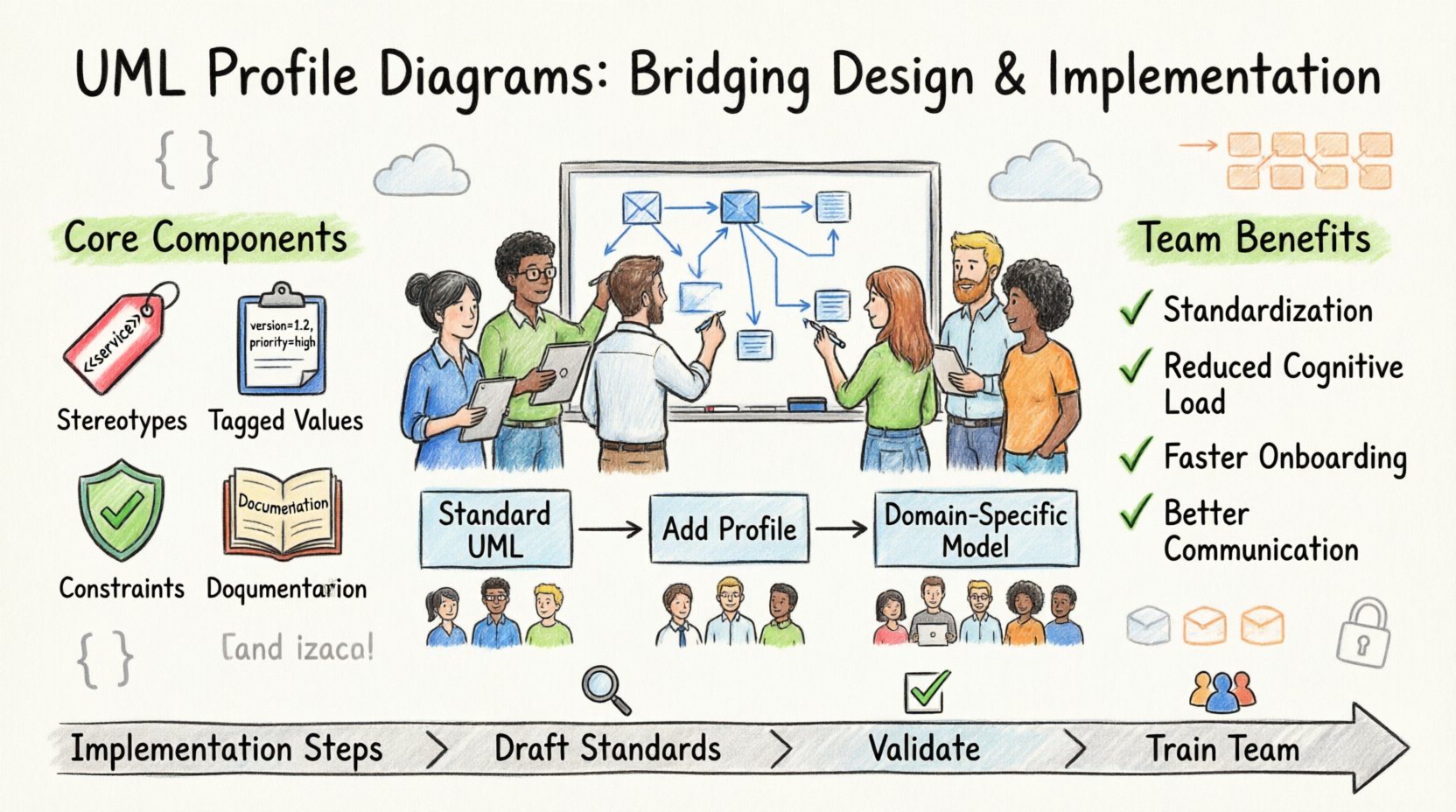
🧩 What Defines a UML Profile?
A UML profile is essentially a mechanism to customize the UML metamodel for a specific domain or technology. Standard UML diagrams cover general concepts like classes, actors, and states. However, specific industries or architectural patterns often require terms that standard UML does not natively support. For instance, a microservices architecture might need to denote a service as stateless or event-driven explicitly in the model, beyond what a standard class diagram allows.
Profiles address this by introducing stereotypes. A stereotype is a way to categorize a model element using a specific name enclosed in guillemets, such as <<service>>. This allows the team to tag elements with meaning relevant to their context. It is not a new language, but an extension of the existing one. This approach ensures that the diagram remains valid UML while carrying the specific semantic weight required by the team.
Key characteristics include:
- Metamodel Extension: Profiles extend the underlying structure of UML without altering the core definition.
- Stereotypes: Custom labels applied to elements to indicate specific roles or types.
- Tagged Values: Additional data fields attached to elements, such as ownership or complexity metrics.
- Constraints: Rules that define valid states or relationships between elements.
When a team adopts this method, they create a shared vocabulary. Instead of explaining in a meeting that a class is a “repository that caches data,” they can simply label it with a specific stereotype defined in the profile. This reduces ambiguity and speeds up the design review process.
🚀 Why Teams Adopt UML Profiles
Collaboration in software engineering relies heavily on shared understanding. When a large team works on a complex system, the risk of misinterpretation increases. Profiles mitigate this by enforcing a consistent modeling style. Here is why they are beneficial for team dynamics:
- Standardization of Design Patterns: Teams can encode common architectural patterns directly into the model. If a team decides to use a specific pattern for authentication, a profile can enforce that the diagram reflects this structure.
- Reduced Cognitive Load: Developers do not need to memorize complex rules. The diagram itself conveys the rules through the profile definitions.
- Improved Onboarding: New members can learn the system’s architecture by reading the profile documentation, which defines how the system is structured conceptually.
- Better Tooling Support: Even without specific software names, many modeling environments support profile extensions. This allows for automated validation of the model against team standards.
Without profiles, every team member might interpret a diagram differently. One might view a component as a database, while another sees it as a cache. A profile eliminates this variance by defining exactly what that component represents.
📋 Core Components of a Profile
To understand how these diagrams function, one must look at the technical building blocks. A profile is composed of several distinct parts that work together to extend the standard notation. The following table outlines these components and their functions within a team context.
| Component | Description | Team Benefit |
|---|---|---|
| Stereotypes | Custom classifications for model elements (e.g., <<API>>, <<Database>>). | Creates a shared vocabulary across roles. |
| Tagged Values | Name-value pairs attached to elements (e.g., Version: 2.0). | Stores metadata without cluttering the visual layout. |
| Constraints | OCL or textual rules defining valid relationships. | Ensures architectural rules are followed. |
| Documentation | Notes and descriptions attached to stereotypes. | Provides context for why a pattern is used. |
By defining these components clearly, a team ensures that the model is not just a drawing, but a specification that holds technical meaning.
🏷️ Stereotypes and Tagged Values
The most visible part of a profile is the stereotype. It transforms a generic class into a specific architectural entity. Consider a class representing a user. In standard UML, it is just a class. With a profile, it becomes a <<User>> entity with specific properties.
Tagged values add another layer of detail. They allow teams to attach metadata to elements. For example, a developer might tag a component with a security_level or deployment_target. This metadata is invisible in the standard view but crucial for code generation or deployment scripts.
Effective use of these elements requires discipline. Teams should avoid creating too many stereotypes. If every team member creates a new stereotype for every nuance, the profile becomes bloated and hard to maintain. A governance model is necessary to approve new additions to the profile.
⚙️ Implementing Profiles in Your Workflow
Creating a profile is a process that requires planning and coordination. It is not something to be done in isolation. The following steps outline a logical approach to introducing profiles into a team environment.
1. Define the Context
Before drawing anything, identify the specific domain needs. Are you building a cloud-native application? A legacy integration? A real-time data system? The context dictates which stereotypes are necessary. For a cloud system, you might need stereotypes for containers, regions, and load balancers. For a financial system, you might need stereotypes for transaction types and compliance rules.
2. Draft the Standards
Collaborate with senior architects to draft the initial set of stereotypes. Keep the list minimal. Focus on the concepts that are most frequently misunderstood or misconfigured. Write down the rules for each stereotype. For example, define what a <<Service>> stereotype implies about its dependencies.
3. Validate the Model
Apply the profile to an existing project or a pilot project. Check if the stereotypes make sense in practice. Do they capture the necessary information? Do they hinder the modeling process? Adjust based on feedback. This iterative process ensures the profile serves the team, not the other way around.
4. Train the Team
Documentation is essential. Create a guide that explains each stereotype and tagged value. Conduct workshops to ensure every developer understands how to apply them. This training is often the biggest hurdle in adoption.
💻 Domain Specific Applications
Profiles shine brightest when applied to specific domains. Different teams face different challenges, and a generic model often fails to capture the nuances of those challenges. Below are common scenarios where profiles add significant value.
- Microservices Architecture: Teams can define stereotypes for service boundaries, communication protocols (REST, gRPC, Async), and data consistency models. This helps in visualizing the network topology and dependencies clearly.
- Security Compliance: In regulated industries, profiles can enforce security patterns. A <<Compliant>> stereotype might indicate that a component meets specific encryption standards. This makes security audits easier.
- Legacy Modernization: When migrating old systems, profiles can map legacy concepts to new patterns. A <<LegacyModule>> stereotype can indicate that a component is scheduled for refactoring or replacement.
- Embedded Systems: For hardware-constrained environments, profiles can define memory footprints or processor requirements directly on the model elements.
In each case, the profile acts as a filter that highlights the relevant information for that specific domain, hiding the noise of general UML notation.
🔄 Managing Profile Evolution
Software systems are never static. They evolve over time, and so must the models that describe them. A profile that is valid today might be obsolete tomorrow. Managing this evolution is critical to prevent technical debt in the documentation.
Version control is essential for profiles. Just like code, profiles should be versioned. When a change is made, the version number should increment. Old models should be linked to the profile version active at the time of their creation. This prevents confusion when reviewing historical diagrams.
Deprecation is another key aspect. When a stereotype is no longer useful, it should be marked as deprecated rather than deleted immediately. This allows existing diagrams to remain valid while signaling to new work that the pattern should not be used. A clear migration path should be documented for teams moving away from old stereotypes.
🗣️ Overcoming Communication Barriers
One of the primary roles of UML profiles is communication. They serve as a lingua franca between different groups. Without them, a developer might use a term that a tester interprets differently.
Profiles help bridge the gap between technical and non-technical stakeholders. By defining business-relevant stereotypes, architects can explain the system in terms that product managers understand. For example, a <<RevenueGenerator>> stereotype is more meaningful to a business owner than a <<TransactionController>> stereotype.
This alignment reduces the number of clarification meetings. When the diagram speaks the same language as the business goals, the feedback loop becomes faster. Decisions are made based on a shared understanding of the system’s capabilities and constraints.
📈 Measuring Effectiveness
How do you know if the profiles are working? Teams should track specific metrics to evaluate the impact of this modeling strategy.
- Defect Rates: Monitor if defects related to architectural misunderstandings decrease after profile adoption.
- Onboarding Time: Measure how long it takes new developers to understand the system architecture.
- Model Consistency: Check how often diagrams deviate from the profile standards.
- Review Efficiency: Time taken to review a design document. If profiles are effective, reviews should be faster due to reduced ambiguity.
Collecting this data helps justify the effort spent on maintaining the profiles. It provides evidence that the standardization is paying off in terms of quality and speed.
🛡️ Best Practices for Maintenance
To keep profiles useful, they must be maintained. A profile that is ignored or outdated becomes a liability. Here are best practices to ensure long-term viability.
- Keep it Simple: Avoid over-engineering. If a stereotype is rarely used, consider removing it. The goal is clarity, not completeness.
- Centralize Ownership: Assign a specific role or group to own the profile. This prevents arbitrary changes by any team member.
- Automate Validation: If possible, use tooling to check diagrams against the profile rules automatically. This reduces the burden on reviewers.
- Regular Audits: Schedule periodic reviews of the profile to ensure it still matches the current system architecture.
- Documentation First: Always update the documentation before changing the profile. The documentation is the source of truth for the team.
Adhering to these practices ensures that the profiles remain a living part of the architecture rather than a static artifact.
🌐 Future Considerations
The landscape of software development is shifting towards automation and AI. Profiles will likely play a role in these future trends. As code generation becomes more prevalent, profiles can serve as the blueprint for automated scaffolding.
AI-driven modeling tools may eventually analyze profiles to suggest improvements or detect violations. The structured data within a profile makes it ideal for machine learning algorithms to predict architectural risks. Teams should design their profiles with machine readability in mind, ensuring that tagged values and constraints are structured logically.
Furthermore, as systems become more distributed, the need for clear boundary definitions increases. Profiles will continue to be a vital tool for defining those boundaries. They provide the necessary granularity to manage complexity in large-scale systems.
By investing in robust profile definitions today, teams position themselves to adapt to future technological shifts. The flexibility of the UML profile mechanism allows it to evolve alongside the software it describes.
Implementing UML profile diagrams is a strategic decision. It requires upfront effort but yields long-term benefits in communication, quality, and maintainability. Teams that embrace this approach gain a distinct advantage in managing complex architectures. The shared vocabulary they create becomes a foundation for sustained engineering excellence.