


In the landscape of software engineering, complexity is the only constant. As systems evolve from monolithic structures to distributed microservices, the tools used to design and communicate architecture must evolve alongside them. Standard Unified Modeling Language (UML) provides a solid foundation, yet it often lacks the specificity required for niche domains or modern infrastructure. This is where UML Profile Diagrams step in. They act as a mechanism for extension, allowing engineers to tailor the modeling language to their specific context without breaking the standard.
Understanding the utility of profile diagrams is not just about drawing boxes and lines; it is about creating a shared vocabulary that aligns technical teams with business goals. By defining custom stereotypes, constraints, and tagged values, development teams can ensure that their architectural diagrams convey precise semantic meaning. This guide explores the mechanics, benefits, and practical applications of UML profiles in contemporary development workflows.
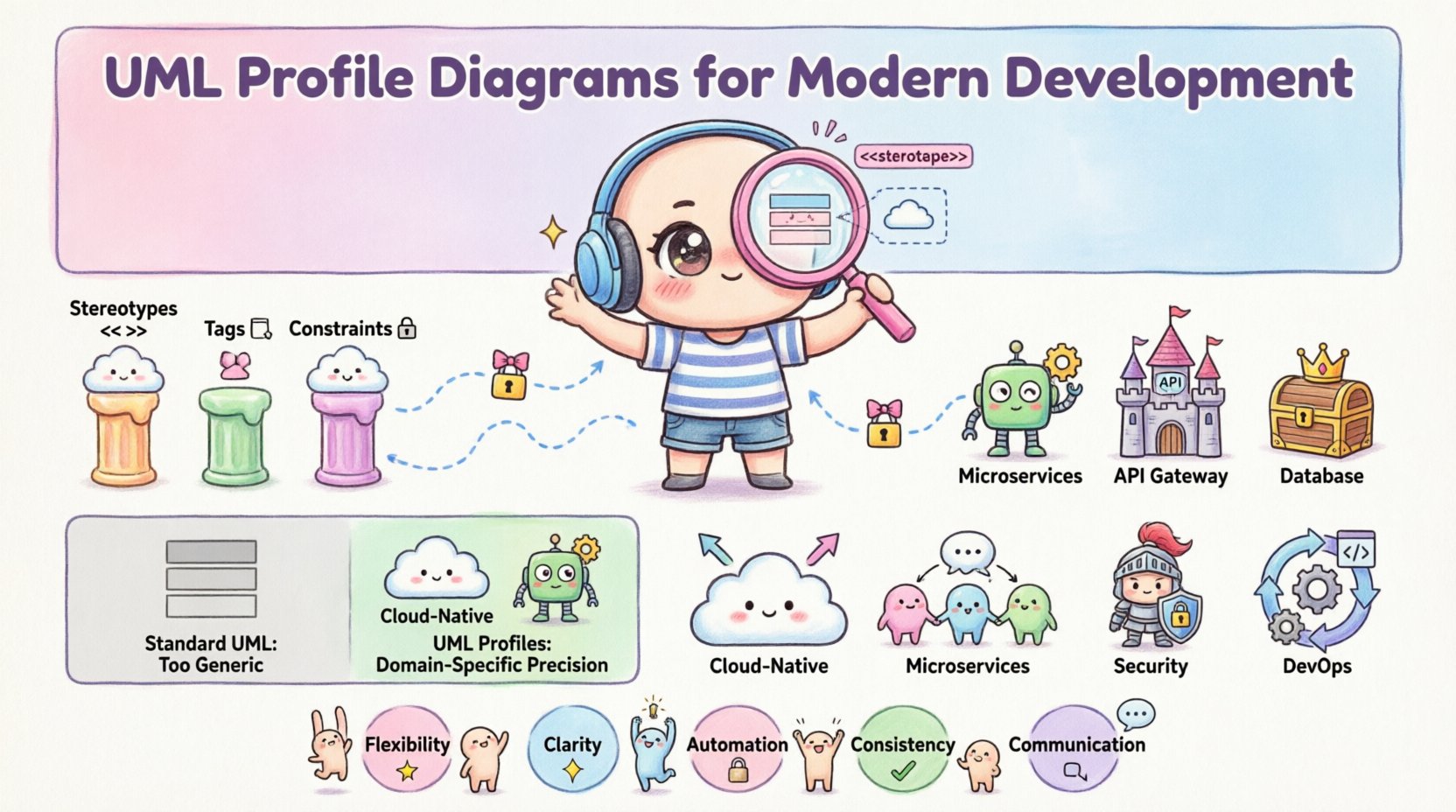
Understanding the UML Profile Mechanism 🔍
A UML Profile is a mechanism defined within the UML specification that allows for the extension of the language. It does not replace the standard UML; instead, it builds upon it. Think of a profile as a plugin or an add-on pack that adds new symbols and rules to the base modeling set. This is essential when standard UML elements are too generic to describe complex modern architectures.
Profiles consist of three primary components that enable this customization:
- Stereotypes: These are the visual markers that extend existing UML elements. For example, a standard class might become a microservice, a database, or a container. Stereotypes are typically denoted by guillemets, such as <<service>> or <<database>>.
- Tags: Also known as tagged values, these allow for the addition of new attributes to model elements. A standard class might have attributes like name or visibility, but a tagged value could add deployment region or API version.
- Constraints: These are rules that restrict how elements can be used or combined. Constraints ensure that the model adheres to specific architectural patterns or business rules.
By combining these elements, a profile creates a Domain Specific Language (DSL) for modeling. This DSL is embedded within the UML framework, ensuring compatibility with standard tools while providing the necessary granularity for specialized needs.
Why Standard UML Falls Short in Modern Contexts 📉
Standard UML was designed with a broad scope in mind. It excels at general object-oriented design and structural relationships. However, modern development introduces layers of abstraction that standard elements struggle to represent clearly. Relying solely on base UML can lead to ambiguity, where a diagram looks correct structurally but fails to communicate deployment realities.
Consider the following scenarios where standard UML elements become insufficient:
- Cloud-Native Architectures: Standard classes do not distinguish between a virtual machine, a serverless function, or a containerized pod. All might simply appear as a class or component.
- Microservices Communication: Standard sequence diagrams show method calls, but they do not inherently capture API gateways, message queues, or event streams without significant visual clutter.
- Security Requirements: Encryption standards, authentication protocols, and compliance constraints are rarely represented in standard element properties.
- DevOps Pipelines: Build, test, and deployment stages are often omitted from architectural diagrams, leading to a disconnect between design and operations.
Without profiles, teams often resort to non-standard shapes or text annotations. While this works for quick sketches, it breaks consistency and prevents automation. Profiles provide a standardized way to introduce these modern concepts without deviating from the UML core.
Extending Semantics with Stereotypes 🛠️
Stereotypes are the most visible part of a UML profile. They redefine the identity of a model element. When a developer sees a standard class, they assume generic object-oriented behavior. When they see a class with a stereotype, the meaning changes immediately.
Effective use of stereotypes ensures that diagrams communicate intent. For instance, in a distributed system, a stereotype can indicate the deployment topology. A component labeled <<api>> signals to the team that this is an interface exposed to external consumers. A component labeled <<internal>> indicates it is private to the system.
Here are common categories for stereotypes in modern development:
- Infrastructure: <<server>>, <<load-balancer>>, <<database>>
- Application: <<service>>, <<worker>>, <<frontend>>
- Integration: <<adapter>>, <<gateway>>, <<queue>>
- Security: <<auth>>, <<encrypt>>, <<audit>>
Using these stereotypes consistently across a project allows for better documentation. New team members can look at a diagram and immediately understand the role of each component without reading external documentation.
Practical Applications in Modern Stacks ☁️
The true value of UML profiles emerges when applied to specific technological stacks. By creating profiles tailored to cloud providers, framework standards, or organizational policies, teams can streamline the design-to-code process.
Cloud Deployment Modeling
Cloud environments introduce dynamic scaling and ephemeral resources. A standard component diagram cannot easily show scaling groups or availability zones. A profile can define a stereotype for a scaling group and include a tagged value for the minimum and maximum instance count. This bridges the gap between design and Infrastructure as Code (IaC).
API Contract Definition
APIs are the backbone of microservices. A profile can define a stereotype for an API endpoint. Tagged values can specify the HTTP method, response codes, and rate limits. This turns the diagram into a living document that developers can reference during implementation.
Security and Compliance
In regulated industries, data flow is critical. A profile can enforce constraints on how data moves between components. For example, a constraint might state that no data leaving the <<internal>> zone can go directly to the <<external>> zone without passing through an <<audit>> component.
Comparison: Standard UML vs. Profiles 📊
To clearly see the distinction, consider the following comparison of capabilities between standard UML elements and UML profiles in a modern context.
| Feature | Standard UML | UML Profile |
|---|---|---|
| Semantic Precision | Generic (e.g., Component) | Specific (e.g., <<Microservice>>) |
| Attribute Flexibility | Fixed (e.g., Visibility) | Dynamic (e.g., API Version, Region) |
| Constraint Enforcement | Basic | Domain-Specific Rules |
| Tooling Integration | Universal | Custom Automation (e.g., Code Gen) |
| Readability | High for Generalists | High for Specialists |
This table highlights that while standard UML offers universality, profiles offer precision. In modern development, precision often outweighs universality because the cost of ambiguity is high.
Creating Effective Profiles 🛠️
Building a profile is not a task to be undertaken lightly. It requires careful planning to ensure it adds value rather than complexity. The process involves identifying domain needs, defining extensions, and validating consistency.
Step 1: Identify Domain Needs
Before defining stereotypes, analyze where the standard language fails. Is it deployment? Is it security? Is it business logic? Collect these gaps and list them as requirements for the profile.
Step 2: Define Stereotypes and Tags
Create stereotypes that map directly to the identified needs. Ensure that tagged values are necessary. Avoid adding too many attributes, as this can clutter the model. Focus on the data points that influence code generation or deployment configuration.
Step 3: Establish Constraints
Define rules that govern the usage of stereotypes. For example, a <<database>> component must have a <<primary-key>> tag. These constraints prevent misuse of the profile and ensure architectural integrity.
Step 4: Validate Consistency
Review the profile with the team. Ensure that the terminology matches the rest of the organization. If the team uses the term “API Gateway” in code, the diagram should use the same term. Consistency is key to adoption.
Common Pitfalls to Avoid ⚠️
Even with the best intentions, teams can misapply profiles. These mistakes can lead to a modeling system that is difficult to maintain or understand. Awareness of common pitfalls helps teams avoid them.
- Over-Engineering: Creating a profile for every minor variation leads to a fragmented system. Keep the profile focused on the core architectural patterns.
- Inconsistent Usage: If one team uses a stereotype and another does not, the diagrams lose meaning. Enforce usage through code review or tooling checks.
- Ignoring Tool Support: Ensure that the modeling tools used by the team support the profile. If the tool cannot render the stereotype, the diagram becomes useless.
- Static Documentation: Profiles should not be static. As the architecture evolves, the profile should evolve. Regular reviews keep the model relevant.
The Role of Automation and Tooling 🤖
One of the strongest arguments for using UML profiles is their compatibility with automation. When a profile is well-defined, it can be parsed by scripts. This enables model-driven engineering (MDE) workflows.
For example, a script can read a diagram with <<service>> stereotypes and generate the corresponding deployment manifests. It can check constraints to ensure no unauthorized connections exist. This reduces manual errors and speeds up the delivery pipeline.
Automation also helps in documentation generation. Reports can be automatically produced based on the profile, showing compliance with architectural standards. This is particularly useful for audits and stakeholder updates.
Future Outlook 🔮
As software development continues to shift towards platform engineering and AI-assisted coding, the role of modeling will change. Profiles provide the structure needed for AI to understand intent. When an AI model is trained on UML profiles, it can generate more accurate code because it understands the specific context of the architecture.
Furthermore, the standardization of profiles across industries could lead to better interoperability. If a cloud provider adopts a standard profile for serverless functions, diagrams created by different teams will be immediately compatible.
Key Takeaways for Implementation ✅
To summarize the value of UML Profile Diagrams in modern development:
- Flexibility: Profiles allow the modeling language to adapt to specific domain needs without breaking standards.
- Clarity: Custom stereotypes provide immediate semantic meaning to architectural components.
- Automation: Profiles enable scripts to validate and generate code or configurations from diagrams.
- Consistency: Defined constraints ensure that all diagrams adhere to the same architectural rules.
- Communication: A shared profile creates a common language for developers, architects, and operations.
The decision to adopt UML profiles should be driven by the need for precision in communication. If your team is struggling to explain deployment details, security flows, or API contracts using standard diagrams, a profile is likely the solution. It transforms the diagram from a static picture into a structured representation of the system’s reality.
Final Thoughts on Architectural Integrity 🧩
Architectural diagrams are more than drawings; they are contracts between the design and the implementation. When these contracts are vague, the implementation drifts. Profiles tighten these contracts by adding specific rules and definitions.
In an era where speed and reliability are paramount, the ability to model complex systems with precision is a competitive advantage. UML Profile Diagrams offer a path to achieve this without sacrificing the benefits of a standardized modeling language. By investing in well-designed profiles, teams ensure that their architecture remains clear, consistent, and automated throughout the software lifecycle.