


In the modern landscape of software engineering and business analysis, tools are often siloed. Developers use one tool for coding, business analysts use another for process mapping, and product managers rely on a third for roadmaps. This fragmentation creates data islands, making it difficult to maintain traceability from a high-level strategic goal down to a specific line of code.
This tutorial explores the Unified Platform approach, specifically focusing on how tools like Visual Paradigm integrate these disparate functions into a single ecosystem. By understanding the typical usage cases and the workflow of a unified environment, you can streamline the journey from abstract ideas to tangible implementation.
1. The Core Philosophy: A Single Source of Truth
The primary advantage of a unified platform is the elimination of the “translation tax.” In traditional environments, a requirement document created in Word often needs to be manually re-typed into a modeling tool, which then needs to be manually exported to a requirements management system. A unified platform eliminates these steps by treating the model as the central artifact.
When you define a requirement, it is immediately available to the process modeler, the architect, and the developer. This approach supports the following key pillars:
- Traceability: You can trace a specific API endpoint back to the user story that requested it, and further back to the original stakeholder need.
- Consistency: Changes made at the business process level can automatically trigger alerts or updates in the technical design layer.
- Accessibility: Non-technical stakeholders can view high-level process flows without needing to understand complex UML syntax.
2. Deep Dive: The Nine Typical Usage Cases
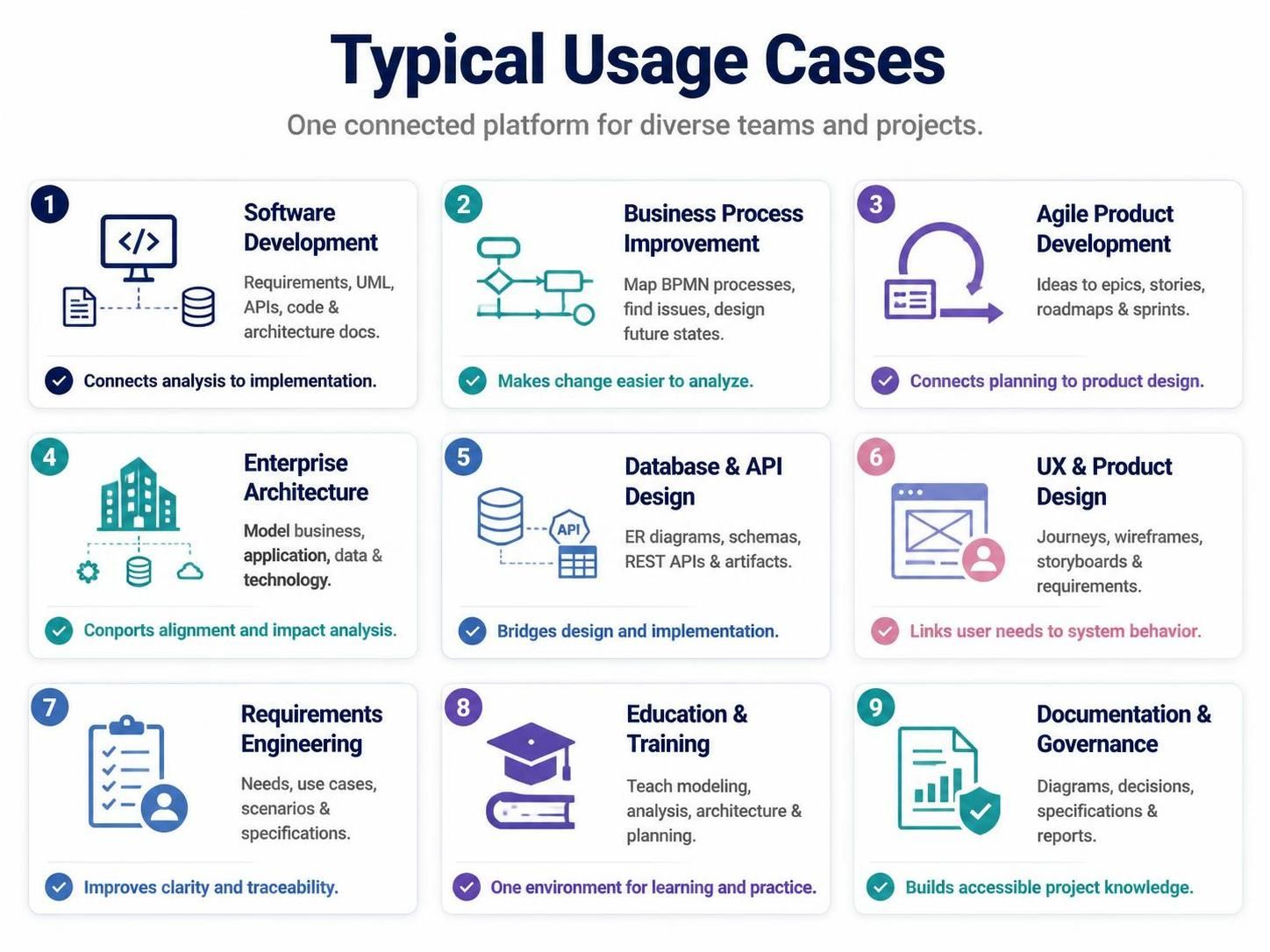
The Unified Platform is designed to be versatile. Below, we break down the nine specific usage cases shown in the reference material, explaining how they interconnect.
2.1 Software Development & Requirements Engineering
These two go hand-in-hand. In a unified workflow, Requirements Engineering involves capturing stakeholder needs and defining use cases. These are not static documents; they are the input for Software Development.
Instead of writing code from scratch based on a PDF, the developer uses the models to generate code skeletons. This ensures that the implementation strictly adheres to the original architectural design.
2.2 Business Process Improvement & Enterprise Architecture
Enterprise Architecture provides the strategic view, modeling business, application, data, and technology layers. Business Process Improvement zooms in on the “Business Layer,” mapping current processes in BPMN (Business Process Model and Notation).
The power here lies in Impact Analysis. If you change a business rule in the process model, the platform helps you understand which applications or data layers will be affected.
2.3 Agile Product Development & UX Design
Agile teams often struggle with the disconnect between the “Product Owner” view (Epics, Stories) and the “Developer” view (Code, Architecture). The Unified Platform bridges this by allowing you to:
- Convert product ideas into User Stories and Sprint Plans.
- Map User Journeys and Wireframes directly to those stories.
This ensures that the visual design (UX) is not just an afterthought but is linked directly to the functional requirements.
2.4 Database & API Design
Technical artifacts like ER Diagrams and REST API models are critical for backend stability. In a unified environment, these are not created in isolation. They are generated from the logical domain models defined in earlier stages, ensuring that the physical database schema matches the business logic.
2.5 Education, Training, and Governance
Finally, the platform serves as an educational tool. Because it supports theoretical learning (UML, BPMN) and practical application simultaneously, it is ideal for training new hires. Furthermore, it acts as a governance tool by maintaining a centralized repository of decision records and specifications.
💡 Did You Know?
In Visual Paradigm, you can use VPasCode to generate entire project structures (like database scripts or Java classes) directly from your models. This allows you to switch between a visual modeling interface and a code editor seamlessly, effectively treating code as just another type of model.
3. The Workflow: From Idea to Implementation
The most powerful aspect of the Unified Platform is the ability to support a hybrid workflow. Let’s walk through a typical sequence of moving from a high-level idea to technical implementation.
- Capture the Idea: Start in the requirements module. Record the business problem, stakeholder goals, or product opportunity. This is your “North Star.”
- Define Requirements: Refine these informal ideas into structured requirements. Create use cases and define acceptance criteria to ensure they are testable.
- Model the Processes: Use BPMN or activity diagrams to describe how work should happen. This visualizes the flow of data and decision points.
- Design the Solution: Now, move to the technical design. Create domain models for business logic, class diagrams for structure, and sequence diagrams for interactions.
- Design Data and APIs: Develop ER diagrams for database structures and model REST APIs for integration. Define how data flows between systems.
- Plan Delivery: Organize the work into a product backlog. Create a visual roadmap and break down tasks for sprint planning.
- Implement the Solution: Use code engineering features to generate skeleton code. If you are working on legacy systems, you can reverse-engineer existing code into models to understand the architecture.
- Review and Validate: Check models for consistency. Analyze dependencies and simulate processes where appropriate to catch logic errors early.
- Publish and Collaborate: Generate final specifications and reports. Share project views with both technical and non-technical audiences for feedback.
4. Conclusion
Adopting a Unified Platform is not just about buying a new tool; it is about changing how you manage information. By connecting analysis with implementation, you reduce rework, improve communication, and create a living document of your system that evolves alongside your project.