


Are you struggling to prioritize features for your next mobile app release? The MoSCoW Prioritization Framework Tool from Visual Paradigm is an AI-powered solution that transforms the chaos of feature brainstorming into a clear, actionable roadmap. This powerful tool guides you through a structured 5-step workflow to categorize your requirements into Must Have, Should Have, Could Have, and Won’t Have, ensuring your project stays focused on delivering maximum value. With AI assistance, you can generate a comprehensive initial draft in seconds, saving hours of manual effort. The final report provides a professional summary, perfect for aligning stakeholders and guiding development. This is the ultimate tool for product owners, project managers, and agile teams looking to streamline their prioritization process and deliver successful projects.
Quick Summary
-
Use the AI-Powered MoSCoW Prioritization Framework Tool to create a clear, strategic roadmap for your project.
-
Generate a comprehensive list of features categorized into Must Have, Should Have, Could Have, and Won’t Have.
-
Save your analysis locally for complete data privacy and control.
-
Produce a professional final report to share with your team and stakeholders.
-
Accelerate your planning process with AI-generated suggestions based on your project context.
From Chaos to Clarity: The AI-Powered MoSCoW Journey
Imagine a project where your team is drowning in a sea of feature requests, and every stakeholder has a different idea of what’s most important. This is the common reality for many product teams, leading to scope creep, missed deadlines, and frustrated stakeholders. The MoSCoW Prioritization Framework Tool from Visual Paradigm offers a powerful solution to this problem. It provides a structured, step-by-step process to bring order to the chaos and ensure everyone is aligned on the project’s core objectives.
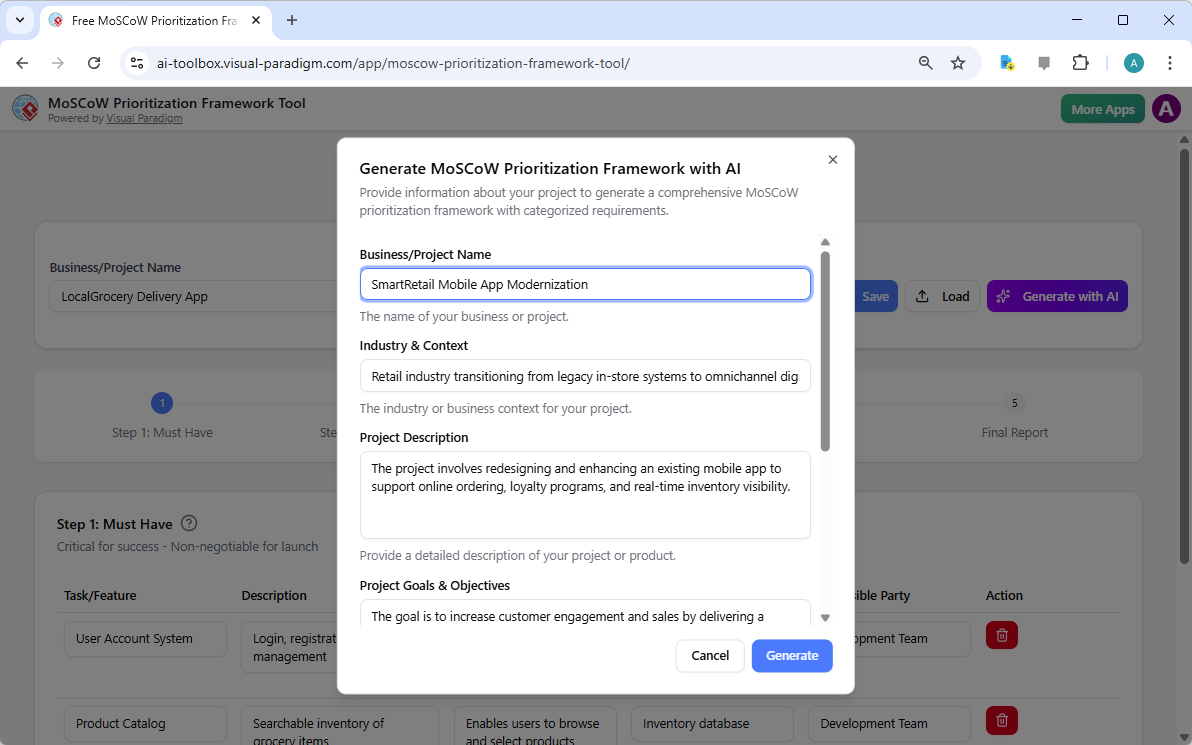
Let’s see how it works with a real-world example. Image 1 shows the initial AI generation screen. The user has input the project name, “SmartRetail Mobile App Modernization,” and provides critical context: the retail industry is transitioning to omnichannel experiences, the goal is to increase customer engagement and sales, and the project is constrained by a six-month timeline and fixed budget. By providing this context, the AI is primed to generate a prioritization framework that is not generic, but tailored to the specific challenges and goals of this project. This is the first step in transforming a complex, ambiguous project into a clear, prioritized plan.
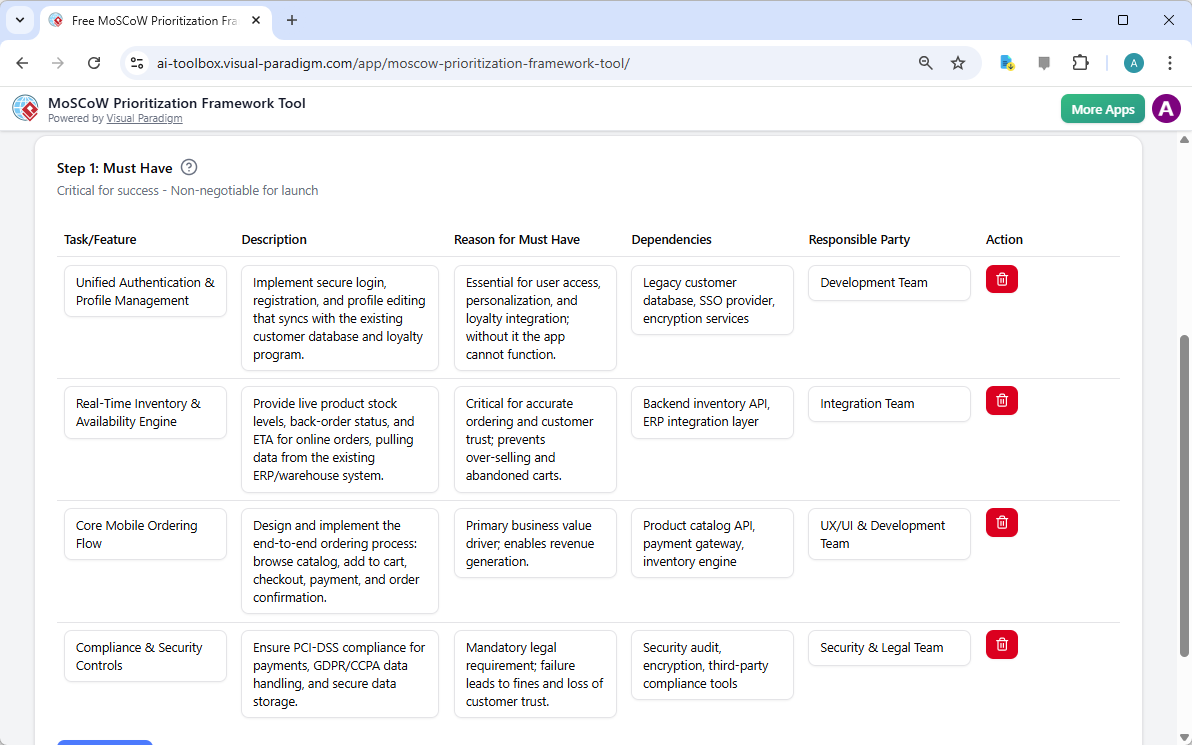
Once the AI has generated the initial data, the process moves to the core of the tool. Image 2 shows the first step of the wizard: “Step 1: Must Have.” This is where the most critical, non-negotiable requirements are defined. The AI has already populated the table with items like “Unified Authentication & Profile Management” and “Real-Time Inventory & Availability Engine,” each with a detailed description, reason for inclusion, dependencies, and a responsible party. This structure forces the team to think critically about what is essential for the project’s success. The user can then easily review, edit, or add to this list, ensuring that the final “Must Have” list is accurate and reflects the team’s collective understanding.
Refining the Plan: The Should Have, Could Have, and Won’t Have Steps
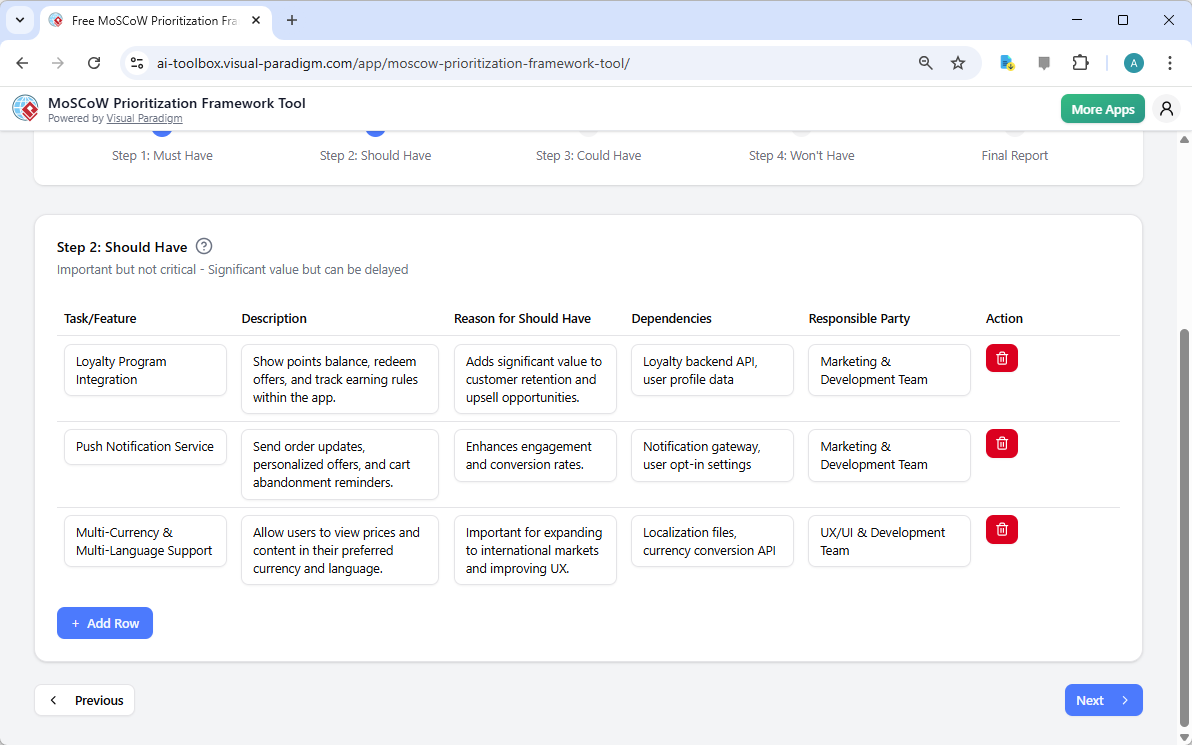
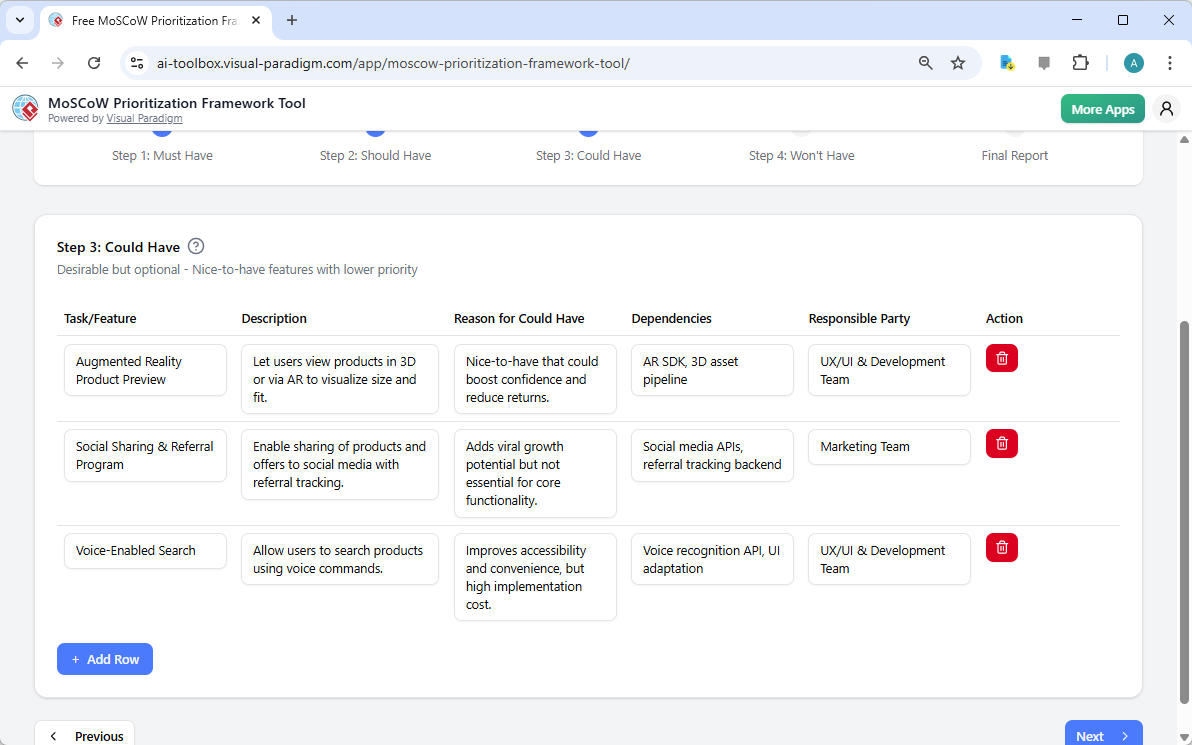
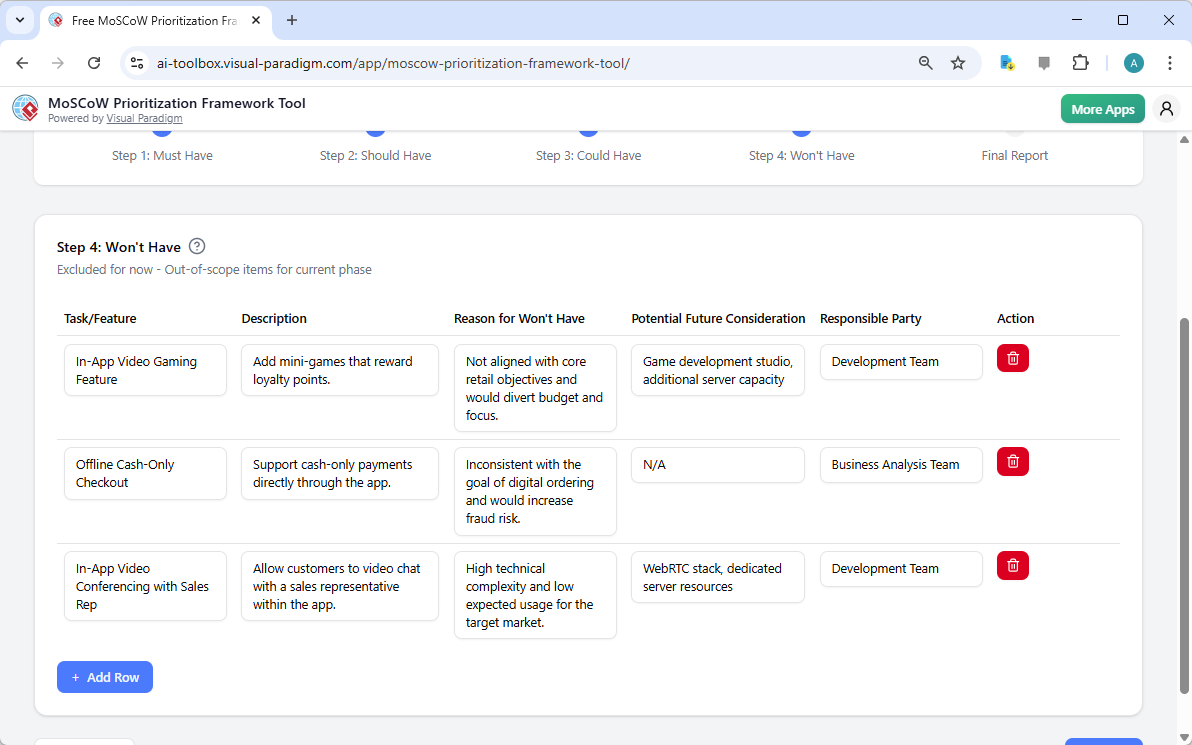
After finalizing the “Must Have” items, the user proceeds to the next stages. Image 3 displays “Step 2: Should Have.” These are features that are important but not critical. The AI has suggested items like “Loyalty Program Integration” and “Push Notification Service,” which add significant value but can be delayed if necessary. This step helps the team identify the next tier of high-value features. The process continues with Image 4, showing “Step 3: Could Have.” Here, the focus shifts to desirable but lower-priority features, such as “Augmented Reality Product Preview” and “Voice-Enabled Search.” These are the “nice-to-have” items that could enhance the user experience but are not essential for the initial launch. Finally, Image 5 shows “Step 4: Won’t Have,” where items explicitly excluded from the current scope are defined. In this example, “In-App Video Gaming Feature” and “Offline Cash-Only Checkout” are listed as out of scope, with clear reasons why they are not aligned with the project’s goals. This step is crucial for managing expectations and preventing scope creep.
Bringing It All Together: The Final Report
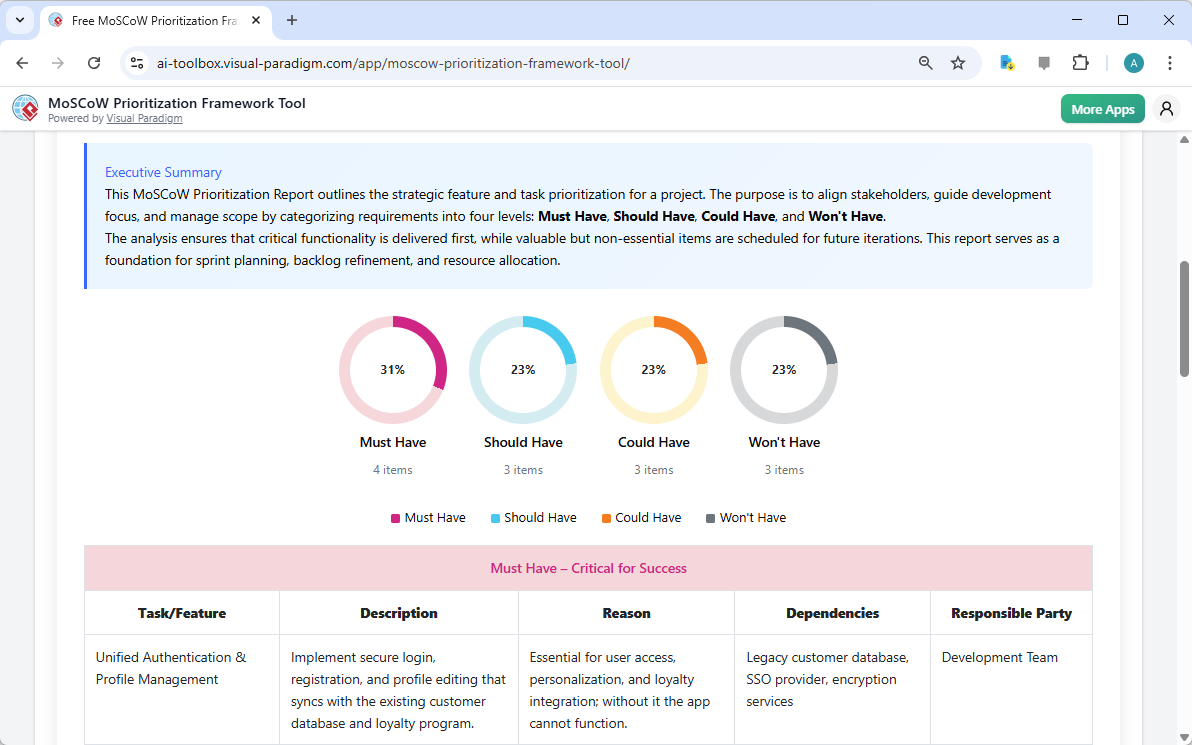
With all the prioritization work complete, the final step is to generate a professional report. Image 6 shows the “Final Report” screen, which consolidates all the information from the previous steps into a single, easy-to-understand document. The report begins with an executive summary that explains the purpose of the MoSCoW framework and how it aligns stakeholders and guides development. It then presents a clear pie chart visualizing the distribution of items across the four categories, making it easy to see the project’s focus. The report includes a detailed table that lists every task or feature, its description, the reason for its priority, dependencies, and the responsible party. This comprehensive output serves as a single source of truth for the entire team, providing a foundation for sprint planning, backlog refinement, and resource allocation.
The MoSCoW Prioritization Framework Tool is more than just a simple list; it’s a strategic planning engine. It leverages AI to accelerate the initial prioritization process, but it also empowers the team to refine and validate the results. By using this tool, you can ensure that your project focuses on delivering the most critical features first, while clearly communicating what is and is not in scope. This leads to faster time-to-market, better stakeholder alignment, and a higher chance of project success.
Ready to transform your project planning? Try the AI-Powered MoSCoW Prioritization Framework Tool now and create your strategic roadmap in minutes.
Visual Reference:
Visual Reference:
Visual Reference:
Visual Reference:
Visual Reference:
Visual Reference:
Related Links
Visual Paradigm’s AI suite provides a broad array of intelligent tools designed to automate complex modeling tasks, from generating UML and enterprise architecture diagrams from natural language prompts to offering context-aware guidance through interactive assistants,,,. These tools enhance productivity by streamlining strategic analysis, software design, and digital content creation,.
-
AI-Powered Visual Modeling and Design Solutions: A central hub for AI-driven tools that accelerate development workflows through automated diagramming and software design.
-
Visual Paradigm AI Diagram Generation Guide: A step-by-step tutorial on leveraging AI-powered tools for fast and accurate diagram creation across various standards.
-
AI Chatbot – Intelligent Assistance for Visual Paradigm Users: An interactive assistant that delivers instant guidance, automates repetitive tasks, and converts text prompts into visual models,.
-
AI Textual Analysis – Transform Text into Visual Models Automatically: This tool analyzes text documents to automatically generate UML, BPMN, and ERD diagrams, significantly speeding up modeling and documentation.
-
AI-Powered Use Case Description Generator: An automation tool that creates detailed, structured use case descriptions from user input to support requirement engineering.
-
AI-Powered ArchiMate Viewpoints Generator: A specialized feature that automates the generation of ArchiMate viewpoints, ensuring accuracy and efficiency in enterprise architecture modeling.
-
DBModeler AI: Intelligent Database Modeling Tool: An AI-driven solution for automated database schema generation, normalization, and design optimization,.
-
AI-Powered C4 Diagram Generator: A generator supporting all four core levels of the C4 model—Context, Container, Component, and Deployment—for comprehensive architectural documentation.
-
AI-Powered SWOT and TOWS Business Analysis Tool: An analytical tool that uses artificial intelligence to transform SWOT findings into actionable strategies through the TOWS matrix,.
-
Lumina AI Slideshow Maker: Create Stunning Presentations with AI: A tool that converts simple text into professional-quality slides and animated presentations using generative AI,.