This is a demo site showcasing flipbooks created with Visual Paradigm Online.

Extending Standard UML with Profile Diagrams: A Guide

Read this post in: de_DEes_ESfr_FRhi_INid_IDjapl_PLpt_PTru_RUvizh_CNzh_TW

Unified Modeling Language (UML) provides a standardized way to visualize, specify, construct, and document the artifacts of a software system. However, the standard set of diagrams and notations often requires adaptation to fit specific domains, industries, or architectural styles. This is where the concept of UML Profiles becomes essential. A profile allows modelers to extend the UML metamodel without altering the standard itself. This guide explores the mechanics, structure, and practical application of extending standard UML with profile diagrams.
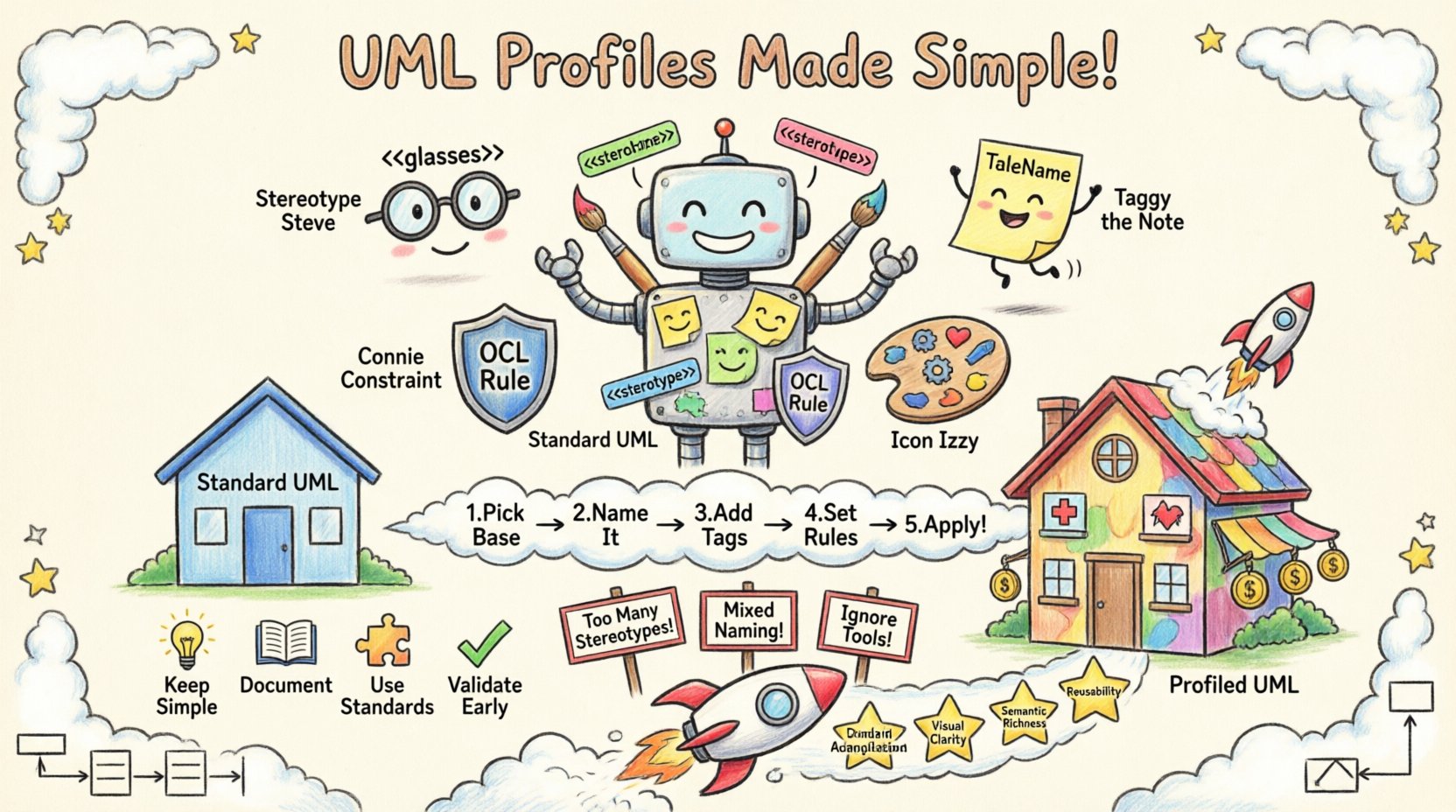
Child's drawing style infographic explaining UML Profile diagrams: shows Standard UML robot receiving colorful extensions including stereotypes with << >> symbols, tagged values, constraints, and custom icons; illustrates the 5-step profile creation process, compares standard vs profiled UML with house metaphors, displays best practices and pitfalls with playful icons, and highlights key benefits like domain adaptation, visual clarity, and reusability for software modeling”/></figure>
</div>

<h2>Understanding the Need for UML Profiles 🤔</h2>

<p>The standard UML specification covers a broad spectrum of software engineering needs. It includes structural diagrams like Class and Object diagrams, behavioral diagrams like State and Activity diagrams, and interaction diagrams like Sequence and Communication diagrams. Despite its breadth, a generic model often fails to capture domain-specific nuances. For instance, a model describing a microservices architecture requires different semantics than a model describing a safety-critical embedded system.</p>

<p>Without profiles, teams might resort to informal annotations or non-standard symbols, leading to confusion and maintenance issues. Profiles solve this by allowing the definition of new stereotypes, tagged values, and constraints that are compliant with the UML standard. This ensures that the extended notation remains machine-readable and interoperable while addressing specific requirements.</p>

<h3>Key Drivers for Extension</h3>
<ul>
    <li><strong>Domain Specificity:</strong> Tailoring models for specific industries such as finance, healthcare, or aerospace.</li>
    <li><strong>Architectural Patterns:</strong> Encoding common design patterns like MVC or Microservices into reusable constructs.</li>
    <li><strong>Tool Interoperability:</strong> Ensuring that specific modeling tools can interpret custom notations correctly.</li>
    <li><strong>Constraint Enforcement:</strong> Adding semantic rules that the standard UML does not explicitly define.</li>
</ul>

<h2>Core Components of a UML Profile 🧩</h2>

<p>A profile is essentially a package that extends the UML metamodel. It defines a set of new concepts that can be applied to existing model elements. To build a robust profile, one must understand its fundamental building blocks.</p>

<h3>1. Stereotypes</h3>
<p>Stereotypes are the primary mechanism for extending UML. They allow you to classify a model element in a new way. Visually, they are represented by text enclosed in guillemets (e.g., <<Service>>). Semantically, a stereotype is a specialization of a UML Classifier. When you apply a stereotype to a class, you are defining a new kind of class that inherits from the original definition but adds specific properties.</p>

<h3>2. Tagged Values</h3>
<p>Tagged values allow you to attach additional information to a model element. While UML has standard properties like visibility and multiplicity, tagged values let you define custom attributes. For example, a stereotype representing a database table might have a tagged value for <em>Table Name</em> or <em>Primary Key</em>.</p>

<h3>3. Constraints</h3>
<p>Constraints are rules that restrict the values or relationships allowed within a model. They are often written in Object Constraint Language (OCL). Profiles can define standard constraints that apply to specific stereotypes. For example, a constraint might dictate that a specific type of class must have a constructor.</p>

<h3>4. Icons and Notation</h3>
<p>Visual representation is crucial for model readability. Profiles can define custom icons for stereotypes. This helps distinguish between a standard class and a profiled class at a glance, improving the visual clarity of complex diagrams.</p>

<h2>Defining Stereotypes and Metaclasses 🏗️</h2>

<p>The relationship between a stereotype and a metaclass is the backbone of profile extension. Every stereotype is defined in relation to a specific metaclass. For example, if you create a stereotype for a database table, it is likely based on the <em>Class</em> metaclass. If you create a stereotype for an interface, it is based on the <em>Interface</em> metaclass.</p>

<p>When defining a stereotype, you are essentially creating a new classifier that extends the base metaclass. This means the new element retains all properties of the base element but allows for the addition of new properties via tagged values.</p>

<h3>Step-by-Step Definition Process</h3>
<ol>
    <li><strong>Select the Base Metaclass:</strong> Identify which standard UML element the new concept extends. Is it a Class? An Association? A Component?</li>
    <li><strong>Create the Stereotype:</strong> Define the name of the stereotype. This name becomes the label used in the model.</li>
    <li><strong>Define Tagged Values:</strong> List the additional data points required for this new type of element. Specify data types for each value.</li>
    <li><strong>Define Constraints:</strong> Add any logical rules that must be satisfied for the element to be valid.</li>
    <li><strong>Apply the Profile:</strong> Once defined, the profile must be applied to the model to make the stereotypes available for use.</li>
</ol>

<h2>Constructing a Profile: A Practical Walkthrough 🛠️</h2>

<p>Creating a profile involves organizing these components into a cohesive package. Below is a conceptual approach to building a profile for a web application architecture.</p>

<h3>Phase 1: Analysis</h3>
<p>Before defining elements, analyze the domain. What concepts are common? In web development, common concepts include Controllers, Models, Views, and API Endpoints. These do not map perfectly to standard UML classes without semantic loss.</p>

<h3>Phase 2: Definition</h3>
<p>Define the stereotypes based on the analysis.</p>
<ul>
    <li><strong><<Controller>></strong>: Extends Class. Tagged values: <em>Handler Method</em>, <em>Route Path</em>.</li>
    <li><strong><<Model>></strong>: Extends Class. Tagged values: <em>Table Name</em>, <em>Validation Rules</em>.</li>
    <li><strong><<View>></strong>: Extends Component. Tagged values: <em>Template Engine</em>, <em>Asset Path</em>.</li>
</ul>

<h3>Phase 3: Documentation</h3>
<p>Each stereotype should be documented within the profile package. Explain what the stereotype represents, when to use it, and any restrictions. This ensures that other team members understand the intent behind the extension.</p>

<h2>Managing Dependencies and Namespaces 🌐</h2>

<p>Profiles often depend on other profiles or standard UML libraries. Proper management of namespaces is critical to avoid naming collisions. A profile is typically contained within a package that defines its namespace.</p>

<h3>Importing and Extending</h3>
<p>If a profile relies on existing standard elements, it must import the relevant packages. For example, if you are extending the <em>Component</em> diagram, you must ensure the standard Component package is accessible. Dependencies between profiles should be explicit.</p>

<h3>Version Control</h3>
<p>As models evolve, profiles may need updates. Versioning profiles ensures that models created with an older version of the profile do not break when the profile is updated. This is particularly important in large organizations where multiple teams use the same modeling standards.</p>

<h2>Comparison: Standard UML vs. Profiled UML 📊</h2>

<p>Understanding the differences helps in deciding when to use a profile.</p>

<table>
    <thead>
        <tr>
            <th>Feature</th>
            <th>Standard UML</th>
            <th>UML Profile</th>
        </tr>
    </thead>
    <tbody>
        <tr>
            <td><strong>Scope</strong></td>
            <td>General purpose, generic</td>
            <td>Specific to domain or architecture</td>
        </tr>
        <tr>
            <td><strong>Extensibility</strong></td>
            <td>Fixed set of elements</td>
            <td>Extensible via stereotypes</td>
        </tr>
        <tr>
            <td><strong>Notation</strong></td>
            <td>Standard icons and lines</td>
            <td>Custom icons and labels allowed</td>
        </tr>
        <tr>
            <td><strong>Constraints</strong></td>
            <td>Basic structural rules</td>
            <td>Custom semantic rules via OCL</td>
        </tr>
        <tr>
            <td><strong>Interoperability</strong></td>
            <td>High, universally supported</td>
            <td>Depends on tool support for the profile</td>
        </tr>
    </tbody>
</table>

<h2>Best Practices for Implementation ✅</h2>

<p>To ensure that profiles remain maintainable and useful, adhere to the following guidelines.</p>

<h3>1. Keep It Simple</h3>
<p>Do not over-engineer the profile. If a standard stereotype can be used with a tag, prefer that over creating a new stereotype. Every new stereotype adds cognitive load to the model.</p>

<h3>2. Documentation is Key</h3>
<p>A profile without documentation is a burden. Clearly explain the purpose of each stereotype. Include examples of how the stereotype should be used in a diagram.</p>

<h3>3. Use Existing Standards</h3>
<p>Before creating a new profile, check if an existing industry standard exists. For example, SysML is a profile of UML specifically for systems engineering. Using established standards promotes better tool support and community adoption.</p>

<h3>4. Validate Early</h3>
<p>Test the profile on small models before deploying it organization-wide. Ensure that the constraints and tagged values behave as expected. Check for conflicts with standard UML rules.</p>

<h2>Common Pitfalls to Avoid ⚠️</h2>

<p>Even experienced modelers can make mistakes when extending UML. Awareness of common errors can save significant time.</p>

<ul>
    <li><strong>Overuse of Stereotypes:</strong> Creating too many stereotypes makes the model hard to read. Stick to the most critical distinctions.</li>
    <li><strong>Inconsistent Naming:</strong> Use consistent naming conventions for stereotypes and tagged values. Avoid mixing camelCase and snake_case.</li>
    <li><strong>Ignoring Tool Limitations:</strong> Not all modeling tools support the full range of profile features. Check tool compatibility before finalizing the profile.</li>
    <li><strong>Complex Constraints:</strong> Avoid overly complex OCL constraints that make the profile hard to validate. Keep constraints focused on business logic.</li>
</ul>

<h2>Integration with Other Modeling Standards 🔄</h2>

<p>Profiles are not isolated. They often interact with other modeling languages and standards. SysML, for example, extends UML for systems engineering. Domain Specific Modeling (DSM) often uses profile concepts to create entirely new notations.</p>

<h3>Profile vs. DSL</h3>
<p>Domain Specific Languages (DSLs) can be built using profiles. By defining a set of stereotypes and constraints, you create a mini-language within UML. This allows for high-level modeling of specific domains without leaving the UML ecosystem.</p>

<h3>Cross-Profile Integration</h3>
<p>In large systems, multiple profiles might be used simultaneously. For instance, one profile might handle database modeling, while another handles network topology. Managing the relationships between these profiles requires careful namespace management and dependency tracking.</p>

<h2>Conclusion on Profile Utility 💡</h2>

<p>Extending UML with profile diagrams is a powerful technique for aligning abstract models with concrete domain requirements. It bridges the gap between the generic nature of standard UML and the specific needs of modern software and systems engineering. By following structured approaches to defining stereotypes, tagged values, and constraints, teams can create robust, reusable, and clear models.</p>

<p>While the process requires careful planning and adherence to best practices, the result is a modeling environment that is both flexible and disciplined. Profiles enable organizations to maintain a high level of abstraction while capturing the specific details necessary for successful implementation.</p>

<h2>Summary of Capabilities 🚀</h2>

<ul>
    <li><strong>Standard Compliance:</strong> Profiles extend UML without breaking the standard.</li>
    <li><strong>Domain Adaptation:</strong> Tailor models to specific business or technical domains.</li>
    <li><strong>Visual Clarity:</strong> Use custom icons and labels for better diagram readability.</li>
    <li><strong>Semantic Richness:</strong> Add constraints and tagged values to enforce business rules.</li>
    <li><strong>Reusability:</strong> Share profiles across projects and teams.</li>
</ul>

<p>By mastering the mechanics of profile diagrams, architects and modelers can ensure that their documentation remains relevant, accurate, and valuable throughout the lifecycle of a system.</p>					</div><!-- .entry-content -->

		</article>

		<div class=

Leave A Reply

Your email address will not be published. Required fields are marked *