


Unified Modeling Language (UML) provides a standardized way to visualize the design of a system. However, standard UML diagrams often fall short when addressing specific domain requirements. This is where UML Profile Diagrams come into play. Despite their critical role in Model Driven Architecture (MDA), several misconceptions persist regarding their purpose, implementation, and utility. This guide dismantles these myths to provide a clear understanding of how profiles function within a modeling ecosystem.
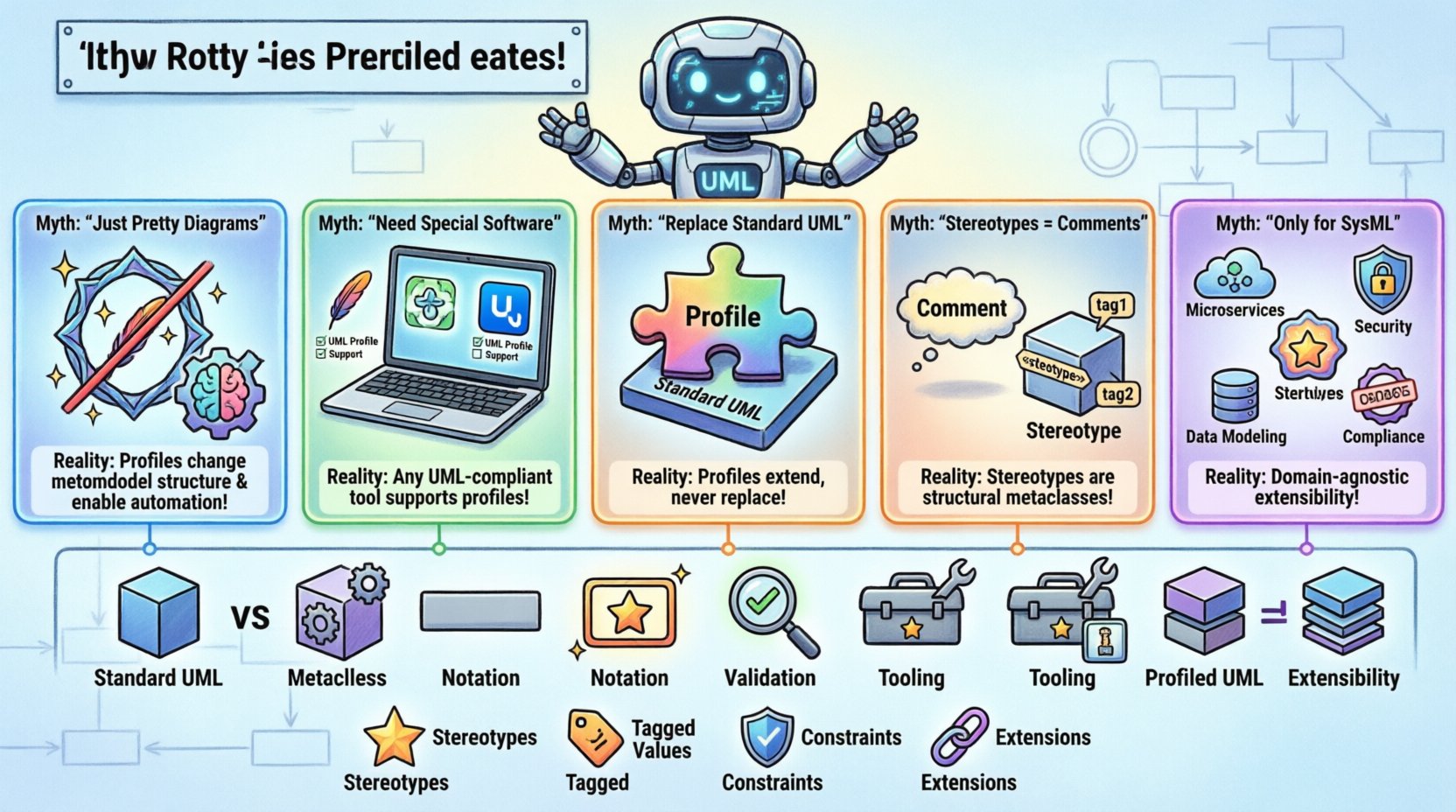
📐 What Is a UML Profile?
Before addressing the misconceptions, it is necessary to establish a solid definition. A UML Profile is a mechanism to customize the UML metamodel for a specific domain or technology. It does not create a new language; rather, it extends the existing one. Think of it as adding a specialized vocabulary to a general language without changing the grammar.
Profiles are defined as packages that contain:
- Stereotypes: Extended classes that define new elements.
- Tagged Values: Attributes that can be added to elements.
- Constraints: Rules that restrict how elements can be used.
- Extensions: Links between the profile and the base metamodel.
When a profile is applied to a model, the base elements gain the capabilities defined in the profile. This allows architects to model domain-specific concepts like security tokens, database transactions, or hardware constraints using standard UML notation, enriched with custom semantics.
❌ Myth 1: Profiles Are Just For Drawing Pretty Diagrams
One of the most pervasive misunderstandings is that profile diagrams are merely visual aids. Some believe they exist solely to make diagrams look different or to create a custom set of icons. This view ignores the semantic power of profiles.
Profiles are functional extensions. When you define a stereotype, you are defining a new type of classifier. This classification allows tools to interpret the model differently. For instance, a stereotype applied to a class might trigger specific code generation behavior. If the profile were just visual, the underlying model data would remain unchanged, rendering the extension useless for automation.
The Reality:
- Profiles change the metamodel structure, not just the appearance.
- Stereotypes carry semantic meaning that tools can parse.
- Tagged values store metadata that drives transformation logic.
- Constraints enforce domain rules that standard UML cannot express.
Without the semantic extension, a profile is a decoration. With it, a profile is a tool for automation and validation.
❌ Myth 2: You Need Specialized Software To Use Profiles
Many practitioners assume that because profiles are advanced, they require expensive, proprietary modeling environments. This belief creates a barrier to entry, discouraging teams from adopting the standard.
The UML specification is open. Any compliant modeling tool supports profiles. The standard defines how a profile is stored, serialized, and applied. While some commercial tools offer enhanced wizards for profile management, the core functionality relies on the UML standard, not the vendor.
The Reality:
- Standard UML tools support profile definition and application.
- Profiles are stored in standard XMI formats.
- Interoperability is maintained across different platforms.
- Open-source tools can define and apply profiles just as effectively.
Restricting profiles to specific software limits the portability of the architecture. A profile defined in one environment should be readable and usable in another, provided both adhere to the UML standard.
❌ Myth 3: Profiles Replace Standard UML Diagrams
There is a fear that introducing profiles means abandoning standard UML notation. Some architects worry that using a profile makes a model incompatible with standard UML viewers or documentation generators.
Profiles are additive, not substitutive. They extend the base metaclass. A class in a profiled model is still a class. It just has additional properties or behaviors defined by the stereotype. The base structure remains recognizable to any UML tool, even if it does not understand the specific profile.
The Reality:
- Profiles extend base classes (e.g., extending Classifier).
- Standard tools can display profiled models, though they may ignore custom tags.
- The model remains valid UML even if the profile is not fully applied.
- Backward compatibility is a core design principle of UML.
This ensures that models can evolve. A team can start with standard UML and gradually introduce profiles as domain complexity increases, without breaking existing documentation.
❌ Myth 4: Stereotypes Are Just Comments
Because stereotypes often appear as text in brackets (e.g., <<Service>>), some treat them as simple labels or comments. This minimizes their technical significance. A comment is informational. A stereotype is structural.
A stereotype defines a new metaclass. It changes how the modeler interacts with the element. It can dictate which other elements can be connected to it. It can trigger specific validation rules. If you treat a stereotype as a comment, you lose the ability to leverage tooling features that depend on that classification.
The Reality:
- Stereotypes are instances of the Stereotype metaclass.
- They can have their own attributes (tagged values).
- They can extend the relationship capabilities of a class.
- Tools can query the model for specific stereotypes to filter views.
Confusing comments with stereotypes leads to models that are difficult to query or automate. A profile-driven model relies on these distinctions to function correctly.
❌ Myth 5: Profiles Are Only For SysML
With the rise of Systems Engineering, SysML became a popular extension of UML. Consequently, many assume profiles are exclusive to SysML or systems engineering contexts. This overlooks the broad applicability of profiles across software, enterprise, and data domains.
While SysML uses profiles heavily for system constraints, software architecture benefits equally. You can define profiles for web services, microservices, database schemas, or security protocols. The mechanism is the same, regardless of the domain.
The Reality:
- Profiles are domain-agnostic.
- Software architecture uses profiles for layered patterns.
- Data modeling uses profiles for database-specific types.
- Enterprise modeling uses profiles for business rules.
📊 Comparison: Standard UML vs. Profiled UML
To clarify the distinction, consider the following comparison table.
| Feature | Standard UML | Profiled UML |
|---|---|---|
| Metaclass | Fixed set of classes | Extended set of classes |
| Notation | Standard icons | Standard icons with stereotypes |
| Validation | UML Syntax Rules | UML Rules + Profile Constraints |
| Tooling | Generic support | Domain-specific support |
| Extensibility | Low | High |
This table highlights that the core difference lies in extensibility and validation. The visual representation often remains familiar, which aids adoption.
🛠️ Technical Implementation Details
Understanding the technical mechanics helps dispel further myths. How does a profile actually attach to a model? It is not a simple drag-and-drop operation. It involves the extension mechanism.
A profile package is created. Inside this package, a stereotype is defined. This stereotype is linked to a base metaclass via an extension relationship. For example, a stereotype might extend the Class metaclass. This link tells the modeling environment that any element with this stereotype is also a Class, but with added properties.
When applying a profile to a model:
- The model references the profile package.
- The tool registers the stereotypes in the namespace.
- Users can select the stereotype when creating elements.
- The element inherits the properties defined in the stereotype.
This process ensures that the model remains consistent. You cannot apply a profile to a model that does not support the required base classes. This constraint prevents broken models.
🔄 Profile Versioning and Maintenance
Another area of confusion involves the lifecycle of a profile. Profiles are not static. They evolve as domain requirements change. Managing this evolution is critical.
If you change a stereotype definition, existing models using that stereotype might become invalid. This is why versioning is essential. A profile should have a version identifier. Models should reference a specific version of the profile.
Best practices for maintenance include:
- Documenting changes in a changelog.
- Testing profile updates against existing models.
- Keeping base extensions stable to minimize breaking changes.
- Using namespaces to separate different profile versions.
Neglecting versioning leads to “dependency hell,” where models break because the profile definition changed unexpectedly. A disciplined approach to profile management ensures long-term model stability.
🌍 Interoperability and Serialization
When models are exchanged, profiles must travel with them. The XMI (XML Metadata Interchange) standard handles this. However, profiles are often complex.
If a profile is embedded within the model file, it increases file size. If it is external, it requires path management. The UML standard allows profiles to be defined externally and imported. This keeps models clean and allows multiple models to share the same profile definition.
For interoperability:
- Export the profile definition along with the model.
- Ensure the receiving tool can read the profile.
- Use standard naming conventions for stereotypes.
- Avoid proprietary extensions in the profile definition.
Failure to manage serialization properly can result in data loss. The receiver might see the elements but not the custom tags, rendering the profile useless in the new environment.
🎯 Use Cases for UML Profiles
Where should you apply this knowledge? Here are specific scenarios where profiles add value.
1. Microservices Architecture
Define stereotypes for services, APIs, and data stores. Add tagged values for deployment location or latency requirements. This allows architects to view the system at a high level while retaining deployment details.
2. Security Modeling
Create stereotypes for authentication mechanisms, encryption standards, and access control points. Tagged values can specify key lengths or protocol versions. This integrates security requirements directly into the design model.
3. Database Design
Extend the Class diagram to include database-specific constraints like unique keys, foreign keys, or indexing strategies. This bridges the gap between logical design and physical schema.
4. Regulatory Compliance
Use profiles to mark elements that must comply with specific regulations. Tagged values can indicate the regulation ID. This facilitates auditing and ensures compliance is modeled, not just documented.
🚀 Best Practices for Adoption
To successfully implement profiles without falling into common traps, follow these guidelines.
- Start Small: Define one stereotype first. Validate it before expanding.
- Keep It Simple: Avoid deep inheritance hierarchies. Flat structures are easier to maintain.
- Document Extensively: Profiles are complex. Documentation is not optional.
- Train the Team: Ensure all modelers understand the profile semantics.
- Review Regularly: Profiles drift. Review them periodically to ensure they match current needs.
🔍 The Impact on Code Generation
One of the primary drivers for using profiles is code generation. Profiles provide the metadata needed for transformation engines.
When a transformation engine processes a model, it looks for stereotypes to determine how to generate code. A class with a specific stereotype might generate a Java class, while another might generate a C# class. This is where profiles shine.
Without profiles, the generator would rely on naming conventions, which are fragile. With profiles, the generator relies on explicit semantic markers. This reduces errors and increases the reliability of the generated code.
Key considerations for generation include:
- Ensuring the profile is loaded before generation.
- Handling missing stereotype attributes gracefully.
- Validating the model before generation starts.
- Logging generation errors related to profile mismatches.
🧩 Final Thoughts on Profile Utility
UML Profile Diagrams are a powerful mechanism for extending the standard. They allow organizations to tailor the modeling language to their specific needs without breaking compatibility. By understanding the technical reality behind the myths, architects can leverage profiles to improve model quality, automation, and communication.
The key is to view profiles as extensions of the metamodel, not decorations of the diagram. When used correctly, they provide the flexibility required for complex systems while maintaining the rigor of the UML standard. This balance is essential for successful Model Driven Architecture.
As you implement profiles in your projects, focus on stability, documentation, and clear semantics. Avoid the trap of over-customization. Keep the profile aligned with the domain needs. This ensures the profile remains a useful tool rather than a source of complexity.