


Software architecture relies heavily on clear communication. When teams build complex systems, standard diagrams often reach their limits. This is where the UML Profile Diagram becomes essential. For a mid-level developer, understanding how to extend the Unified Modeling Language (UML) without breaking its core structure is a critical skill. This guide explores the mechanics, applications, and best practices of creating and utilizing UML Profiles.
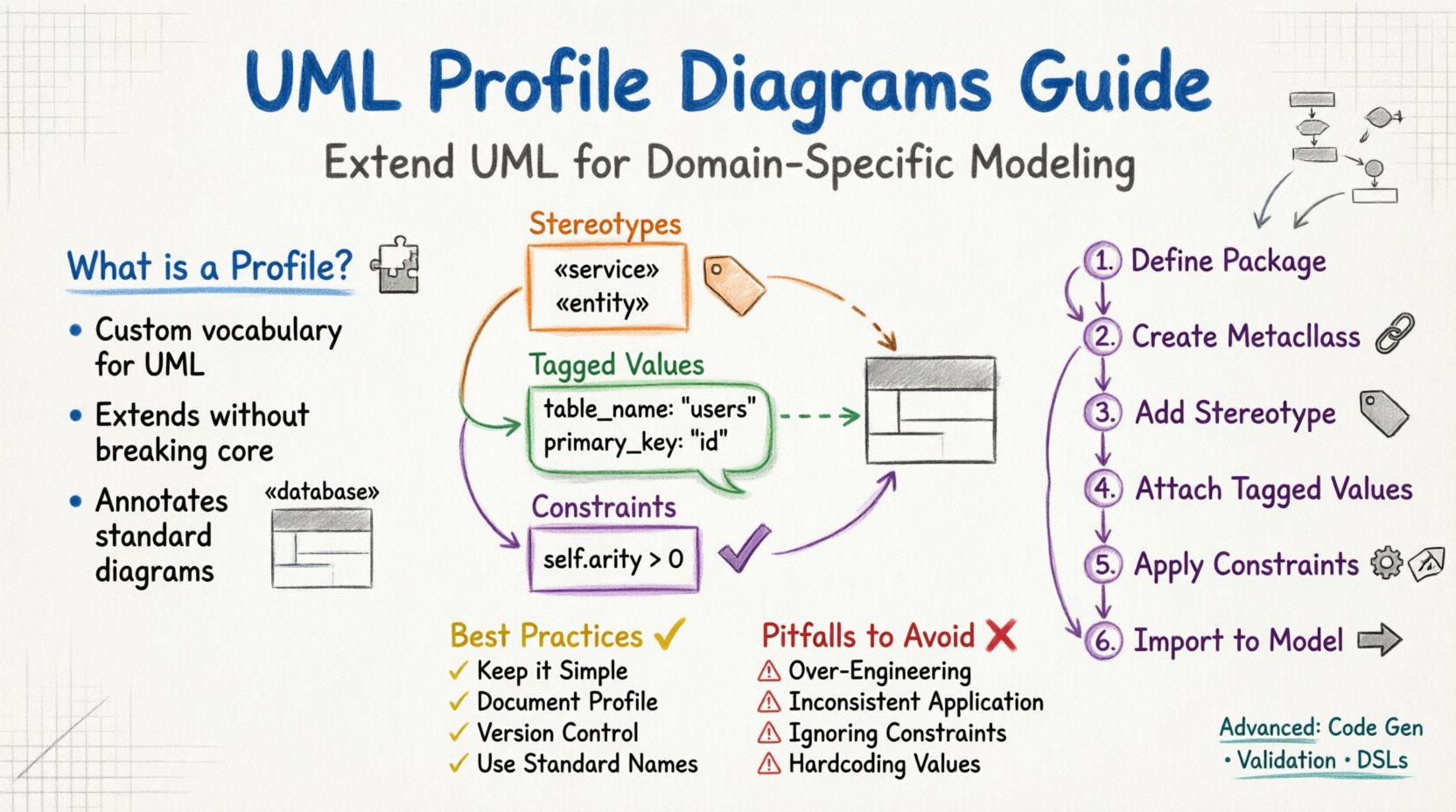
Understanding the Profile Concept 🧩
A UML Profile is a mechanism for extending the UML language. It allows developers to define new modeling elements that fit specific domains without altering the standard UML metamodel. Think of it as adding a custom vocabulary to a standard language. When working on specialized projects, such as embedded systems or financial transactions, generic terms might not suffice. Profiles provide the precision needed.
Profiles do not replace standard UML diagrams. Instead, they annotate them. You might see a standard Class Diagram, but with specific tags or icons indicating that a class represents a database entity or a security token. This distinction is vital. The Profile sits above the model, defining how standard elements should be interpreted in your specific context.
Why Use Profiles?
- Domain Specificity: Tailor modeling to your business domain.
- Standardization: Ensure all team members use the same extended terms.
- Readability: Reduce ambiguity by marking elements clearly.
- Tool Interoperability: Define metadata that tools can process automatically.
Without profiles, teams might rely on informal comments or ad-hoc naming conventions. This leads to confusion as projects grow. Profiles bring structure to these extensions.
Core Components of a Profile 🛠️
Creating a profile involves three primary components. Each plays a distinct role in how the extension is applied to the model. Understanding these building blocks is necessary before attempting to build one.
1. Stereotypes
Stereotypes are the most visible part of a profile. They act as keywords that classify elements. Instead of a standard class, you might define a stereotype like {database}. This tells the reader that the class is not just data storage, but specifically tied to a database schema.
Stereotypes are written between guillemets (brackets). They can be applied to almost any UML element, including classes, interfaces, and packages. When rendered in a diagram, they often appear as a small icon or a specific label above the element name.
2. Tagged Values
Tagged values allow you to attach specific data to an element. Standard UML elements have limited attributes. Profiles add custom attributes. For example, a class might have a standard name and visibility, but a profile could add a table_name or primary_key.
These values are stored as metadata. They are not usually drawn on the diagram itself, but they can be used by code generators or validation tools. This separation of metadata from visual representation keeps the diagram clean while retaining necessary data.
3. Constraints
Constraints define rules that elements must follow. They are often expressed in Object Constraint Language (OCL). A constraint might state that a specific stereotype can only be applied to classes, not interfaces. This prevents misuse of the profile.
Constraints ensure integrity. If a developer tries to apply a profile element incorrectly, the constraint flags the error. This is crucial for maintaining model quality over time.
Comparing Standard vs. Extended Elements 📊
It helps to visualize the difference between standard UML elements and those extended by a profile. The table below outlines how a standard class differs when a profile is applied.
| Feature | Standard UML Class | Profile-Extended Class |
|---|---|---|
| Label | Class Name | {Stereotype} + Class Name |
| Attributes | Standard Fields | Standard Fields + Tagged Values |
| Meaning | Generic Object | Domain-Specific Entity |
| Validation | Basic Syntax | Domain Rules + Constraints |
Building a Profile Step by Step 🏗️
Constructing a profile is a systematic process. You do not modify the UML core. You create a separate package that defines the extensions. This package is then imported into your project model.
Step 1: Define the Package
Start by creating a package dedicated to the profile. Give it a clear name that reflects its domain. Avoid generic names like Profile1. Use something descriptive like DatabaseProfile or SecurityProfile.
Step 2: Create the Metaclass
You must extend a specific UML metaclass. Most often, this is the Class or Package metaclass. This links your new stereotype to the existing UML structure. You are essentially saying, “This new type of element is a subtype of a Class.”
Step 3: Add the Stereotype
Within the package, define the stereotype. Assign it a name. Ensure it matches the guillemet style used in diagrams. This is the label that will appear on your model elements.
Step 4: Attach Tagged Values
Define the custom properties. Specify the data type for each value. Common types include strings, integers, or booleans. For example, a version value might be a string, while a priority value could be an integer.
Step 5: Apply Constraints
Write the OCL rules. Define what is allowed and what is forbidden. This step is often skipped by beginners, but it is where the profile gains its power. It enforces the rules of your domain.
Step 6: Import into the Model
Once the profile is built, it must be applied to the main model. This is done by importing the profile package into the root package of your project. After import, the new stereotypes are available for use in your diagrams.
Integration with Other Diagrams 🔄
Profiles are not isolated. They work alongside sequence diagrams, activity diagrams, and state charts. The key is consistency. If a class is marked as a {service} in a class diagram, it should behave consistently in a sequence diagram.
Sequence Diagrams
In sequence diagrams, profiles can indicate the type of message flow. You might use a stereotype to denote that a message triggers a database transaction. This helps in understanding the flow of control and data.
Activity Diagrams
Activity diagrams often represent business logic. A profile can tag specific nodes as {transaction} or {validation}. This highlights critical paths that require special attention during testing.
State Diagrams
For state machines, profiles can define the lifecycle of an entity. You might tag states as {persistent} or {volatile}. This informs developers about data storage requirements for each state.
Best Practices for Consistency ✅
To maintain a clean model, follow these guidelines when working with profiles.
- Keep it Simple: Do not create a stereotype for every minor attribute. Only use profiles for significant domain concepts.
- Document the Profile: Create a separate document explaining the profile. Include examples of usage. New team members need this reference.
- Version Control: Treat the profile definition like code. Store it in version control. Changes should be reviewed.
- Avoid Redundancy: Do not create a stereotype that is identical to an existing UML extension. Use the standard features first.
- Use Standard Names: Where possible, align your stereotype names with industry standards. This reduces the learning curve.
Common Pitfalls to Avoid ⚠️
Even experienced developers make mistakes when extending UML. Being aware of these common errors can save time.
Over-Engineering
It is tempting to create a profile for every scenario. This leads to a bloated model. If a standard UML element works, use it. Profiles should be reserved for cases where standard elements fail to convey the meaning.
Inconsistent Application
If one developer uses {service} and another uses {api} for the same concept, the model becomes confusing. Establish a naming convention and enforce it across the team.
Ignoring Constraints
Without constraints, the profile is just a set of labels. Developers might apply them incorrectly. Always define rules for when a stereotype can be used.
Hardcoding Values
Do not hardcode values into the profile definition. Keep tagged values flexible. If you hardcode a value, the profile loses its generality and becomes a specific instance rather than a reusable template.
Advanced Usage Scenarios 🚀
Beyond basic modeling, profiles enable more advanced workflows. These scenarios are common in enterprise environments.
Code Generation
Many tools can generate code from models. Profiles provide the metadata needed for this process. If a class has a {entity} stereotype, the generator knows to create a database table. If it has a {view} stereotype, it generates UI code.
This automation reduces manual errors. It ensures the implementation matches the design. Profiles bridge the gap between abstract design and concrete code.
Validation and Testing
Profiles allow for automated validation. You can write scripts that check if all {service} classes have a corresponding {controller}. This ensures architectural rules are followed.
During testing, these tags help identify which components are critical. Test suites can be tagged to run specifically against {transaction} nodes.
Domain Specific Languages
Profiles are the foundation of Domain Specific Languages (DSLs) within UML. By defining a comprehensive profile, you effectively create a DSL tailored to your industry. This makes the model speak the language of the business, not just the language of the computer.
Final Thoughts 💡
UML Profile Diagrams are a powerful tool for mid-level developers. They provide the flexibility to adapt a standard language to specific needs without losing the benefits of standardization. When used correctly, they improve communication, reduce ambiguity, and support automation.
The journey to mastering this technique requires patience. Start with small profiles. Test them in real projects. Gather feedback from your team. As you refine your approach, you will find that profiles become an indispensable part of your modeling toolkit. They transform diagrams from static pictures into dynamic, information-rich blueprints for software systems.
Remember that the goal is clarity. If a profile adds confusion rather than understanding, reconsider its design. Keep the focus on the user, the developer, and the maintenance of the system. With careful application, UML Profiles will serve as a solid foundation for your architectural documentation.