


Unified Modeling Language (UML) serves as the backbone for software architecture, providing a standardized notation for visualizing system designs. However, standard UML is generic. It does not always account for specific industry requirements, legacy constraints, or specialized domains like embedded systems or cloud computing. This is where the UML Profile Diagram becomes a critical tool for architects and developers.
A profile allows you to extend the UML metamodel to suit your specific needs without changing the core language definition. This guide addresses frequently asked questions regarding profiles, their structure, implementation, and best practices. We will explore how to create custom stereotypes, manage tagged values, and ensure your models remain compatible with standard tools.
What Exactly Is a UML Profile? 🤔
A UML profile is a mechanism for customizing the UML language. It is defined as a set of extensions that allow you to adapt the UML notation to a specific context. Think of it as a layer that sits on top of the standard UML metamodel.
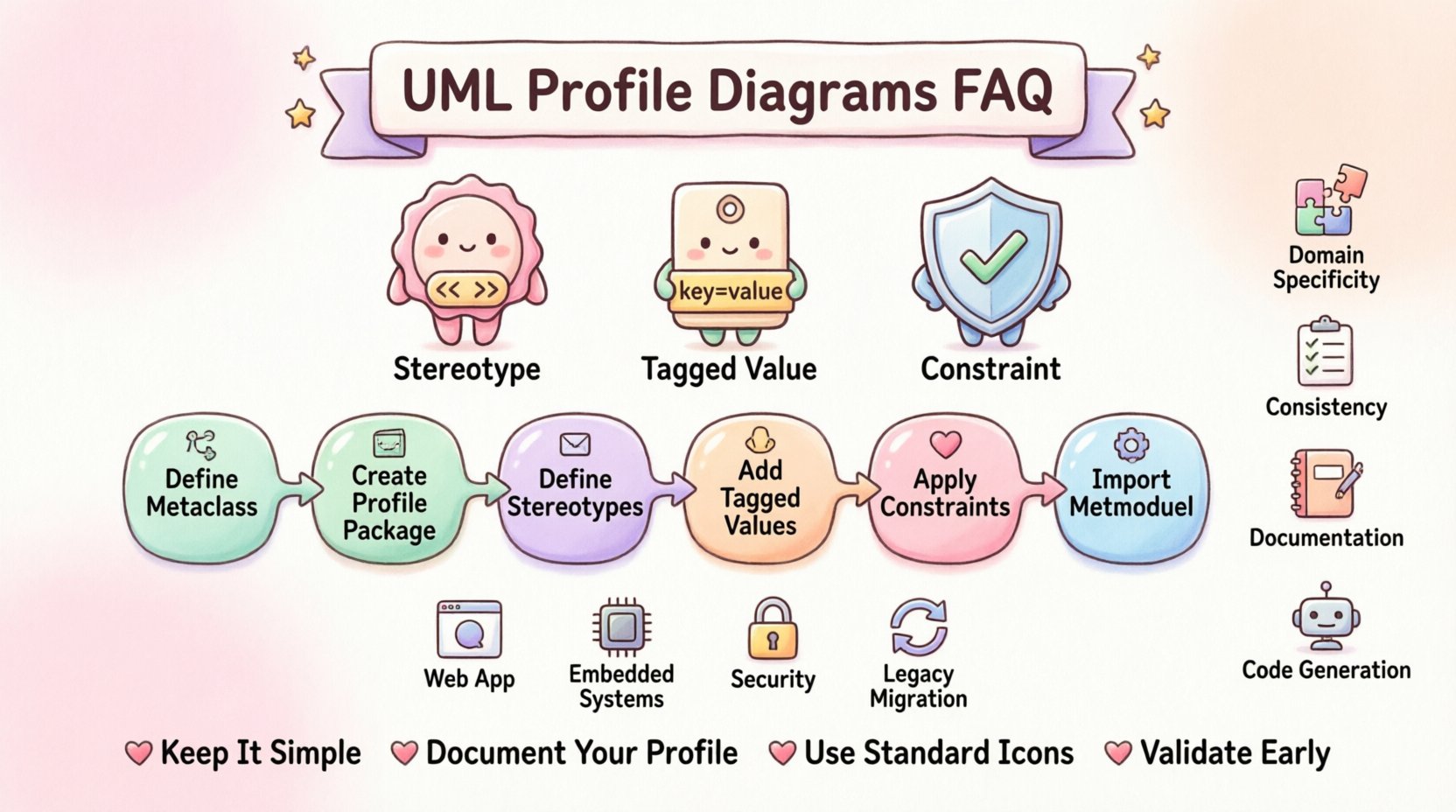
When you define a profile, you are essentially creating a new vocabulary. You do not change the meaning of existing UML elements like classes or use cases, but you add new properties or constraints to them. This is achieved through three primary mechanisms:
- Stereotypes: These are the most visible part of a profile. They allow you to classify model elements in new ways. For example, you might define a stereotype called "<<Service>> to mark a class that acts as a web API endpoint.
- Tagged Values: These are key-value pairs attached to model elements. They allow you to store metadata. If you have a "<<Database>> stereotype, a tagged value might store the connection string or the specific SQL dialect used.
- Constraints: These are logical rules that restrict how model elements can be used. They ensure that your custom extensions adhere to specific business rules or technical limitations.
Profiles are standardized by the Object Management Group (OMG). They are stored as packages within a modeling environment, but they function differently from standard packages. A profile package contains the definitions of the stereotypes and their relationships to the base metaclasses.
Why Should You Use Profiles? 🛠️
Many teams ask why they cannot simply create new diagram types instead of using profiles. The answer lies in interoperability and maintenance. Using profiles ensures that your models remain compatible with standard UML parsers and tools.
Benefits of Using Profiles
- Domain Specificity: You can create notation that speaks the language of your domain. For a medical system, you can define "<<PatientRecord>> instead of generic "Class".
- Consistency: Profiles enforce rules. If a model element is marked with a specific stereotype, it can be validated against a set of rules automatically.
- Documentation: Tagged values provide a place to store design decisions directly on the diagram, reducing the need for separate documentation files.
- Code Generation: Many code generators can read profile information. If you define a stereotype that maps to a specific framework pattern, the generator can produce the correct boilerplate code.
How Are Profiles Structured? 🏗️
Understanding the internal structure of a profile is vital for creating effective diagrams. A profile is essentially a package that imports the UML metamodel. It then defines how new elements extend existing ones.
Core Components Explained
| Component | Description | Example |
|---|---|---|
| Stereotype | A classifier that extends a metaclass. | <<Entity>> extends Class |
| Tagged Value | A property attached to a stereotype or element. | Table Name: "Users" |
| Constraint | A rule defining valid usage. | Must have a Primary Key |
| Import | Links to the standard UML metamodel. | Import "UML" |
When you create a profile, you must specify which base UML class the new stereotype extends. If you extend the "Class" metaclass, the stereotype can be applied to any class in your model. If you extend "Association", it applies to relationships.
How Do You Create a Profile? 📝
Creating a profile involves a specific workflow within a modeling tool. While the interface varies across different environments, the logical steps remain consistent.
- Define the Metaclass: Decide which standard UML element you are extending. Is it a Class? A Use Case? A Component?
- Create the Profile Package: Create a new package dedicated to your profile definitions. This keeps your extensions organized.
- Define Stereotypes: Inside the package, create new stereotype definitions. Assign them a name and an icon.
- Add Tagged Values: Attach properties to the stereotypes. These properties define the data you want to capture for each instance.
- Apply Constraints: Add OCL (Object Constraint Language) rules if necessary to enforce logic.
- Import the Metamodel: Ensure the package references the standard UML metamodel so the tool knows the relationship between your new stereotype and the base class.
Once the profile is defined, you can apply it to your models. In many tools, this requires activating the profile so that the new icons and options appear in the palette.
What Is the Difference Between a Profile and a Package? 📦
This is a common point of confusion. Both are containers for model elements, but they serve different purposes.
- Package: A namespace mechanism. It groups elements to avoid naming conflicts. It does not change the semantics of the elements inside it.
- Profile: A semantic extension mechanism. It changes how elements are interpreted. It adds new capabilities to the language itself.
You can have a package named "MyProject", but you cannot create a stereotype inside a regular package unless that package is designated as a profile package. A profile package must explicitly declare that it extends the UML metamodel.
Common Use Cases for Profiles 💼
Profiles are not just theoretical; they are used extensively in real-world engineering.
1. Web Application Development
Developers often use profiles to distinguish between different layers of a web application. You might have stereotypes like "<<Controller>>, "<<Model>>, and "<<View>>. This makes the architecture immediately visible in the diagram.
2. Embedded Systems
Hardware constraints are critical in embedded design. A profile can define "<<Peripheral>> stereotypes with tagged values for memory addresses and interrupt priorities. This ensures the software model aligns with the hardware datasheets.
3. Security Compliance
In regulated industries, profiles help track compliance. You can define a "<<Encrypted>> stereotype. If a data element lacks this stereotype, a validation tool can flag it as a security risk during the design phase.
4. Legacy Migration
When moving from a legacy system to a new architecture, profiles help map old concepts to new ones. You can create a profile that represents legacy database tables as "<<LegacyTable>> stereotypes, helping developers understand the mapping logic.
How Do Profiles Handle Inheritance? 🔄
UML supports inheritance for stereotypes. This means you can create a hierarchy of stereotypes. For example, you might have a base stereotype "<<Resource>>. You can then create "<<Database>> and "<<File>> that extend "<<Resource>>.
When you apply "<<Database>> to a class, it inherits all the tagged values and constraints defined in "<<Resource>>. This reduces redundancy. You only need to define common properties once.
However, you must be careful not to create deep inheritance trees. If a stereotype extends another that extends another, debugging validation rules becomes difficult. Keep the hierarchy shallow and logical.
What Are Tagged Values and How Do They Work? 🏷️
Tagged values are attributes that you attach to model elements. In a standard class, you might define attributes like "name" or "visibility". In a profile, you define custom attributes.
For example, if you create a "<<Service>> stereotype, you might add a tagged value called "LatencyThreshold" with a type of "Integer". When you apply this stereotype to a class, you can fill in the value for that specific class.
These values can be used by tools for:
- Generating configuration files.
- Running static analysis checks.
- Creating reports for stakeholders.
It is important to define the data type for tagged values. Using "String" for everything is easy, but using "Boolean" for flags or "Float" for measurements allows for better validation.
Can Profiles Interact With Other Standards? 🌐
Yes. Profiles are often designed to bridge gaps between UML and other standards. For instance, the Model Driven Architecture (MDA) initiative relies heavily on profiles to transform platform-independent models into platform-specific models.
Profiles can also map to XML Schema Definitions (XSD). If your system generates XML data, you can define a profile that ensures the UML classes match the XSD requirements exactly. This creates a single source of truth for data contracts.
Best Practices for Profile Design 🎯
Designing a profile requires discipline. A poorly designed profile can make models harder to read rather than easier.
1. Keep It Simple
Do not create a stereotype for every minor difference. If a difference is just a naming convention, use a naming rule instead of a stereotype. Stereotypes should carry semantic weight.
2. Document Your Profile
Since profiles are custom, other team members need to know what they mean. Create a documentation page that lists every stereotype and its tagged values. Explain when to use them and when not to.
3. Use Standard Icons
While you can customize icons, using standard UML shapes where possible helps with compatibility. If you use a custom icon, ensure it is distinct but not confusing.
4. Validate Early
Use validation rules to catch errors. If a "<<Service>> must have a URL, enforce that rule. Do not wait until code generation to find out a required field is missing.
Troubleshooting Common Profile Issues ⚠️
Even with good design, issues can arise. Here are solutions to common problems.
Issue: Elements Won’t Accept the Stereotype
Check the base metaclass. If your stereotype extends "Class", you cannot apply it to an "Association". Ensure the target element type matches the extension target.
Issue: Profile Not Visible in Tool
The profile might not be loaded. In many modeling environments, profiles are not loaded by default. You must explicitly import or activate the profile package in your project settings.
Issue: Tagged Values Are Missing
Check if the tagged value was defined with the correct scope. Some tools require tagged values to be defined at the stereotype level, while others allow them at the model level. Verify the scope settings.
Issue: Circular Dependencies
If Profile A extends Profile B and Profile B extends Profile A, the model will fail to validate. Ensure there are no circular references in your profile hierarchy.
Frequently Asked Questions Table ❓
| Question | Answer |
|---|---|
| Can I delete a stereotype? | Yes, but it may leave orphaned elements. Reapply standard types to elements before deleting. |
| Does a profile change the UML standard? | No, it extends the usage. The core standard remains unchanged and compatible. |
| Can I share profiles between projects? | Yes. Profiles are often stored in shared libraries to ensure consistency across teams. |
| Do all tools support profiles? | Most professional modeling tools support profiles, but the implementation details may vary. |
| What happens if I remove a profile? | Elements retain the stereotype name but lose the profile semantics and tags. |
Future of Profile Diagrams in Modeling 🚀
As software systems become more complex, the need for precise modeling grows. Profiles allow us to create domain-specific languages (DSLs) without leaving the UML ecosystem. This flexibility is crucial for Model Driven Development (MDD).
We are seeing a trend towards cloud-native profiles that define microservices patterns explicitly. Similarly, AI-driven modeling tools are beginning to suggest profile elements based on the context of the diagram. This reduces the manual effort required to maintain consistency.
Maintaining Profile Health 🛡️
A profile is a living artifact. As your system evolves, your profile must evolve with it. However, you should avoid changing existing stereotypes frequently. Changing a stereotype definition can break existing models that rely on it.
If a stereotype needs to change, consider creating a new version. For example, change "<<Service>> to "<<Service_v2>>. This allows you to migrate models gradually. Always version your profile packages to track changes over time.
Regular audits of your profile usage are recommended. Check if any stereotypes are unused. If a stereotype hasn’t been used in a year, consider archiving it to keep the palette clean.
Conclusion on Profile Mastery 🎓
UML Profile Diagrams are a powerful extension mechanism that brings flexibility to the rigid structure of standard UML. They allow teams to tailor the modeling language to their specific architectural patterns, regulatory needs, and technical constraints. By understanding stereotypes, tagged values, and constraints, you can create models that are not just visual representations, but functional specifications that drive development.
Remember that the goal is clarity. If a profile makes your diagrams harder to understand, it is not serving its purpose. Use profiles to enhance communication, not to add complexity. With careful design and adherence to best practices, profiles become an invaluable asset in your software engineering toolkit.
Key Takeaways 📌
- Profiles extend the UML metamodel without changing the core language.
- Stereotypes, Tagged Values, and Constraints are the three pillars of a profile.
- Profiles ensure consistency across teams and projects.
- Always document your profile definitions for team collaboration.
- Validate your models to ensure profile rules are followed.
- Version your profiles to manage evolution safely.
By implementing these concepts, you ensure your modeling efforts remain scalable, maintainable, and aligned with your organization’s specific needs. The UML Profile Diagram is not just a diagram; it is a contract between your design and your implementation.