


Full-stack development involves navigating multiple layers of technology, from user interface components to backend logic and database interactions. Each layer often speaks a different dialect of system design. This fragmentation creates friction when teams attempt to align architecture with implementation. A UML Profile Diagram offers a structured solution to this challenge. It allows developers to extend standard modeling languages to fit specific domain needs without altering the core language itself.
This guide explores how full-stack engineers can utilize UML profiles to standardize communication, reduce ambiguity, and maintain consistency across complex systems. We will examine the mechanics of profiles, their practical application in modern development workflows, and strategies for effective implementation.
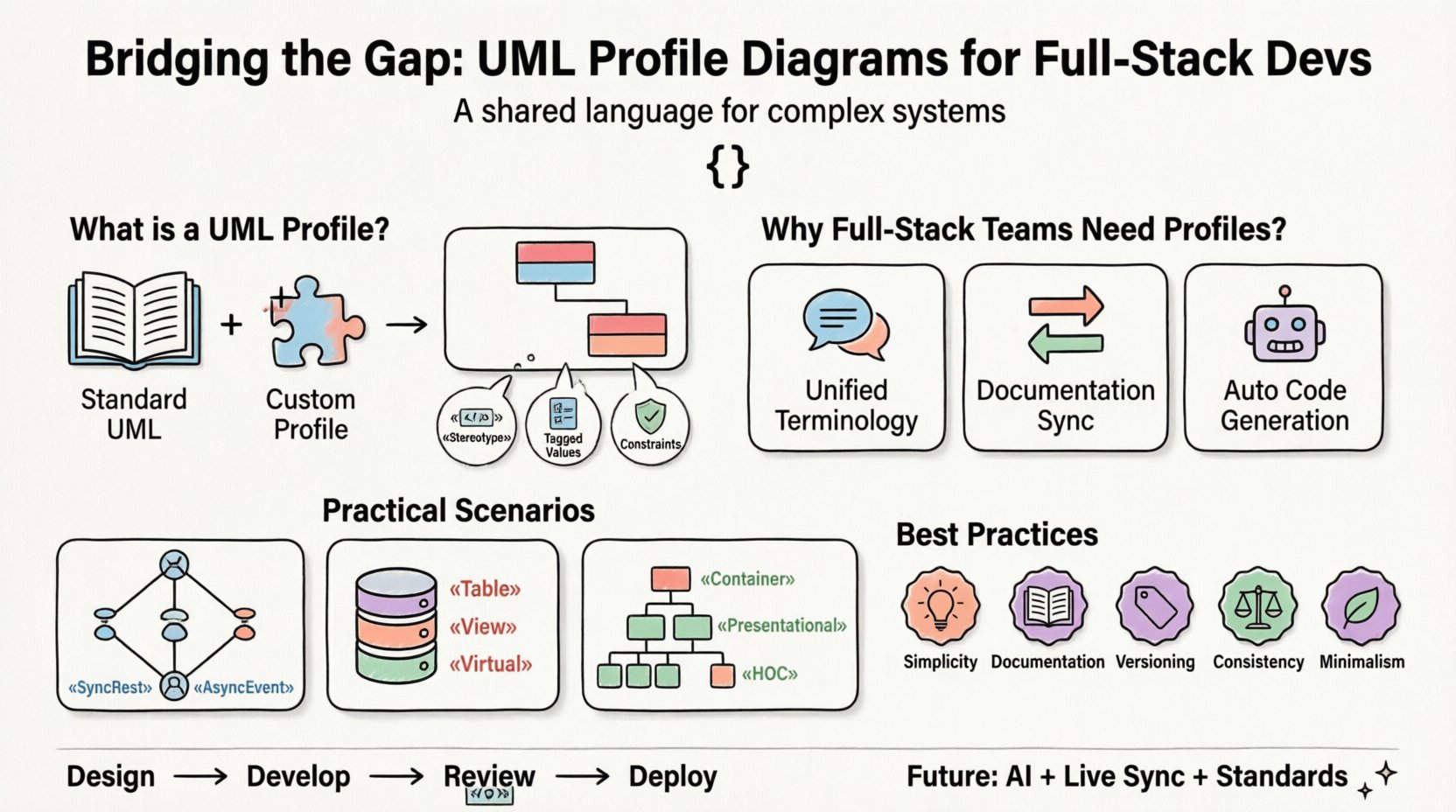
📐 Understanding the UML Profile Concept
Unified Modeling Language (UML) provides a standardized notation for visualizing software systems. However, standard UML diagrams often lack the specificity required for unique project contexts. A Profile serves as an extension mechanism. It allows you to define new elements, constraints, and relationships that apply to a specific domain.
Think of a Profile as a custom dictionary added to the base language. It does not replace the original grammar; it adds vocabulary that makes sense for your specific architecture.
- Stereotypes: These are custom tags that classify elements. For example, a standard Class might be stereotyped as «Service» or «Controller» to indicate its role.
- Tagged Values: These add metadata to elements. A class might have a tag called “APIVersion” with a value of “2.0”.
- Constraints: These define rules that elements must follow. An example is a constraint ensuring a specific field is mandatory for a «User» entity.
🔍 Why Full-Stack Teams Need Profiles
Full-stack environments are inherently complex. Frontend developers focus on component state and interaction, while backend developers manage data integrity and business logic. Without a shared modeling standard, the gap between design and code widens.
1. Unified Terminology
When everyone refers to a «Repository» or «Gateway» stereotype, discussions become precise. There is no confusion about whether a class represents a data model or a service layer.
2. Documentation Synchronization
Documentation often falls behind code. Profiles allow diagrams to carry metadata that remains relevant even as the code evolves. If the stereotype includes versioning tags, the diagram reflects the current state of the API.
3. Automated Code Generation
Many modeling tools interpret stereotypes to generate boilerplate code. By defining clear profiles, you enable the automation of repetitive tasks across the stack, such as creating API endpoints or database migrations.
🧩 Anatomy of a Custom Profile
Creating a profile requires deliberate design. It should not be an exercise in adding unnecessary complexity. The goal is clarity.
Core Components
- Package: Profiles are typically organized within a specific package to avoid namespace collisions.
- Extension Metamodel: You must define which existing UML element is being extended (e.g., extending a Class or an Association).
- Extension Definition: This links the new stereotype to the base element.
Example: Defining a Service Layer
Consider a scenario where you need to distinguish between internal services and public-facing APIs. You could define a stereotype called «PublicAPI» attached to the Class element.
This stereotype might include the following tagged values:
- RateLimit: Integer value indicating requests per minute.
- AuthType: String value (e.g., “OAuth2”, “APIKey”).
- Version: String value for semantic versioning.
When applied to a diagram, this information is visible at a glance, removing the need to search through code comments or external documentation.
🚀 Practical Application Scenarios
Profiles gain value when applied to real-world development problems. Below are specific scenarios where full-stack developers can leverage this technology.
Scenario 1: Microservices Communication
In distributed systems, the method of communication varies. Some services use synchronous REST calls, while others rely on asynchronous event streams. A Profile can define stereotypes for these interactions.
- «SyncRest» on an Association.
- «AsyncEvent» on an Association.
By tagging the relationships, architects can instantly see the communication topology. This helps in identifying potential bottlenecks or single points of failure.
Scenario 2: Database Schema Management
Database models often differ from application models. Profiles can bridge this gap by tagging entities to indicate their persistence layer.
- «Table» indicates a physical database table.
- «View» indicates a read-only data set.
- «Virtual» indicates a model that exists only in memory or cache.
Developers can verify that every «Table» entity has corresponding migration scripts, ensuring the schema matches the code.
Scenario 3: Frontend Component Structure
Frontend frameworks often rely on specific patterns. A Profile can standardize how components are modeled.
- «Container» for state-heavy components.
- «Presentational» for pure UI components.
- «HOC» for Higher-Order Component wrappers.
This ensures that the architecture diagram reflects the actual component hierarchy used in the codebase.
📊 Standard UML vs. Profile-Enhanced UML
Understanding the difference between a standard diagram and one enhanced with profiles is crucial for adoption.
| Feature | Standard UML Diagram | Profile-Enhanced Diagram |
|---|---|---|
| Granularity | Generic (e.g., Class, Interface) | Specific (e.g., «Service», «API») |
| Metadata | Limited or none | Rich (Tags, Constraints, Properties) |
| Domain Context | Technology agnostic | Tailored to project stack |
| Readability | High for beginners | High for domain experts |
| Maintenance | Static | Dynamic (Linked to code conventions) |
The table highlights that while standard UML is universally understood, profiles provide the context necessary for large-scale full-stack projects.
🛠️ Best Practices for Implementation
Creating a profile is a significant investment. To ensure it yields value, follow these guidelines.
1. Keep It Simple
Do not create a profile for every minor detail. Focus on elements that impact architecture, deployment, or security. If a stereotype is used only once, it likely belongs in the code comments, not the model.
2. Document the Profile Itself
Just as you document code, document the profile. Create a specification document that defines what each stereotype means, what tags are required, and what constraints apply. This ensures new team members understand the modeling standards.
3. Version Your Profiles
As your architecture evolves, your profiles may need updates. Version the profile package. This allows you to maintain legacy diagrams while introducing new modeling standards in current projects.
4. Enforce Consistency
Use linting or validation scripts to check diagrams against the profile rules. If a «Service» is missing the required “AuthType” tag, the model should flag it during the design phase.
5. Avoid Over-Engineering
It is easy to create too many stereotypes. Limit the core set to the essential layers: Presentation, Business Logic, Data Access, and Infrastructure. Anything beyond that should be evaluated carefully.
⚠️ Common Pitfalls to Avoid
Even with good intentions, teams often stumble when introducing UML profiles.
Pitfall 1: Creating a New Language
Do not create stereotypes that contradict standard UML semantics. If a stereotype changes the fundamental meaning of a Class in a confusing way, it creates more friction than it solves.
Pitfall 2: Ignoring the Tooling
Ensure the modeling tools you use support the profile features you need. Some tools handle stereotypes well, while others struggle with tagged values. Validate your workflow before committing to a large design effort.
Pitfall 3: Static Documentation
A profile diagram that is never updated becomes a liability. If the code changes but the diagram remains static, the diagram loses trust. Integrate diagram updates into the pull request process.
Pitfall 4: Excessive Complexity
Using deep inheritance hierarchies for stereotypes can make the diagram hard to read. Keep the hierarchy flat. A flat structure is easier for developers to parse quickly during design reviews.
🔄 Integrating Profiles into the Workflow
Successful adoption requires integrating profiles into the daily development lifecycle.
Design Phase
Start with the profile. Before writing code, define the architecture using the custom stereotypes. This forces the team to agree on the structure and constraints early.
Development Phase
Developers should reference the profile when naming classes and interfaces. If the diagram says «Service», the code should reflect a service pattern. This alignment reduces technical debt.
Review Phase
During code reviews, check for profile compliance. If a new component is added to the code, ensure it is reflected in the diagram with the correct stereotypes. This keeps the documentation current.
Deployment Phase
Use the metadata in the profile for deployment configurations. If a class is tagged as «PublicAPI», the deployment pipeline can automatically configure the load balancer rules associated with that tag.
🔮 Future Trends in Modeling
The landscape of system design is evolving. AI and automation are beginning to influence how profiles are used.
- AI-Assisted Modeling: Future tools may suggest appropriate stereotypes based on code analysis, helping developers maintain consistency.
- Live Synchronization: Real-time synchronization between code repositories and diagrams will become more common, ensuring the model is always accurate.
- Standardization: Industry-wide profiles may emerge for common architectures, allowing teams to share best practices more easily.
❓ Frequently Asked Questions
Do I need a specific tool to use UML Profiles?
No. While many modeling tools support profiles, the concept is part of the UML standard. You can define profiles in any tool that adheres to the UML specification.
How do I handle legacy systems?
Start small. Apply profiles to new modules first. Gradually map existing code to the profile over time. Do not attempt to refactor the entire architecture at once.
Can profiles automate code generation?
Yes. Many platforms allow you to define generation rules based on stereotypes. For example, a «Repository» stereotype might trigger the generation of standard CRUD methods.
Is a profile the same as a design pattern?
No. A design pattern is a solution to a problem. A profile is a notation mechanism to document or enforce that pattern visually. They work together but serve different purposes.
What if the team resists using profiles?
Focus on the benefits. Show how profiles reduce confusion during handoffs or how they speed up onboarding. Start with a pilot project to demonstrate value before rolling it out enterprise-wide.
🏁 Final Thoughts
UML Profile Diagrams are not just about drawing boxes and lines. They are about establishing a shared language for complex systems. For full-stack developers, who sit at the intersection of diverse technologies, this shared language is invaluable.
By extending the standard UML notation with domain-specific stereotypes, tags, and constraints, teams can achieve greater alignment between design and implementation. The result is a system that is easier to understand, maintain, and evolve. The investment in defining these profiles pays off through reduced communication overhead and higher code quality.
Start by identifying the most confusing parts of your architecture. Define a profile to clarify those areas. Test it on a small module. If it helps, expand. If it hinders, refine. The goal is clarity, not complexity.