


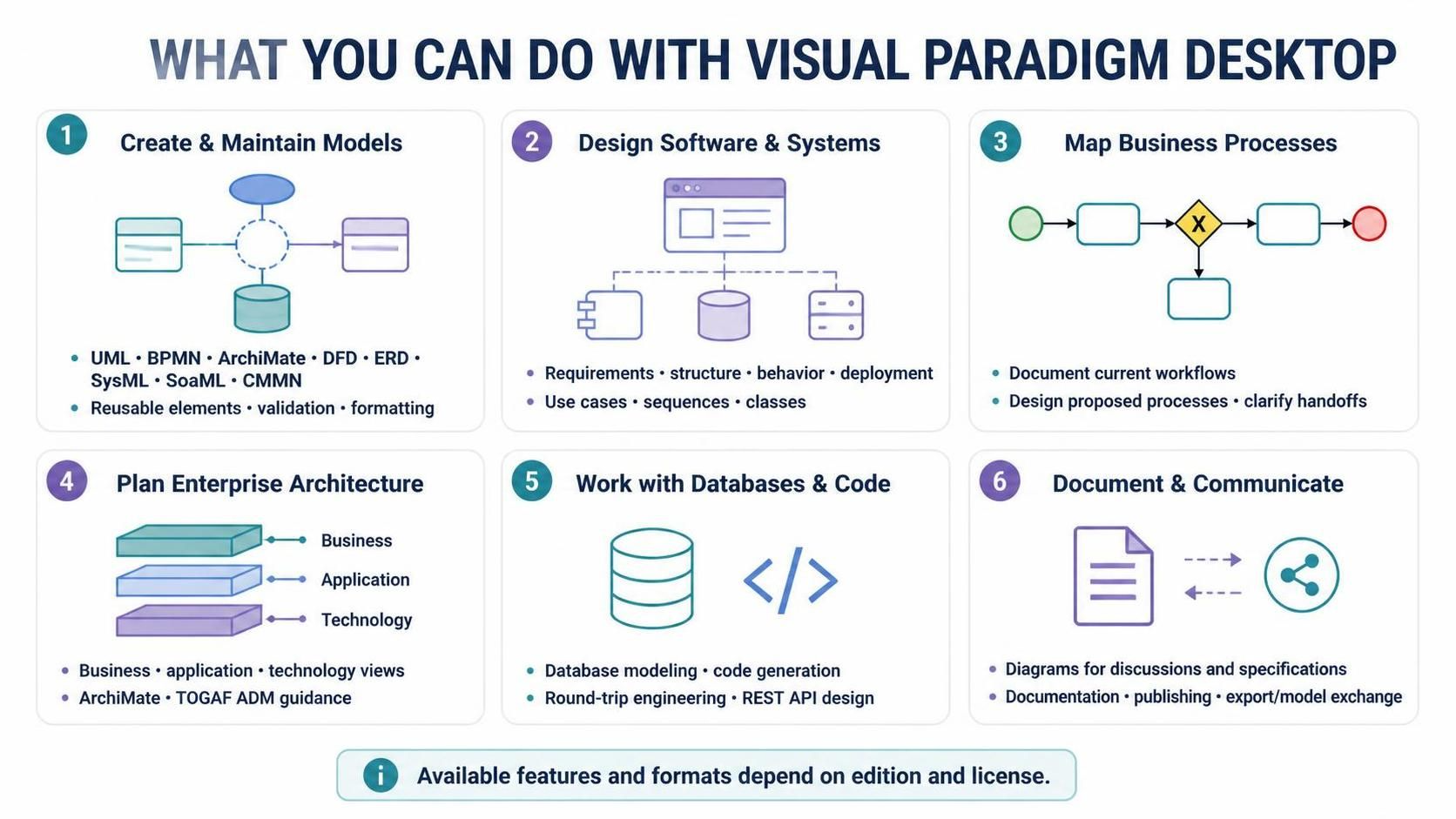
Visual Paradigm Desktop Edition is a comprehensive tool designed to bridge the gap between business strategy and technical implementation. Whether you are a business analyst mapping out workflows, a software architect designing system structures, or a developer generating code from models, the platform offers a unified environment. This tutorial explores the six core pillars of capability within Visual Paradigm, demonstrating how to leverage its features for effective system design and enterprise planning.
1. Creating and Maintaining Models
The foundation of any successful project lies in robust modeling. Visual Paradigm provides a drag-and-drop diagram editor that simplifies the creation of complex models. It supports a vast array of industry-standard notations, ensuring you can communicate effectively regardless of your domain.
- UML (Unified Modeling Language): The standard for object-oriented software design.
- BPMN (Business Process Model and Notation): Essential for visualizing business workflows.
- ArchiMate: The framework for enterprise architecture modeling.
- DFD (Data Flow Diagram): Useful for tracking data movement through a system.
- ERD (Entity Relationship Diagram): Critical for database schema design.
- SysML & SoaML: Specialized notations for systems engineering and service-oriented architecture.
Beyond simple drawing, the platform includes modeling aids such as reusable elements, syntax validation, and formatting tools. This ensures that your diagrams are not only visually appealing but also technically accurate and consistent.
2. Designing Software and Systems
When moving from abstract requirements to concrete software designs, Visual Paradigm acts as a visual programming environment. You can use UML diagrams to explore every aspect of a system’s lifecycle.
Consider a scenario where a team is building a new application. They might start by mapping user goals using Use Case diagrams. Next, they would describe the interactions between users and the system using Sequence diagrams. Finally, they would model the domain classes and document how components are deployed in the final infrastructure.
Example: Designing a Class Structure
Below is an example of how a developer might define a class structure using the platform’s code editor capabilities.
public class OrderProcessor {
    private List<Order> orders;

    public void processOrder(Order order) {
        // Logic to validate and process the order
        validateOrder(order);
        orders.add(order);
        System.out.println("Order processed: " + order.getId());
    }
}
3. Mapping Business Processes
Business processes are the backbone of organizational efficiency. Visual Paradigm allows teams to document how work currently flows (As-Is) and design proposed processes (To-Be) using BPMN.
Key benefits include:
- Visualizing Handoffs: Clearly see where one department passes responsibility to another.
- Defining Responsibilities: Use swimlanes to assign specific tasks to roles or actors.
- Structured Analysis: Identify bottlenecks or redundant steps before implementation.
4. Planning Enterprise Architecture
Enterprise Architecture (EA) requires a high-level view of the organization. Visual Paradigm supports ArchiMate diagrams and TOGAF ADM guidance to help architects describe the Business, Application, and Technology layers of an organization.
The architecture is typically viewed in three distinct layers:
- Business Layer: Strategy, governance, organization, and business processes.
- Application Layer: Software systems and their interactions.
- Technology Layer: Hardware and infrastructure supporting the applications.
By organizing work through a framework like TOGAF, architects can ensure that technical decisions align with business goals.
5. Working with Databases and Code
For developers, the gap between design and implementation is the most critical. Visual Paradigm bridges this gap through round-trip engineering.
- Database Modeling: Design your schema visually and generate SQL scripts automatically.
- Code Generation: Create source code skeletons directly from UML class diagrams.
- Reverse Engineering: Import existing codebases to generate models, making it easy to understand legacy systems.
- REST API Design: Document and design APIs to ensure seamless integration between microservices.
6. Documenting and Communicating
A model is only useful if it is understood. Visual Paradigm provides robust documentation and publishing tools. Diagrams serve as shared reference points for project discussions, specifications, and presentations.
Furthermore, the platform supports exporting diagrams and exchanging models with other tools and formats. Whether you need to present a PDF to a stakeholder or share a model file with a team member using different software, the export capabilities ensure compatibility.
Summary
Visual Paradigm Desktop Edition is more than just a drawing tool; it is a full-cycle engineering platform. From planning enterprise architecture and mapping business processes to designing software systems and generating code, it provides the structure necessary to turn complex ideas into tangible results.