


In the complex world of Business Process Model and Notation (BPMN), clarity is just as important as logic. While the flow of a process—represented by arrows and shapes—dictates how a system executes, the Annotation is what ensures human stakeholders understand the context behind those actions.
Today, we are diving deep into the Annotation marker. Think of this as the “sticky note” of the BPMN world: essential for communication, but strictly passive regarding execution. We will explore its visual syntax, its “zero-impact” nature on engine logic, and how to leverage AI tools to keep your diagrams professional and clutter-free.
The Anatomy of an Annotation
An Annotation in BPMN is a specific symbol designed to provide supplementary information to a process element. Unlike complex logic gates or data objects, its sole purpose is to act as a bridge between the technical diagram and the human reader.
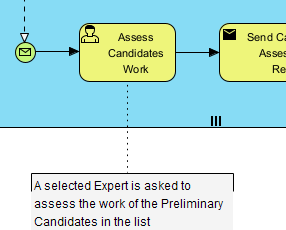
Visually, the Annotation is distinct and recognizable:
- Visual Symbol: It appears as an open bracket (often looking like a folded corner of a page) connected to a process element via a dotted line.
- Connection Type: The line connecting the annotation to the task is a standard Association connector. It is always a dotted line with an open arrowhead, indicating a relationship of “information” rather than “flow.”
- Placement: It is typically attached to the specific task, gate, or event it describes.
Real-World Application: The Approval Context
To understand why Annotations are vital, let’s look at a common scenario: Expense Approval.
Imagine you have a task labeled “Approve Expense.” If this task requires a specific condition—such as “Requires VP approval if amount > $10,000″—you might be tempted to rename the task to “Approve Expense (if > $10k).” However, this clutters the diagram and makes the process harder to read at a glance.
Instead, you attach an Annotation to the task. The task remains “Approve Expense,” and the annotation contains the text: “Requires VP approval if amount > $10,000.” This keeps the visual flow clean while ensuring that stakeholders and auditors have the necessary context immediately available.
The Golden Rule: Zero Execution Impact
One of the most critical concepts for a technical tutor to impart is the difference between documentation and logic.
It is a common misconception that an Annotation can trigger a system action. In strict BPMN standards (and in tools like Visual Paradigm), the Annotation has Zero Execution Impact.
What this means for your architecture:
- Engine Logic: The BPMN engine will completely ignore the text inside the annotation when running the process.
- Routing: It does not create a new path or branch in the workflow.
- Data Flow: It does not pass data objects from one task to another.
If you need to enforce the rule mentioned above (the $10,000 threshold), you must use an Exclusive Gateway and a Condition Expression. The Annotation is purely for human readability; the Gateway is for machine execution.
Visual Paradigm & AI-Assisted Modeling
In modern modeling environments like Visual Paradigm, you have access to powerful AI features. However, with Annotations, the key is conciseness.
When using AI Description Generators or Model Transcription tools, the goal is to auto-suggest clear, concise notes based on the task name. A good annotation summarizes the “Why” or the “How,” not the “What” (which is already in the task name).
Summary: Best Practices for Annotation
As you build your own BPMN diagrams, keep these principles in mind to ensure high-quality, maintainable documentation:
- Do not clutter: Use annotations to explain complex rules that would otherwise require renaming tasks.
- Respect the syntax: Always use the dotted Association line with the open bracket symbol.
- Separate logic from notes: Remember that the engine ignores annotations. If a rule needs to be enforced programmatically, use a Gateway, not an Annotation.
- Leverage AI: Use AI tools to draft annotations, but review them to ensure they remain high-level and readable.
By mastering the Annotation, you transform a simple flowchart into a comprehensive business contract that is both machine-executable and human-understandable.