


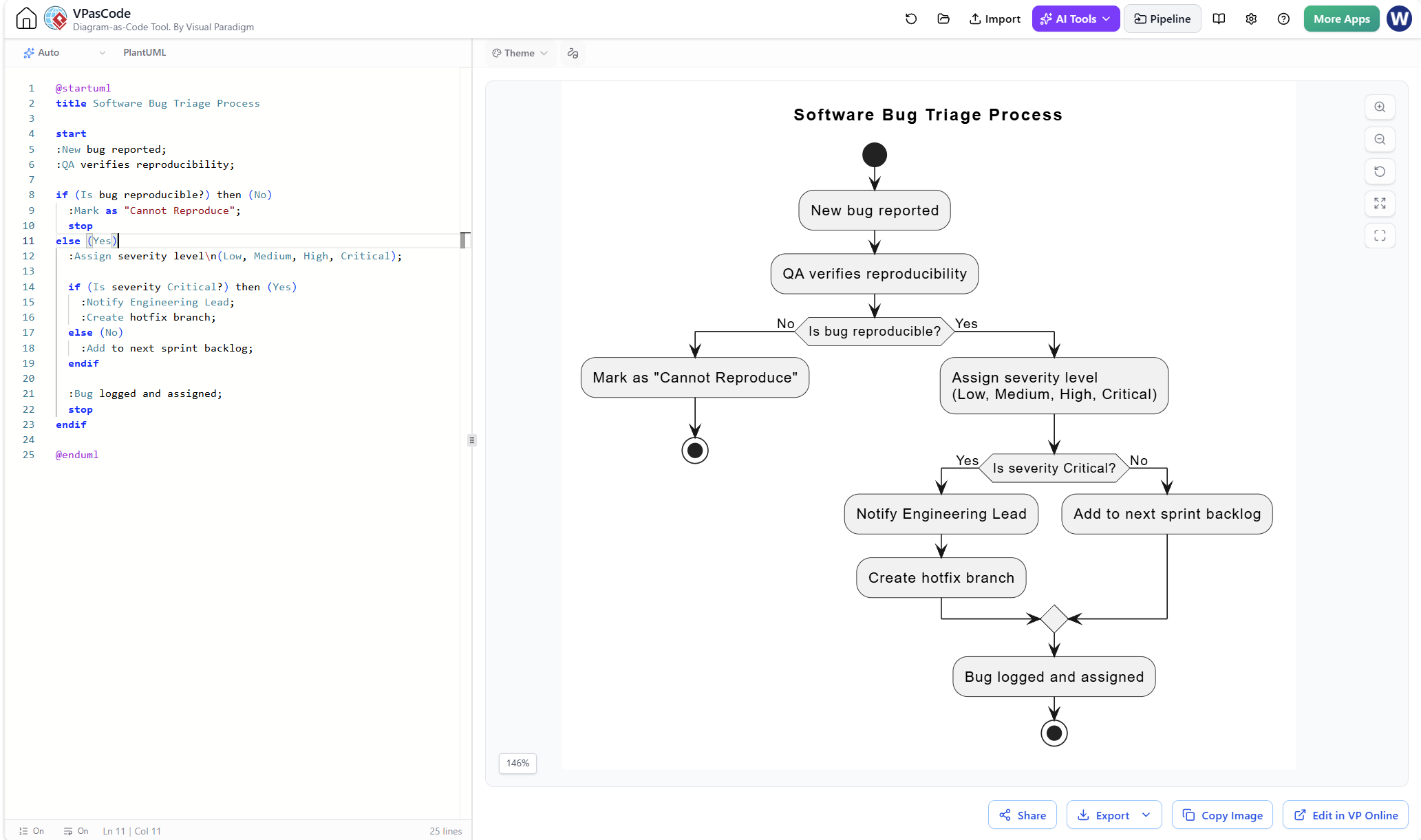
In the fast-paced world of software development, the efficiency of your bug triage process directly impacts product stability and team velocity. A well-defined workflow ensures that critical issues are addressed immediately while routine defects are managed systematically. This tutorial explores how to model the “Software Bug Triage Process” using Visual Paradigm’s VPasCode tool. By combining the power of diagramming with code-based definition, we create a robust, version-controlled, and easily modifiable flowchart.
The Power of Code-Based Modeling
Traditionally, creating flowcharts involved drawing shapes and connecting lines manually. While visual, this approach can become cumbersome when managing complex logic or frequent updates. VPasCode (Visual Paradigm as Code) shifts this paradigm by allowing you to define the diagram logic using a simple text-based language—specifically PlantUML in this context.
This approach offers several distinct advantages:
- Version Control Friendly: Text is easier to diff and merge in Git repositories compared to binary image files.
- Rapid Iteration: Updating a flowchart is as simple as editing a text file.
- AI Integration: Modern tools like VPasCode can leverage AI to generate these diagrams from natural language prompts, speeding up the initial design phase.
Step-by-Step: Building the Bug Triage Flow
1. Defining the Process Title
The first step in any PlantUML flowchart is to set the context. We use the title directive to label the diagram, ensuring that stakeholders immediately understand the scope of the workflow.
title Software Bug Triage Process2. Initiating the Workflow
Every flowchart needs a starting point. In PlantUML, the start keyword represents the entry node. The subsequent lines, prefixed with a colon (:), represent process steps.
start
:New bug reported;
:QA verifies reproducibility;
Here, we simulate the real-world scenario where a bug enters the system and undergoes an initial validation check by Quality Assurance (QA). This step is crucial to filter out noise before it reaches engineering teams.
3. Implementing Decision Logic (The If-Else Block)
The core of the triage process lies in decision-making. We need to determine if the bug is reproducible. This is handled using the if and else statements.
if (Is bug reproducible?) then (No)
  :Mark as "Cannot Reproduce";
  stop
else (Yes)
  :Assign severity level
(Low, Medium, High, Critical);
  ...
endif
Key Concepts:
- Decision Syntax: The condition is written inside parentheses
(Is bug reproducible?). - Labeling Paths: You must specify the outcome labels for the Yes/No branches, such as
then (No)andelse (Yes). - Line Breaks: Notice the
4. Nested Logic for Severity
Once a bug is confirmed as reproducible, the next step is prioritization. We nest a second if statement inside the “Yes” branch of the first decision. This allows us to handle “Critical” bugs differently from standard issues.
if (Is severity Critical?) then (Yes)
  :Notify Engineering Lead;
  :Create hotfix branch;
else (No)
  :Add to next sprint backlog;
endif
This nested logic highlights the branching paths of a complex workflow. Critical issues trigger immediate action (hotfixing), while non-critical issues are scheduled for future development sprints.
Visualizing the Architecture
When this code is rendered in Visual Paradigm, the text transforms into a graphical flowchart. The start node becomes a black circle, the process steps become rounded rectangles, and the if blocks become diamond-shaped decision nodes. The arrows connecting them represent the flow of control, visually mapping the logic we defined in the code.
Conclusion
By utilizing VPasCode, you transform the bug triage process from a static image into a living document. The separation of logic (code) and presentation (rendering) allows technical teams to maintain their workflows with the same discipline they apply to their software code. Whether you are documenting a process or planning a new one, this code-first approach ensures clarity and precision.