


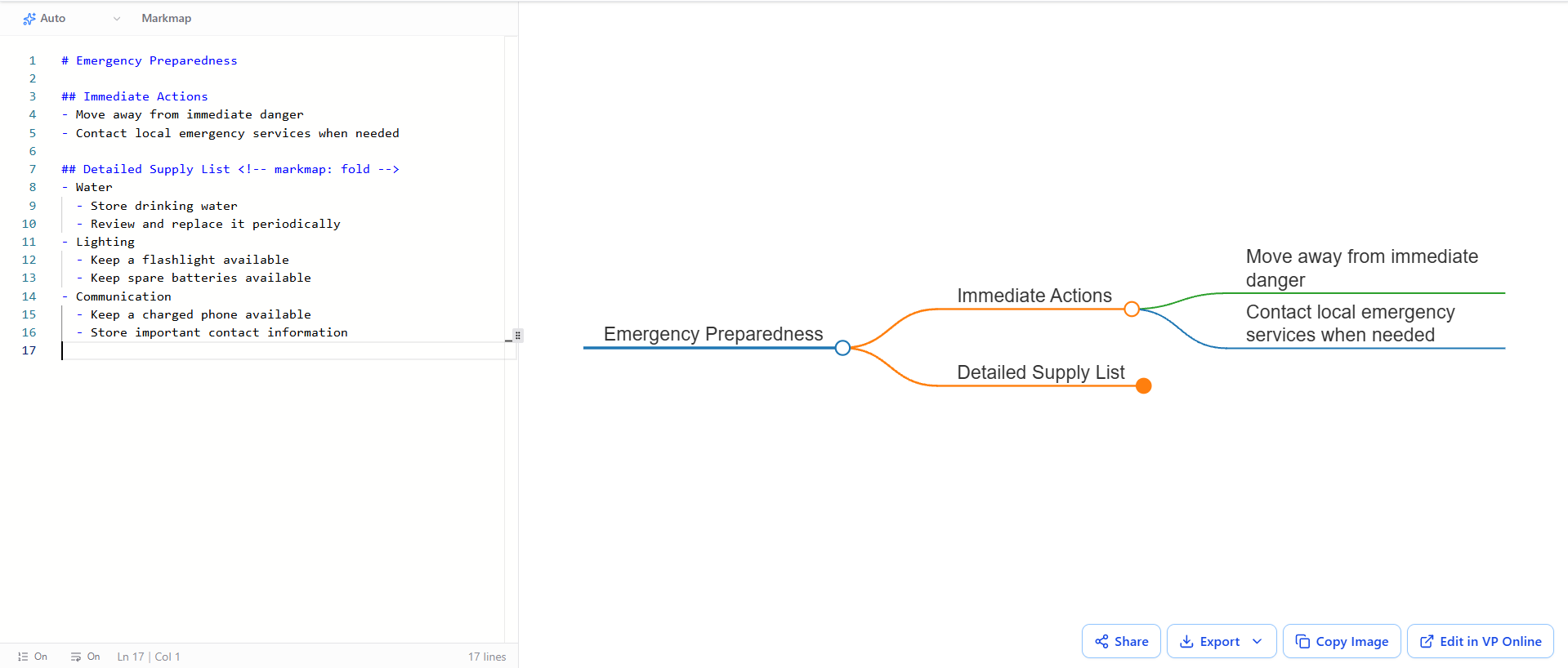
In the realm of technical documentation and system architecture, the ability to manage cognitive load is just as critical as the information itself. VPasCode, the integrated text-based modeling tool within Visual Paradigm, empowers users to create dynamic, interactive diagrams using simple Markdown syntax. One of its most powerful features for structuring complex hierarchies is the Folding capability.
This tutorial explores the specific syntax required to control the visibility of detailed content within a Markmap diagram, ensuring that your documentation remains clean, concise, and organized.
The Concept of Contextual Folding
Folding is a UI/UX pattern designed to hide secondary information until the user explicitly requests to see it. In the context of VPasCode’s Markmap, this allows you to present a high-level overview of a topic—such as “Emergency Preparedness”—while keeping granular details, like specific supply lists, collapsed by default.
This approach is particularly effective for:
- Executive Summaries: Keeping the main view focused on immediate actions or high-level decisions.
- Large Datasets: Preventing the diagram from becoming overwhelming when dealing with extensive lists of requirements.
- Interactive Learning: Encouraging users to actively explore the structure of the topic.
Implementing Fold Comments
To enable folding in a Markmap diagram, VPasCode relies on a specific HTML-style comment syntax attached to the header of the section you wish to hide. This is not a standard Markdown command, but a specialized directive for the rendering engine.
Syntax Rules
The syntax follows a strict format. You must place a comment block immediately after the header line (the ## or ### line) that contains the keyword markmap: fold.
## Detailed Supply List
- Water
- Lighting
Step-by-Step Implementation
Let us analyze the structure of a “Emergency Preparedness” scenario to demonstrate how this works in practice.
- Define the Root Node: Start with your main topic using a single hash symbol.
- Create Immediate Nodes: Define your primary branches. These will typically expand by default.
- Apply the Fold Directive: For the section you want to hide initially (e.g., the supply list), add the specific comment immediately after the header.
# Emergency Preparedness## Immediate Actions
- Move away from immediate danger
- Contact local emergency services## Detailed Supply List
- Water
- LightingVisualizing the Structure
When rendered by the VPasCode engine, the diagram interprets the markmap: fold directive to apply a specific state to the node. The “Detailed Supply List” node will appear in the map with a control indicator (often a small circle or triangle), signaling to the user that content is hidden. Clicking this control expands the branch, revealing the sub-nodes for Water, Lighting, and Communication.
This separation between “Immediate Actions” and “Detailed Supply List” effectively guides the viewer’s attention, ensuring critical safety steps are noticed first.
Best Practices for Technical Documentation
Using folding comments is more than just a visual trick; it is a best practice for technical writing. By utilizing this feature, you adhere to the principle of progressive disclosure—presenting information in layers. This prevents the “wall of text” effect that often plagues complex system architecture diagrams.
When documenting system requirements or emergency protocols, remember that the goal is clarity. Let the text structure do the heavy lifting by using VPasCode to organize your data logically, and let the folding mechanism manage the complexity.