


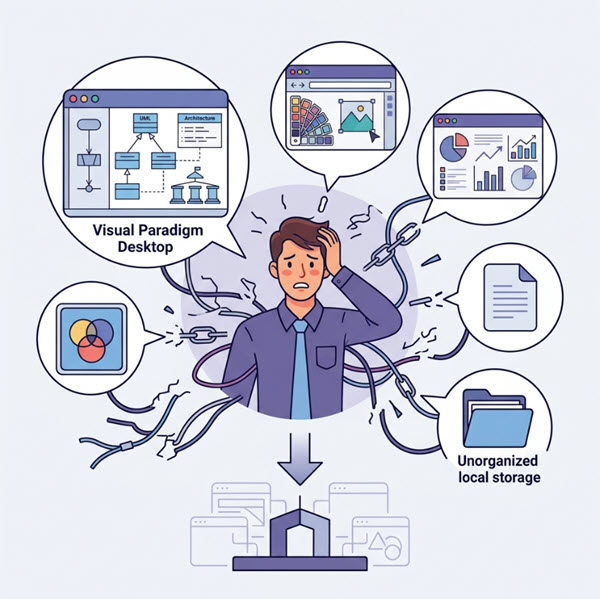
In the modern software engineering landscape, the most significant barrier to productivity is often not a lack of tools, but the friction caused by their disconnection. As illustrated in the diagram above, developers frequently find themselves trapped in a “fragmented digital environment.” Detailed UML models sit in one isolated desktop application, while strategic documents, graphic designs, and ad-hoc charts exist in separate, disconnected web tools. This creates invisible silos where valuable architectural models become inaccessible and collaboration becomes a logistical nightmare.
The Anatomy of the “Disconnected” Workflow
The visual metaphor of the professional surrounded by tangled chains and floating icons represents the current state of many development environments. Let’s break down the architectural flaws shown in the illustration:
- The Desktop Silo: The icon labeled Visual Paradigm Desktop represents powerful, feature-rich modeling tools. However, without a cloud-connected workspace, these models remain local assets. They are “invisible” to the rest of the team and disconnected from the cloud drive.
- The Web Tool Fragmentation: The surrounding icons—representing design tools, charts, and documents—highlight the reliance on disparate web applications. While convenient for specific tasks, they save data in isolated silos with no central organization.
- The Unorganized Local Storage: The folder icon labeled Unorganized local storage signifies the traditional file system approach. This creates a “black hole” for data, making it difficult to discover the right tool or version for a specific job.
This fragmentation creates friction. It hinders collaboration because a team member working on the cloud version of a document cannot see the architectural changes happening in the local desktop app. It makes a holistic view of your project impossible.
Architectural Innovation: The Unified Platform
The solution to this architectural debt is not just a UI revamp, but a fundamental shift in how we organize resources. The Visual Paradasm Unified Platform acts as the central nervous system for your workflow, solving the disconnect by unifying resources into a single, cohesive ecosystem.
Key Architectural Components
Transitioning from a fragmented state to a unified architecture involves adopting three core pillars:
- Cross-Device Continuity: The platform ensures that your detailed UML diagrams and architectural models are no longer locked to a specific machine. By integrating with cloud drives, your desktop models become accessible from anywhere.
- Centralized Organization: Instead of scattered folders, the Unified Platform provides a single repository. This eliminates the “search” phase of development, where valuable models are lost in unorganized local storage.
- Integrated Ecosystem: The “Command Center” approach allows you to view graphic designs, strategic documents, and technical diagrams side-by-side. This fosters a holistic view where the “what” (diagram) and the “why” (document) are intrinsically linked.
Implementing the Unified Workflow
To move away from the state depicted in the illustration, you must adopt a workflow that prioritizes the cloud as the source of truth. Here is how the architecture supports your daily tasks:
1. Cloud-Native Modeling
When you create a new architecture diagram, the system should immediately treat it as a cloud resource. This means that when you switch from your desktop client to the web editor, you are not loading a file; you are accessing a live, synchronized model.
2. The Single-Pane-of-Glass View
The goal of the Unified Platform is to provide a dashboard where all project artifacts—code, diagrams, and documentation—are accessible via a single interface. This reduces the cognitive load of constantly switching contexts between different applications.
3. Breaking the Chains
The illustration shows chains being broken or falling away. In technical terms, this represents the removal of dependency friction. You no longer need to export a diagram as an image to put it in a document, nor do you need to import a document into a diagram to link it. They are natively integrated.
Conclusion
The journey from a scattered, disconnected environment to a unified ecosystem is an architectural upgrade for your entire workflow. By centralizing your resources and breaking down the silos between desktop modeling tools and web-based collaboration, you reclaim the time lost to friction and regain the ability to see the big picture.