


In the realm of software engineering and systems architecture, diagrams often suffer from a reputation as being mere “administrative overhead.” They are frequently created to satisfy a project manager’s checklist rather than to solve actual problems. However, when used correctly, a diagram is a high-leverage tool that earns its place on the page by enabling a team to take action. It should not just be a static picture; it must be a dynamic instrument for collaboration.
This tutorial explores the strategic framework for creating effective models using Visual Paradigm. We will move beyond simple drawing and focus on how to use diagrams to agree on scope, clarify interfaces, and make implementation safer.
1. The Strategic Value of Diagramming
A diagram earns its place in a project’s documentation repository only if it helps the team do something specific. In Visual Paradigm, we move from “drawing boxes” to “modeling value.”
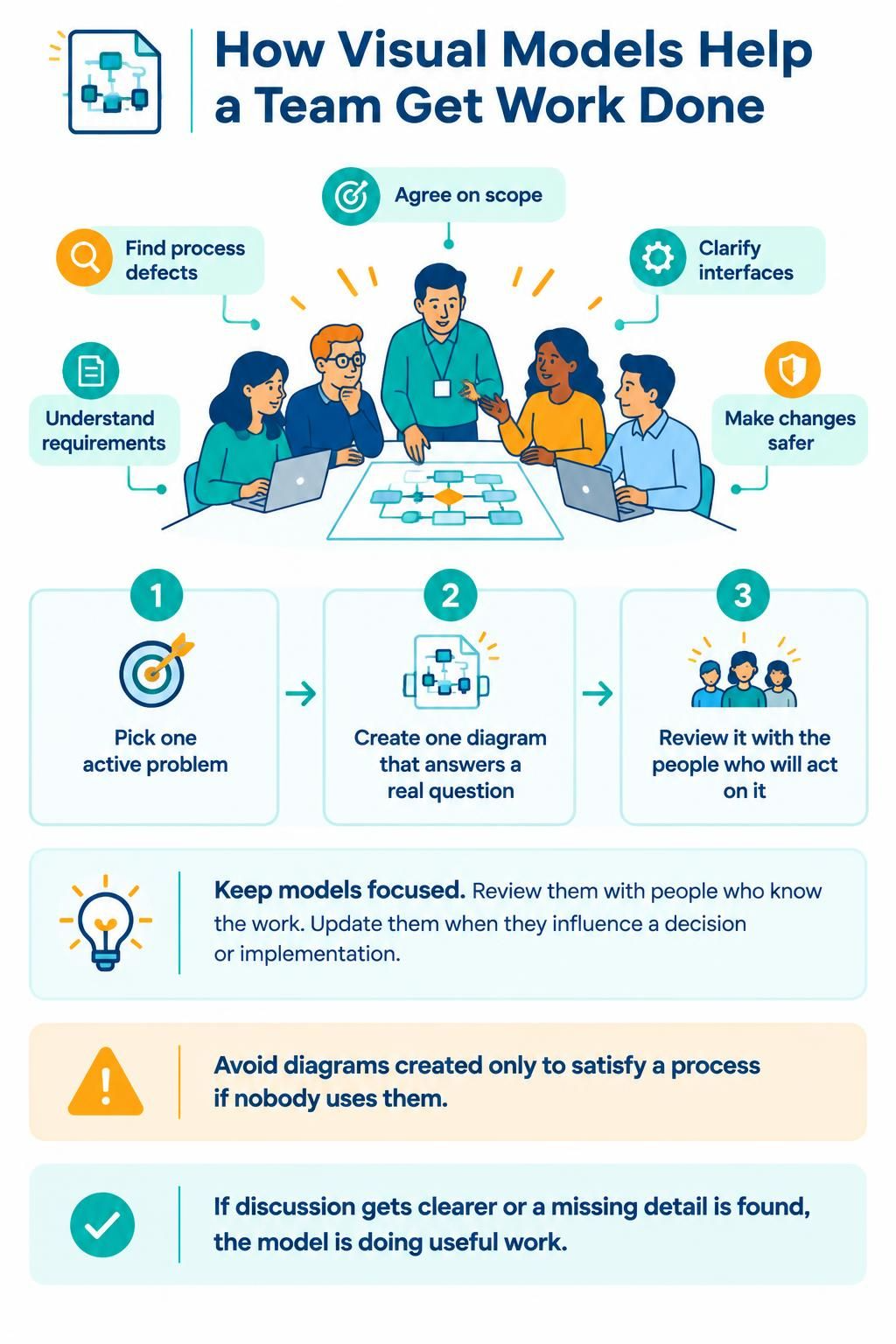
Effective modeling serves five primary purposes:
- Agree on Scope: Visualizing the boundaries of a system helps stakeholders agree on what is included and, crucially, what is excluded.
- Find Process Defects: By mapping out a workflow, teams can visually identify bottlenecks, redundant loops, or logical errors that text descriptions often hide.
- Clarify Interfaces: Complex systems rely on how components talk to each other. A well-defined interface diagram reduces integration errors.
- Understand Requirements: Translating abstract text requirements into a concrete visual model ensures the team is building the right thing.
- Make Changes Safer: Before refactoring code, a model allows architects to simulate the impact of a change on the broader system architecture.
2. The Three-Step Method for Effective Modeling
To ensure your diagrams are useful, Visual Paradigm recommends a specific workflow that prioritizes impact over volume. Do not start by creating a “perfect” system model; start by solving a problem.
Step 1: Pick One Active Problem
Do not attempt to model the entire enterprise architecture in one go. Instead, identify a single, active problem or question that the team is currently struggling with. Is there ambiguity in a specific requirement? Is there a defect in a user flow? Focus your modeling efforts entirely on that specific issue.
Step 2: Create One Diagram That Answers a Real Question
Create a single model designed specifically to address the problem identified in Step 1. In Visual Paradigm, this means selecting the appropriate diagram type (e.g., a Sequence Diagram for a flow issue, or a Class Diagram for a structural ambiguity) and keeping the model focused. Avoid “gold-plating” the diagram with unnecessary details that do not serve the immediate question.
Step 3: Review It With The People Who Will Act On It
This is the most critical step. A diagram created in a vacuum is useless. You must review the model with the developers, testers, or stakeholders who will be implementing the solution. The goal of this review is not to admire the drawing, but to validate the logic.
3. Keeping Models Focused and Up-to-Date
Many projects fail because their diagrams become outdated as soon as they are saved. To avoid this, Visual Paradigm promotes a culture of living models.
- Keep Models Focused: A diagram should have a single responsibility. If it becomes too cluttered, it has likely lost its focus. Split complex models into smaller, focused views.
- Update for Decisions: The model must evolve. If a diagram influences a decision or an implementation change, it must be updated to reflect that new reality.
- Validate Utility: If a discussion becomes clearer because of the diagram, or if a missing detail is uncovered during the review, the model is doing useful work. If the discussion is still muddy, the model needs refinement.
4. The Warning: Avoid “Checklist Diagramming”
The most dangerous trap in systems modeling is creating diagrams solely to satisfy a process. If you are drawing a diagram because “it is the standard” or “the audit requires it,” but nobody actually uses it to understand the system, you are wasting time.
Avoid diagrams that nobody uses. If a diagram sits in a repository and is never referenced during a code review, a design meeting, or a debugging session, it should be archived or deleted. The cost of maintaining an unused diagram is a direct drain on the team’s productivity.
Conclusion
By adopting the strategy of picking one active problem, creating a focused answer, and reviewing it with the acting team, you transform your diagrams from static artifacts into active work tools. Whether you are using Visual Paradigm’s AI-assisted features to generate boilerplate or manually refining complex logic, the goal remains the same: clarity.