


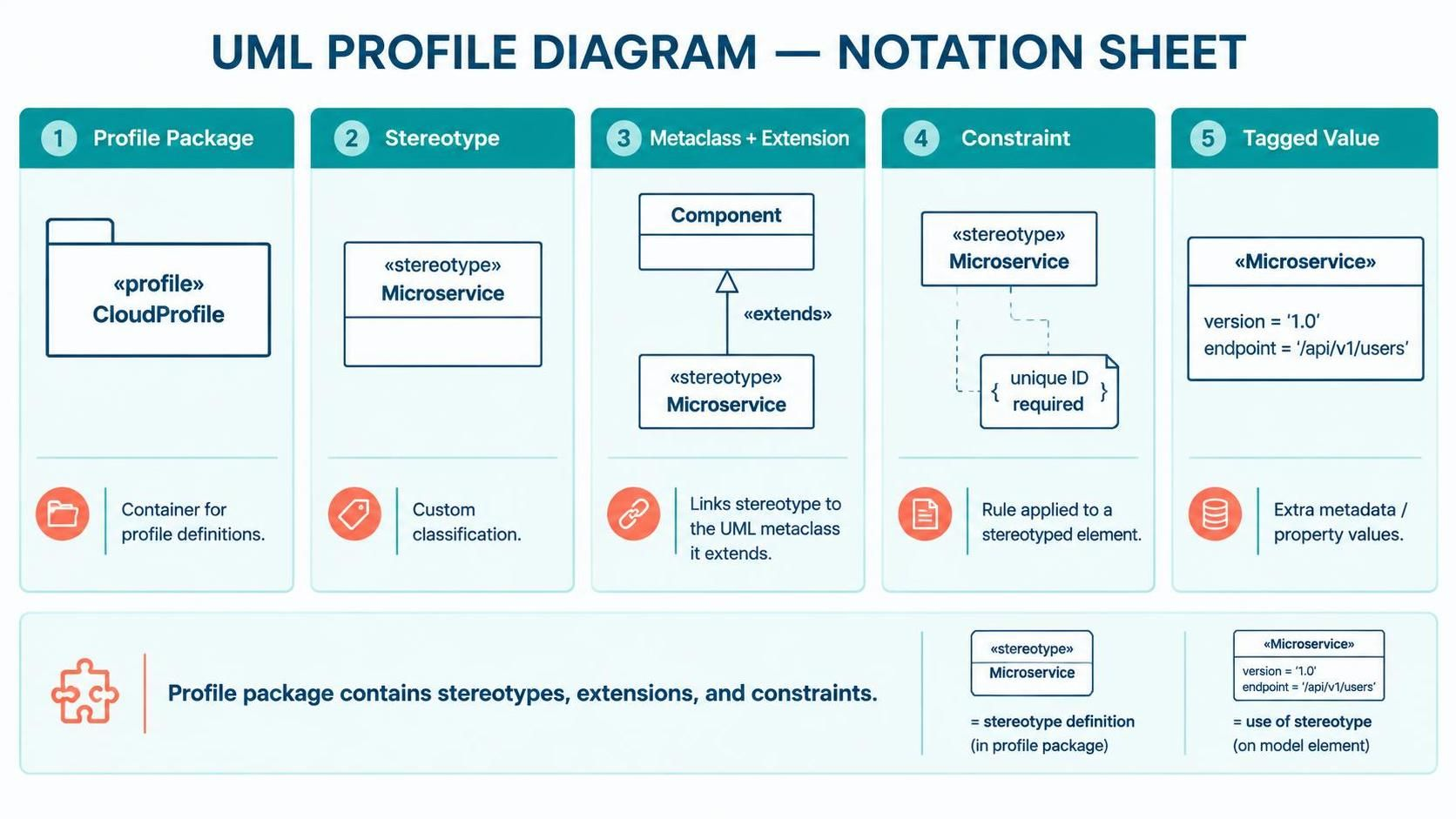
Standard UML (Unified Modeling Language) is powerful, but it can sometimes feel rigid when applied to modern, specialized architectures like Microservices, Cloud Computing, or specific Enterprise standards. This is where UML Profile Diagrams come into play. They act as a customization layer, allowing you to extend the base UML language to fit your specific domain needs without changing the core standard.
In this tutorial, we will break down the anatomy of a UML Profile Diagram. We will explore the five core components, how they relate to one another, and how to apply them to create maintainable, modular architecture models.
The 5 Core Components of a Profile
Just like a building has a foundation, walls, and a roof, a Profile Diagram has specific structural elements that define its behavior. Understanding these five building blocks is essential for interpreting or creating any profile.
1. Profile Package: The Container
The entire profile definition lives inside a Profile Package. Think of this as a folder or a namespace that holds all the custom definitions. It is typically marked with the keyword <<profile>>.
- Function: It encapsulates all stereotypes, extensions, and constraints, keeping them organized.
- Visuals: In diagrams, it looks like a standard package but carries the specific profile tag.
2. Stereotype: The Heart of Customization
The Stereotype is the primary tool for extending UML. It allows you to create new classifications for existing UML elements. It appears as text enclosed in guillemets (double angle brackets), such as <<Entity>>, <<Service>>, or <<API>.
- Purpose: It adds semantic meaning. For example, a standard UML Class is just a “Class,” but
<<DatabaseTable>tells the reader it specifically represents a database entity.
3. Metaclass: The Base Element
A stereotype does not exist in a vacuum; it must extend a standard UML element. This base element is called the Metaclass. Common metaclasses include Class, Component, or UseCase.
- Example: You might extend the Component metaclass to create a stereotype called
<<Microservice>. - Relationship: This creates a link where the new stereotype inherits the structural properties of the base metaclass.
4. Constraint: The Rule Enforcer
Stereotypes allow you to label things, but Constraints define the rules. These are conditions that must be met when the stereotype is used. They are often written in natural language or OCL (Object Constraint Language) within braces { }.
- Example: { must have unique ID } or { requires SSL encryption }.
- Function: Constraints validate the model and ensure architectural standards are met.
5. Tagged Value: Extra Metadata
Sometimes you need to store specific data attached to a model element. Tagged Values allow you to attach properties to a stereotype. These are key-value pairs that provide extra metadata.
- Examples:
version = "1.0",priority = "High", orendpoint = "/api/v1/users". - Benefit: This turns a diagram into a documentation source that includes configuration details.
Key Concepts and Relationships
Understanding how these components interact is crucial. A Profile Diagram is not just a collection of definitions; it is a map of relationships.
The Extension Mechanism
The most important relationship in a profile is the Extension. This tells the modeling tool: “When I use <<SecureService>, I am actually using a Component, but with added security properties.”
- Visual Style: A dashed line with an open arrow.
- Direction: It points from the Stereotype to the Metaclass it extends.
Inheritance and Reusability
Profiles can be hierarchical. Stereotypes can inherit from other stereotypes, promoting modularity.
- Base Stereotype:
<<Service>> - Derived Stereotype:
<<SecureService>(inherits all properties of Service and adds security constraints).
This hierarchy ensures that if you change a rule for the base <<Service>>, it automatically applies to all its children, keeping your model maintainable.
Visualizing the Notation
Below is a visual representation of how these definitions look in a standard UML Profile Diagram. This image demonstrates the structural link between the definition and the usage.
Profile Definition vs. Profile Usage
Package "CloudProfile" {
    Stereotype "Microservice" {
        extends Component
        constraint "{ unique ID required }"
        taggedValue "version = '1.0'"
    }
}

Component "UserAPI" {
    stereotype "Microservice"
    value "version = '1.0'"
    value "endpoint = '/api/v1/users'"
}
Summary
By mastering the Profile Package, Stereotypes, Metaclasses, Constraints, and Tagged Values, you gain the ability to speak the specific language of your organization’s architecture. Whether you are modeling cloud-native systems or legacy enterprise apps, UML Profiles give you the flexibility to extend the standard UML language to fit your unique needs.