


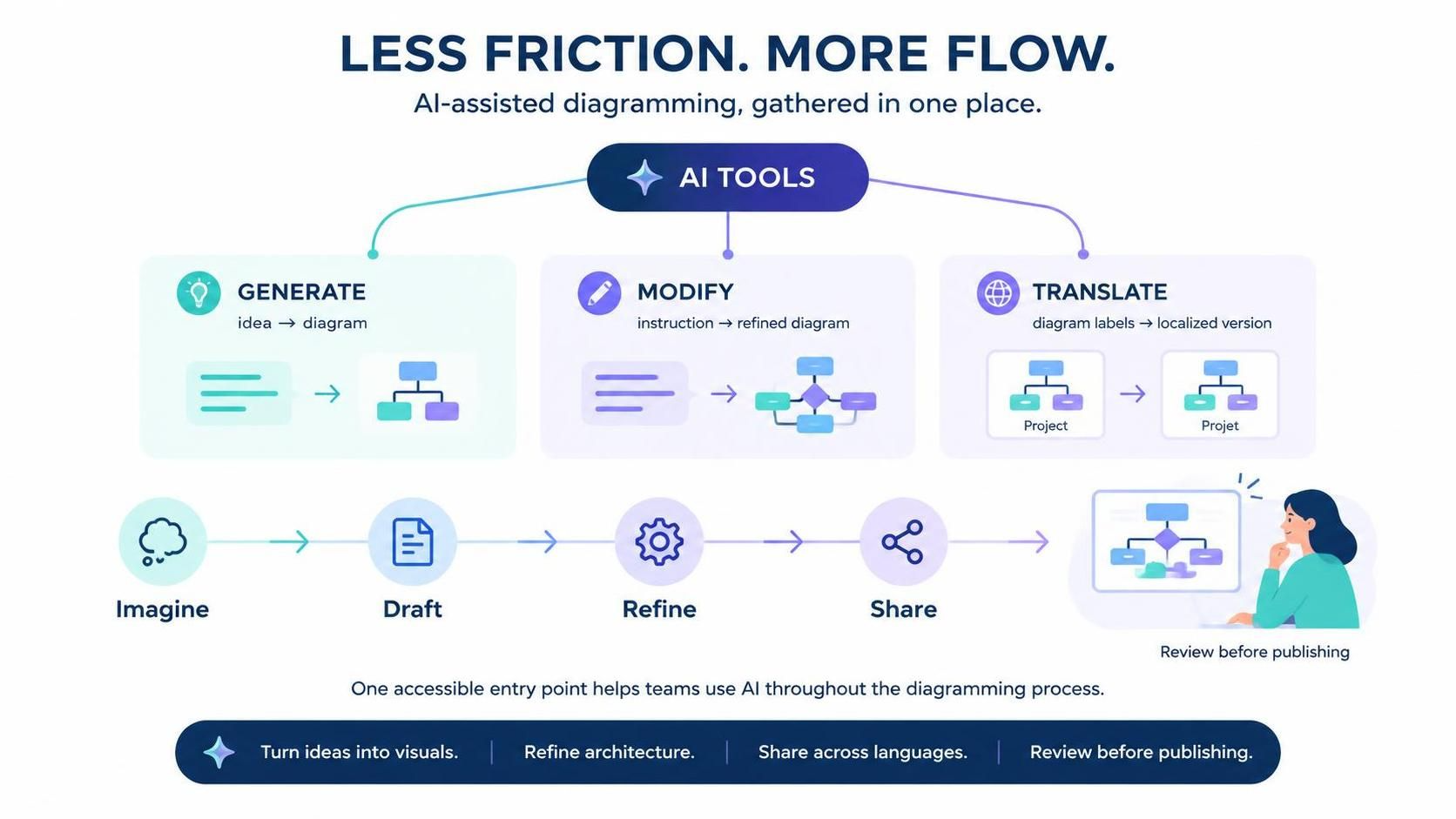
The landscape of technical documentation and system architecture is undergoing a significant transformation. Historically, diagramming required a steep learning curve involving manual node placement, strict syntax adherence, and often, tedious manual formatting. Visual Paradigm’s introduction of the AI Tools menu in VPasCode addresses these challenges by consolidating three distinct capabilities—Generation, Modification, and Translation—into a single, frictionless interface.
This tutorial explores the system architecture of this AI-assisted workflow. We will deconstruct the “Less Friction. More Flow.” philosophy presented in the VPasCode update and walk you through how to leverage these tools to move from a vague concept to a polished, global-ready architecture diagram.
The Core Philosophy: Reducing Cognitive Load
The primary innovation in this update is the consolidation of AI capabilities. Previously, users might have relied on disparate tools or manual commands for different stages of the diagramming lifecycle. The VPasCode AI Tools menu acts as a central command center. By grouping Generate, Modify, and Translate functions together, the system acknowledges that diagramming is not a linear task but a cyclical process of creation, refinement, and dissemination.
This architecture is designed to minimize “friction”—the cognitive load required to switch contexts or learn new commands. Instead of memorizing complex syntax for every action, the user provides high-level intent, and the AI engine handles the structural execution.
Phase 1: Generation (The “Imagine” to “Draft” Transition)
The journey begins with the Generate tool. In traditional modeling, starting from a blank canvas is often the hardest step. Users must manually drag and drop components, connect them, and ensure correct notation (e.g., UML or BPMN standards).
The AI Generation engine bridges the gap between abstract thought and concrete visualization.
- The Input: Instead of drawing a box, you provide a natural language description of your system’s idea. This could be a high-level summary of a microservice architecture or a business process flow.
- The Processing: The AI parses the semantic meaning of your input. It identifies entities (actors, databases, services) and relationships (flows, data transfers).
- The Output: The system renders a structured draft diagram. This transforms a text-based idea into a visual representation instantly.
This phase effectively automates the “Draft” stage of the workflow. It allows the user to skip the tedious setup of the canvas and focus immediately on the conceptual validity of the architecture.
Phase 2: Modification (The “Refine” Stage)
Once a diagram is generated, it rarely meets the exact requirements of a complex system. This is where the Modify tool comes into play. The VPasCode AI engine acts as an intelligent assistant capable of interpreting instructions to refine the existing model.
The modification workflow allows for dynamic updates without manual re-drawing:
- Instruction-Based Editing: You can issue commands to add specific components, remove redundant nodes, or reorganize the layout. For example, “Add a security gateway between the client and the server.”
- Complexity Management: As architectures grow, diagrams become cluttered. The AI can assist in simplifying views or breaking down complex subsystems into sub-diagrams.
- Standardization: The AI ensures that modifications adhere to the selected notation standards, maintaining the integrity of the visual language.
This capability transforms the diagramming process from a static drawing exercise into a dynamic conversation between the architect and the tool. The system evolves alongside the project requirements.
Phase 3: Translation (The “Share” Stage)
One of the most overlooked aspects of technical modeling is localization. In global teams, diagrams often need to be understood by stakeholders speaking different languages. Manual translation of diagram labels is prone to error and inconsistency.
The Translate tool addresses this by automating the localization of diagram labels. It allows users to convert diagram text from one language to another, ensuring that a “Project Manager” in New York and a “Chef de Projet” in Paris are looking at the exact same architectural intent.
The Unified Workflow: Imagine, Draft, Refine, Share
The VPasCode architecture integrates these three phases into a seamless lifecycle:
- Imagine: The user conceptualizes the system architecture.
- Draft: The Generate tool converts the concept into a visual draft.
- Refine: The Modify tool allows for iterative improvements based on feedback or new requirements.
- Share: The Translate tool prepares the diagram for a global audience, ensuring accessibility.
This “one accessible entry point” ensures that help is always just a click away, regardless of the stage of the project.
Conclusion
The introduction of the AI Tools menu in VPasCode represents a shift towards a more intelligent, less friction-filled diagramming workflow. By automating the translation of ideas to visuals, the refinement of complex architectures, and the localization of labels, Visual Paradigm empowers users to focus on the “why” and “what” of their systems, leaving the “how” of the drawing to the AI.
Whether you are designing a new system from scratch or maintaining a legacy architecture, these tools provide a smoother path to clarity. As the saying goes, “Less Friction. More Flow.” It is time to launch VPasCode and experience the power of AI-assisted modeling.