


In modern software and business process engineering, the traditional method of modeling workflows using drag-and-drop tools often creates friction. While visual tools are intuitive for drawing, they struggle with version control, automated testing, and rapid iteration. This tutorial introduces VPasCode, a revolutionary platform that allows developers and business analysts to define complex BPMN (Business Process Model and Notation) diagrams using simple text-based syntax powered by PlantUML.
By adopting a “Diagram as Code” approach, you gain the ability to version control your process logic alongside your software code, leverage AI for rapid prototyping, and ensure that your business process models remain consistent and maintainable.
Understanding the Claims Management Workflow
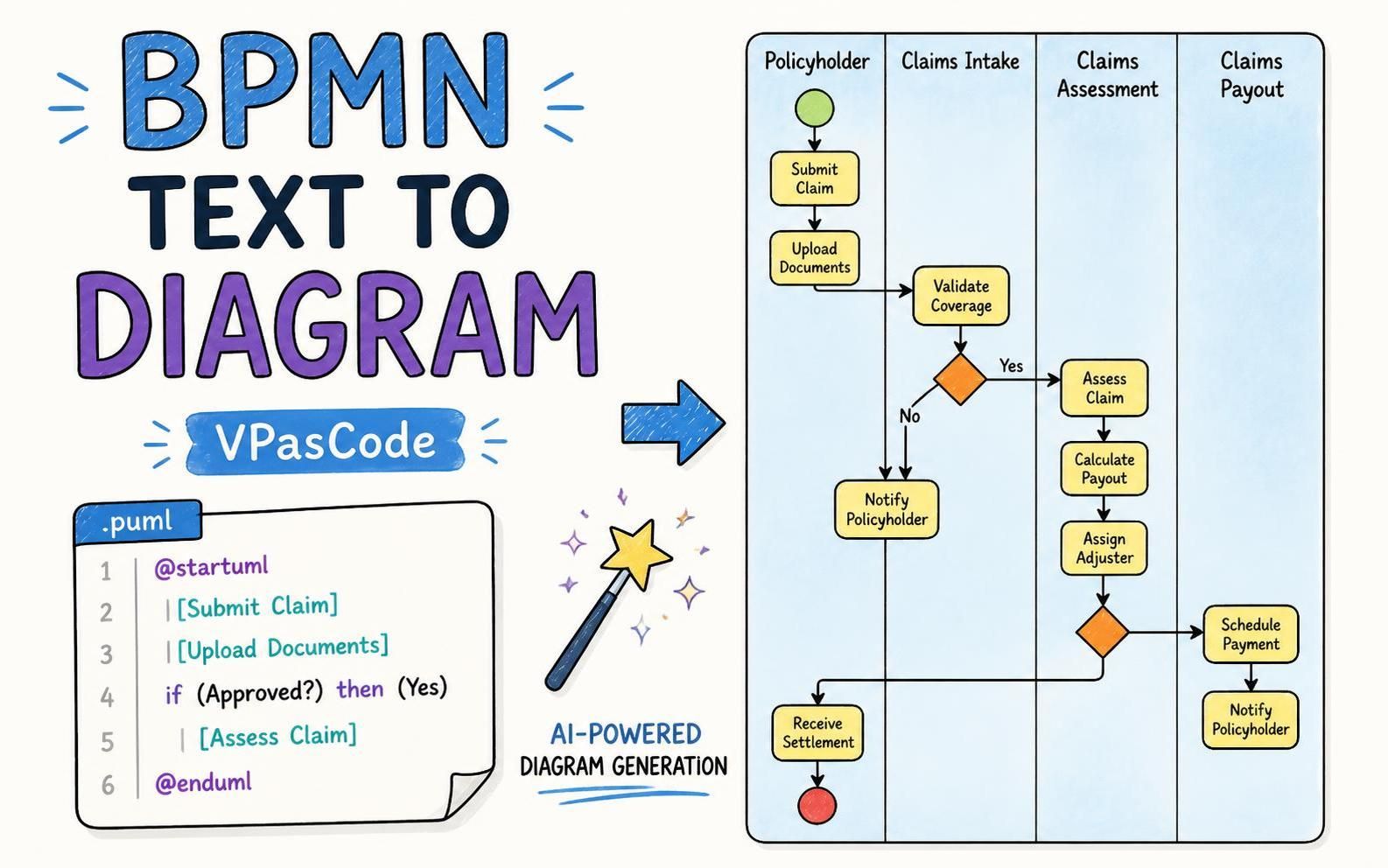
The core of this tutorial revolves around a standard Insurance Claims Management process. To understand how VPasCode translates text to visual diagrams, we must first deconstruct the logic shown in the reference diagram. This process is a classic example of a “Swimlane” diagram, where different actors are responsible for specific tasks.
1. The Actors (Swimlanes)
The process is divided into four distinct vertical sections, representing the lifecycle of a claim:
- Policyholder: The individual initiating the request. Their role is primarily to submit data and receive the final outcome.
- Claims Intake: The administrative gatekeeper. They validate the initial submission and handle the “No” path of the decision logic.
- Claims Assessment: The analytical engine. This team assesses the validity of the claim and calculates the financial payout.
- Claims Payout: The final execution phase. This involves scheduling the actual transfer of funds and notifying the policyholder.
2. The Decision Logic
At the heart of this workflow is a critical decision point: Validate Coverage. The system must determine if the claim is eligible before proceeding to financial assessment. This is represented by a diamond shape in the diagram:
- Yes Path: If the coverage is valid, the flow moves to Assess Claim.
- No Path: If the coverage is invalid, the flow diverts to Notify Policyholder, effectively closing that specific interaction loop.
Translating Logic to VPasCode Syntax
VPasCode utilizes a PlantUML-based syntax that maps directly to BPMN concepts. This allows you to define the start node, the sequence of activities, and the conditional logic using plain text.
Step 1: Defining the Process Start
Every BPMN diagram in VPasCode begins with a directive to start the UML or BPMN block.
@startuml
Step 2: Defining Activities
In the text editor, activities are represented by brackets containing the task name. VPasCode automatically infers the shape (typically a rounded rectangle) and the direction of flow.
| [Submit Claim]
| [Upload Documents]
| [Validate Coverage]
Step 3: Implementing Conditional Logic (If/Else)
The most powerful feature of this text-based approach is how easily it handles branching logic. Instead of drawing arrows manually, you use standard programming-like if statements. The text parser understands that a condition implies a decision diamond and routes the flow accordingly.
if (Approved?) then (Yes)
  | [Assess Claim]
else (No)
  | [Notify Policyholder]
endif
Step 4: Defining the End State
The process concludes with the @enduml directive, which tells the rendering engine to finalize the diagram and close the swimlane context.
@enduml
From Code to Visual Model
When you input the code snippet above into the VPasCode editor, the system performs a real-time render. The text parser interprets the | character as an instruction to place the task in the active swimlane. The if block automatically generates the diamond-shaped decision node and the connecting arrows labeled “Yes” and “No”.
This “Text to Diagram” workflow significantly reduces the cognitive load on the modeler. You focus on the logic of the process (the sequence and conditions) rather than the geometry of the drawing.
Conclusion
By leveraging VPasCode, the Claims Management process transforms from a static image into a living document. This approach ensures that the visual representation of your business processes is always synchronized with the underlying logic, making it easier to maintain, version, and scale across your organization.