


In the era of global software development, creating technical diagrams that serve diverse international teams is a critical skill. However, maintaining the integrity of a diagram’s logic while translating its labels into different languages has historically been a nightmare of broken syntax and manual rework. VPasCode, a tool by Visual Paradigm, revolutionizes this workflow by introducing an AI-driven, domain-aware translation filter.
This tutorial explores how VPasCode transforms a Chinese-language Use Case diagram into a functional, English-compatible model without breaking the underlying code. We will dissect the architecture of this translation engine, analyze the specific code transformations, and demonstrate how semantic retention ensures your diagrams remain executable regardless of the display language.
The Core Concept: Semantic Retention vs. Visual Replacement
Traditional translation tools often perform simple “find and replace” operations on text strings. While this changes what you see, it often breaks the code behind it if the translated text is accidentally used as a variable name or command.
VPasCode employs a sophisticated approach called Semantic Retention. It distinguishes between two distinct layers of the diagram:
- The Visual Layer: The text strings rendered inside the blocks (e.g., the label “插入银行卡”). This is what the end-user sees.
- The DSL Layer: The underlying Domain Specific Language (DSL) syntax (e.g.,
usecase "Insert Card" as UC1). This defines the logic and connections.
The system automatically translates the Visual Layer into multiple languages while strictly preserving the DSL Layer. This ensures that the diagram remains functional and compilable, regardless of whether the user interface is set to Chinese, English, or any other supported language.
Step-by-Step: The Architecture of the Translation
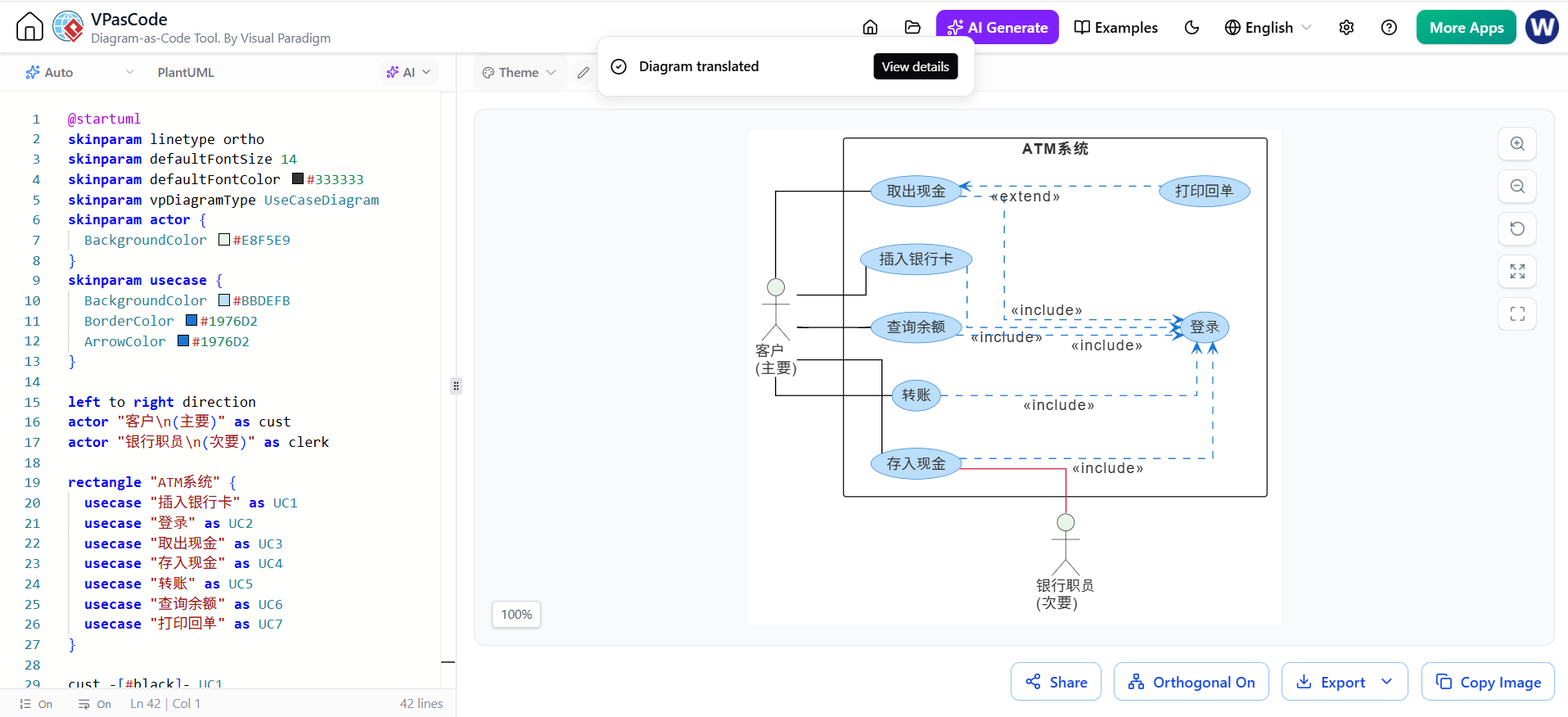
Let’s walk through the provided screenshot, which displays an ATM System Use Case Diagram. On the left is the raw VPasCode syntax, and on the right is the rendered visual result.
1. Analyzing the Source Code (Left Panel)
The source code on the left defines the structure of the system using standard VPasCode syntax. Notice how the code utilizes English keywords (like actor, rectangle, usecase) but contains Chinese strings within the quotes.
skinparam usecase {
    BackgroundColor #BBDFFB
    BorderColor #1976D2
    ArrowColor #1976D2
}

left to right direction
actor "客户
(主要)" as cust
actor "银行职员
(次要)" as clerk

rectangle "ATM系统" {
    usecase "插入银行卡" as UC1
    usecase "登录" as UC2
    usecase "取出现金" as UC3
    usecase "存入现金" as UC4
    usecase "转账" as UC5
    usecase "查询余额" as UC6
    usecase "打印回单" as UC7
}
In this state, the variables cust and clerk are defined, and the Use Cases are assigned to specific IDs (UC1 through UC7). The visual text is purely Chinese.
2. The Translation Process (AI Filter)
When the “Diagram translated” feature is triggered (as indicated by the purple notification in the screenshot), the VPasCode engine performs the following steps:
- Identification: It scans the code for string literals inside quotes.
- Translation: It sends these strings to the AI translation engine.
- Substitution: It replaces the visual text with the translated string (e.g., “插入银行卡” becomes “Insert Bank Card”).
- Preservation: It does not alter the variable names (e.g.,
as UC1) or the structural commands (e.g.,usecase).
3. The Resulting Output (Right Panel)
The rendered diagram on the right shows the result of this process. The visual nodes are now labeled in Chinese (as per the source code in this specific view), but the system is capable of rendering them in English instantly. The relationships—dashed lines with <<include>> and <<extend>> stereotypes—are preserved perfectly.
The diagram illustrates a robust architecture:
- Actor:
cust(Customer) interacts with the system. - System Boundary: The
ATM系统(ATM System) encapsulates the core functionalities. - Use Cases: Specific actions like
插入银行卡(Insert Card) and登录(Login) are linked via standard UML relationships.
Why This Matters for Distributed Teams
This capability is a game-changer for international development groups. Previously, if a team in Germany wanted to review a diagram created in Japan, they would have to manually re-label every node, risking the disconnection of lines and the breaking of logic.
With VPasCode’s semantic retention:
- Seamless Collaboration: Stakeholders can view the diagram in their native language without modifying the code.
- Integrity Assurance: Because the underlying syntax remains untouched, the diagram remains compilable and valid.
- Efficiency: Translation happens automatically, saving hours of manual editing.
Conclusion
The VPasCode platform exemplifies the future of Model-Driven Engineering (MDE) tools. By integrating AI directly into the modeling workflow, it allows developers to focus on the system’s logic and structure rather than the tedious task of maintaining multilingual consistency. Whether you are designing a simple ATM system or a complex enterprise architecture, VPasCode ensures that your diagrams are not just visual representations, but robust, language-agnostic blueprints.