


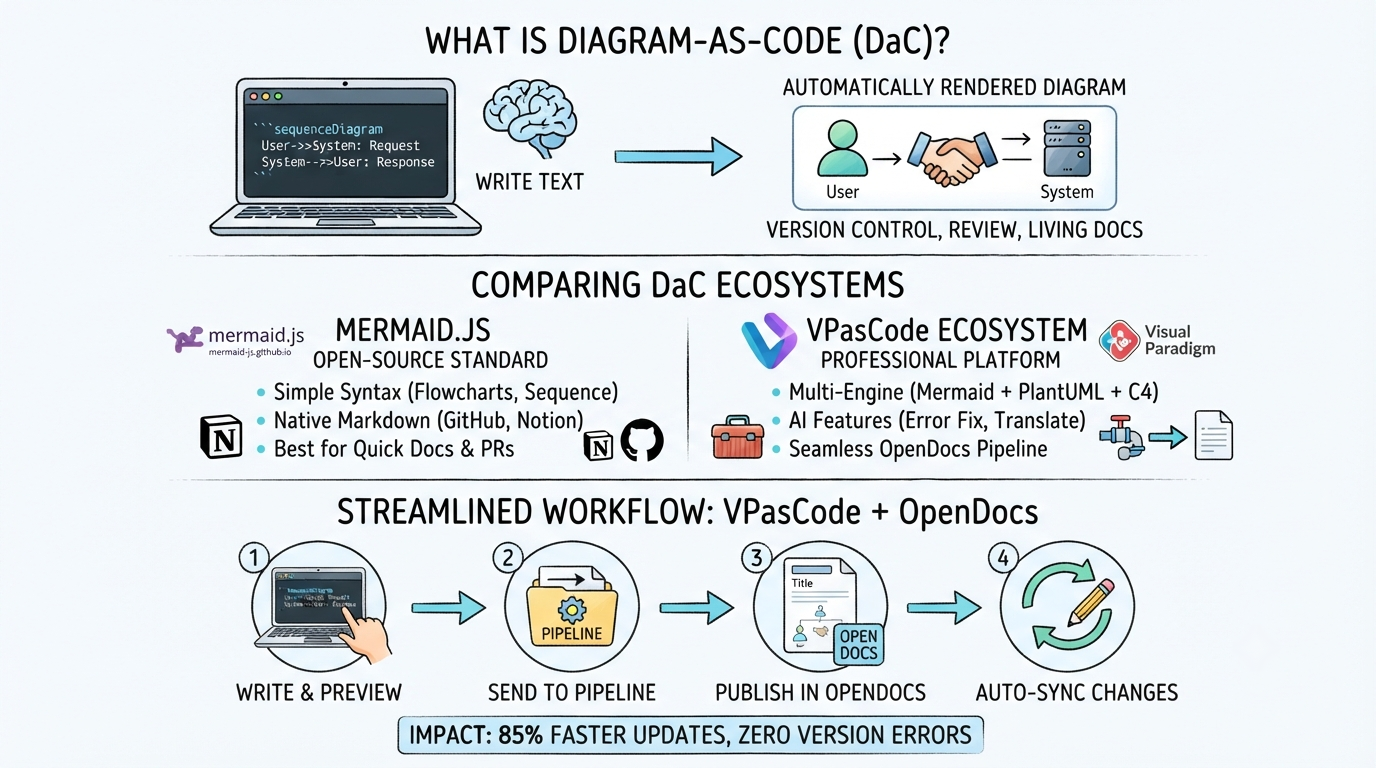
In the world of modern software architecture, documentation often falls victim to “bit rot”—it becomes outdated the moment it is published. The solution to this challenge is Diagram-as-Code (DaC), a methodology that treats system visualization as a programming artifact rather than a static image. This guide explores how to leverage the VPasCode ecosystem and the OpenDocs pipeline to create living, breathing documentation that evolves alongside your codebase.
The Core Concept: Diagram-as-Code
At its heart, DaC is the practice of defining visual diagrams using plain text and structured syntax. Instead of dragging and dropping shapes in a GUI, you write code that describes the relationships between components. When rendered, this text becomes a diagram.
The workflow is deceptively simple but incredibly powerful:
- Write Text: You define the system logic in a text editor (e.g., VS Code) using a specific syntax like Mermaid.
- Version Control: This text file is committed to Git, allowing you to track history and collaborate via Pull Requests.
- Render: A tool (like Mermaid.js or VPasCode) parses the text and automatically renders the visual diagram.
Choosing Your Engine: Mermaid.js vs. VPasCode
While the concept is universal, the tools you use to implement it vary significantly. The infographic highlights two primary approaches: the open-source standard and the professional ecosystem.
1. Mermaid.js: The Open-Source Standard
Mermaid.js is a JavaScript library that renders diagrams from text. It is the “go-to” solution for quick documentation because of its native integration with platforms like GitHub and Notion. It is best suited for:
- Quick sequence and flow diagrams.
- Markdown-based documentation.
- Teams that need immediate visual feedback without setup.
2. VPasCode Ecosystem: The Professional Platform
VPasCode takes the DaC concept further by integrating AI features and a robust OpenDocs pipeline. Unlike the standalone nature of Mermaid.js, VPasCode acts as a comprehensive engine that can support multiple diagram types (Mermaid, PlantUML, C4) and automate the publishing process.
The VPasCode + OpenDocs Workflow
The real power of the VPasCode ecosystem lies in its ability to streamline the lifecycle of documentation. This workflow eliminates manual exports and ensures that the “Source of Truth” is always the code itself.
Step 1: Write & Preview
Developers write the diagram definition directly in their IDE. Using AI-assisted tools, developers can generate syntax or fix errors in real-time.
Step 2: Send to Pipeline
Once the diagram code is committed, it enters the automated pipeline. This stage handles the compilation and rendering of the diagram, ensuring it meets the required standards.
Step 3: Publish in OpenDocs
The rendered output is automatically pushed to the OpenDocs platform. This creates a centralized, searchable repository for system architecture that is always up to date.
Step 4: Auto-Sync Changes
If the source code changes, the diagram updates automatically. This ensures that your documentation never lags behind the system evolution.
Practical Example: The VPasCode Syntax
To understand how this works technically, let’s look at a sequence diagram. In VPasCode, you write the logic in a text block. Here is a standard Mermaid syntax example that defines a user interaction flow:
sequenceDiagram
    autonumber
    participant User
    participant API
    participant DB

    User->>API: Request Data
    API->>DB: Query Database
    DB-->>API: Return JSON
    API-->>User: Display Data
When this code is fed into the VPasCode engine, it is parsed and rendered into a visual representation of the data flow, ready to be published in OpenDocs.
Conclusion
By adopting the VPasCode ecosystem and the OpenDocs pipeline, teams move beyond static documentation. They embrace a workflow where diagrams are versioned, reviewed, and automated—resulting in a “living documentation” system that provides 85% faster updates and zero version errors.